
Reconciliation act
Why you need this
A reconciliation act («акт сверки») shows who owes whom at the end of a period. Both sides sign it when the amounts disagree or the year closes. Payda fills the act from your documents, and you enter the counterparty's figures from their data — any gap becomes visible at once.
What you need
- The counterparty in the reference book — see Counterparties.
- The contract in the reference book, if you reconcile settlements under a specific contract — see Contracts.
- The reconciliation period — usually a quarter or a year.
- The counterparty's own reconciliation act or settlement figures, if you want to compare them with yours.
Step by step
List of reconciliation acts
- In the left menu, in the Бухгалтерия (Accounting) block, click Акт сверки (reconciliation act) — the Акты сверки (reconciliation acts) page opens.
- Find the act you need. The table columns are № (number), Дата (date), Контрагент (counterparty), Договор (contract), Период (period) and Связанные документы (linked documents).
- Click a row to open the act. You can correct it and save it again.
- To create a new act, click the Акт сверки button with a plus icon.
Fill in a reconciliation act
Click the Акт сверки button with a plus icon — the Акт сверки | Создание (reconciliation act, new) form opens.
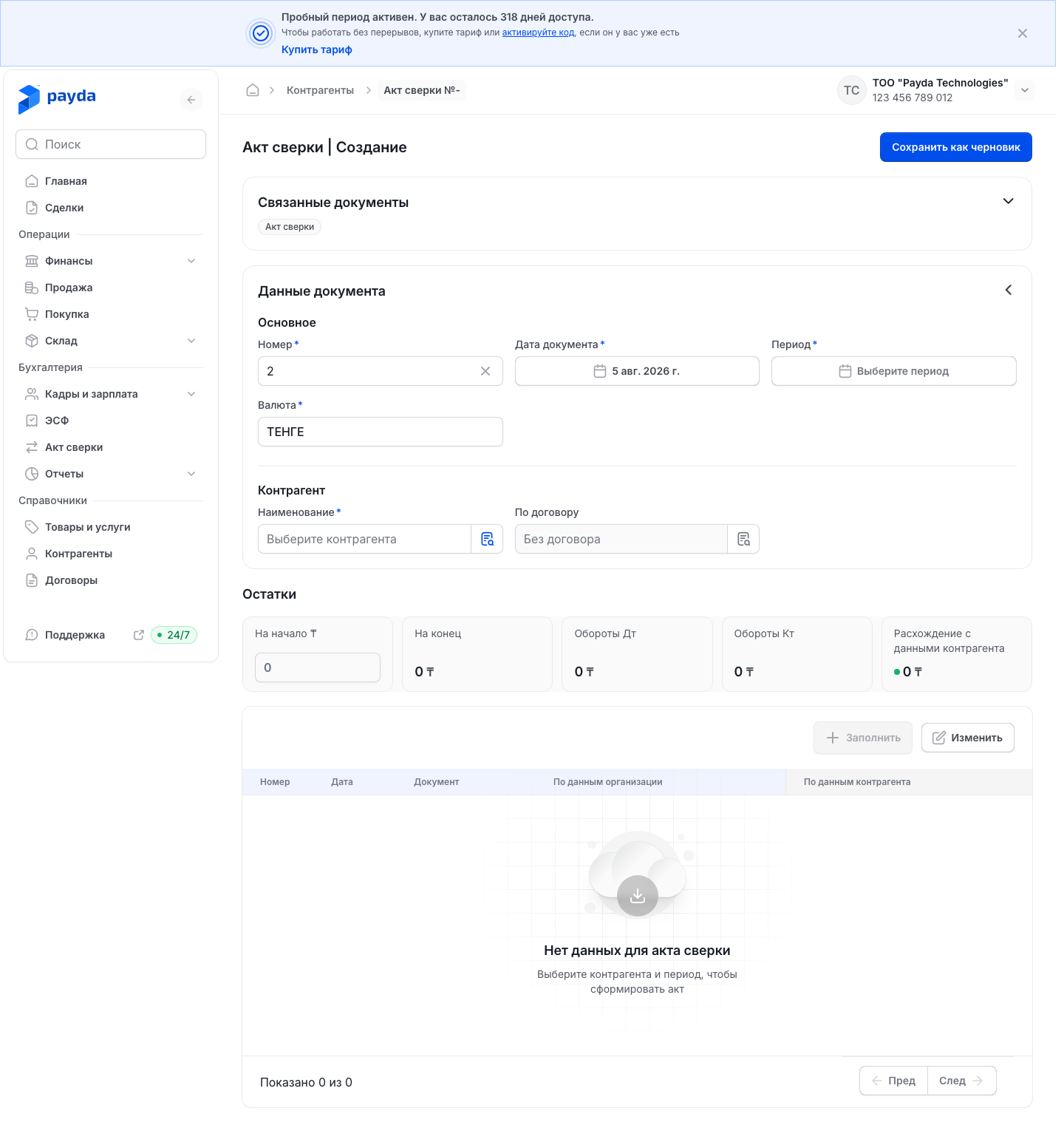
In the Данные документа (document data) block, Основное (main) section, check Номер (number) and Дата документа (document date): they are filled in automatically. Валюта (currency) is tenge by default.
Pick the reconciliation Период.
In the Контрагент section, pick Наименование (name).
To reconcile settlements under one contract only, pick it in По договору (under contract). If the contract does not matter, leave the field empty — it reads «Без договора» (no contract).
Click Заполнить (fill in) above the table. Payda fills the table with the documents for this counterparty in the period and calculates the balances.
Check the cards in the Остатки (balances) block:
- На начало ₸ — the opening balance. Payda fills it in, but you can correct the figure right in the field;
- На конец — the closing balance, the figure you discuss with the counterparty;
- Обороты Дт and Обороты Кт — debit and credit turnover for the period;
- Расхождение с данными контрагента (difference with the counterparty's data) — the figure that matters: zero with a green dot means your data agree.
Compare the table rows with the counterparty's act. The По данным организации (per your company) and По данным контрагента (per the counterparty) columns each have two cells — debit and credit.
To correct an amount, click it right in the cell and type a new one. This is how you enter the counterparty's figures in По данным контрагента.
After you edit amounts or На начало ₸, the «Применить изменения для перерасчета?» (apply changes and recalculate?) bar appears at the bottom of the screen. Click Подтвердить (confirm) — Payda recalculates the balances.
The Отменить (cancel) button on that bar restores the amounts as they were before the edit.
You can remove extra rows:
- Click Изменить (edit) above the table — checkboxes appear on the rows.
- Tick the rows and click Удалить (N) (delete), where N is the number of ticked rows. To leave without deleting, click Готово (done).
- On the «Применить изменения для перерасчета?» bar, click Подтвердить.
To fill the table in again, click Заполнить once more. In the «Перед заполнением табличная часть будет очищена. Заполнить?» window (the table will be cleared first — fill in?), click Заполнить again — your edits in the table are lost.
The same window appears if you change the counterparty, contract, period or currency of an act that is already filled in.
When the act is ready, save it:
- Click Сохранить как черновик (save as draft) — the act has no other save button.
- The message «Акт сверки успешно cоздан» (reconciliation act created) appears and you return to the Акты сверки list. After you edit a saved act, the message is «Акт сверки успешно изменен» (reconciliation act updated).
Send the act to the counterparty
You send the counterparty the printable form — a ready-made reconciliation act form.
- Open the saved act from the Акты сверки list.
- In the Связанные документы block at the top of the form, click the green Акт сверки chip — the printable form opens. If the block is expanded, click the Акт сверки card in Производные документы (derived documents).
- Click Скачать (download) or Переслать (forward). Скачать saves the PDF to your computer, Переслать copies a link to the act to the clipboard — the message «Ссылка скопирована» (link copied) appears.
- Send the file or the link to the counterparty yourself, for example by email or in a messenger.
More about the printable form's buttons — see Linked documents.
A reconciliation act has no Отправить на подпись (send for signature) button: send it as a link or a file.
How to check it worked
- The act appears in the Акты сверки list.
- In the opened act, the Связанные документы block shows the green Акт сверки chip — the printable form is ready.
- In the opened act, the Расхождение с данными контрагента card shows 0 with a green dot. A red dot means there is a difference: compare the table rows with the counterparty's act.
Common problems
| What you see | Why | What to do |
|---|---|---|
| The Заполнить button cannot be clicked | Наименование or Период is not selected | Pick the counterparty and the period |
| After Заполнить the table shows «Нет данных для акта сверки» (no data for the act) | There are no documents for this counterparty with the selected contract and currency in the period | Check Период, Наименование, По договору and Валюта, then click Заполнить again |
| Nothing happens after Сохранить как черновик, the form stays open | The table has no rows: an act without rows is not saved | Click Заполнить. If the table stays empty, see the row above |
| The balances did not change after you edited amounts | Подтвердить was not clicked on the «Применить изменения для перерасчета?» bar, or Отменить was clicked | Correct the amount again and click Подтвердить |
| Your edits in the table are gone | Заполнить was clicked in the «Перед заполнением табличная часть будет очищена. Заполнить?» window — it also appears after you change the counterparty, contract, period or currency | Enter the edits again and click Подтвердить |
| The total disagrees with the counterparty's data | Some documents are booked to another counterparty or contract, or are dated outside the period | Cross-check the documents in Sales and Purchases |
| No Отправить на подпись button | A reconciliation act does not have it | Send the act with Переслать or download the PDF with Скачать |
What next
- Counterparties — check the counterparty's card.
- Contracts — how a contract gets into documents and the reconciliation act.
- Linked documents — the printable form and its buttons.