
Goods receipt
Why you need this
A goods receipt (поступление) is the purchase document: what you bought from the supplier, which warehouse the goods came to and how much VAT the price includes. The supplier payment is created from it.
Without a receipt or a stock posting (оприходование) the goods are not in the warehouse: when you sell them, Payda warns that stock is insufficient.
What you need
- The supplier in the counterparty reference book. You can pick or add it right from the form — see Counterparties.
- Items in the Goods and services reference book. You can also type a new name straight into a document row — when you save, Payda offers to add it to the reference book.
- For goods — a warehouse. The main warehouse is filled in automatically; how to set up warehouses — Movements and stock.
- The supplier's document with its number, date and items: a waybill or an ESF (electronic invoice).
Step by step
The Purchases section (Покупка): document list
Open Покупка (purchases) in the left menu — the Покупки page opens.
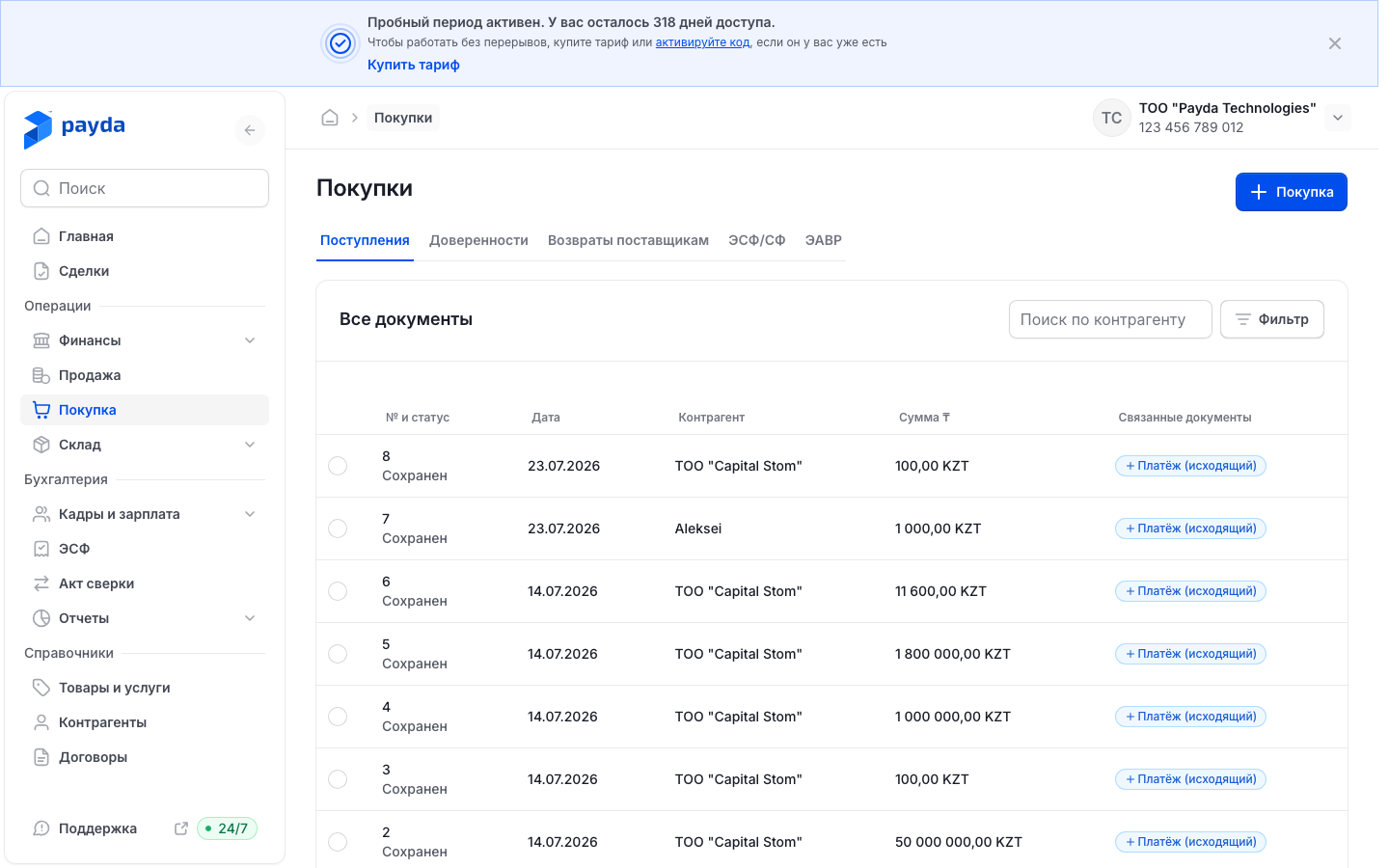
- There are two tabs: Поступления (goods receipts) with the Покупка (purchase) button marked with a plus icon, and Доверенности (powers of attorney) with the Доверенность button marked with a plus icon. A power of attorney is issued to your own employee so they can collect goods from a supplier — see Issue a power of attorney to collect goods.
- Columns on the Поступления tab: № и статус (number and status), Дата (date), Контрагент (counterparty), Сумма ₸ (amount) and Связанные документы (linked documents). The document status is shown under the number: Сохранен (saved) or Проведен (posted).
- In Поиск по контрагенту (search by counterparty) start typing a name and pick the counterparty from the list.
- Фильтр (filter) opens the Фильтры window: Номер документа (document number), Дата документа от and Дата документа до (date from / to), Сумма от and Сумма до (amount from / to). Press Подтвердить (confirm). The selected conditions appear above the table — the cross next to a condition removes it.
- Click a row to open the document.
In the Связанные документы column a goods receipt has a blue + Платёж (исходящий) (outgoing payment) mark: it creates the supplier payment from this receipt. See Linked documents.
To copy a receipt, tick the circle on the left of its row — a panel with Открыть (open) and Дублировать (duplicate) appears at the bottom.
Дублировать asks «Продублировать поступление №…?» (duplicate receipt No. …?) — confirm with Дублировать. A new receipt form opens with the original's data, the next number and today's date. The original is not changed.
Creating a goods receipt
- On the Поступления tab press the Покупка button with the plus icon — the Поступление | Создание (receipt | new) form opens.
- In the Данные документа (document data) block, Основное (main) section:
- Номер (number) — Payda fills in the next number in sequence; you can change it;
- Дата (date) — the receipt date;
- Склад (warehouse) — the main warehouse is filled in. The field becomes active and required once the table has a product with a quantity.
- In the Контрагент section pick the supplier in Наименование (name). If the purchase is under a contract, pick it in По договору (under contract).
- Add items. The table is split into the Товар (goods) and Услуга (service) tabs:
- Добавить из справочника (add from reference book) opens the Номенклатура (items) panel: find the items, tick them and press Выбрать (select) — the button shows how many items are ticked;
- Добавить (add) adds an empty row at the end of the table; you can type the name right in it.
- Check Кол-во (quantity), Цена (price) and НДС (VAT) on every row — Сумма, Сумма НДС and Всего (total) are calculated automatically. If the supplier's prices include VAT, tick НДС внутри суммы (VAT included in the amount), preferably before you enter the prices. Switching the checkbox makes Payda recalculate the prices already entered — check them and re-enter them if needed.
- Press Сохранить как черновик (save as draft). If the table has names that are not yet in the reference book, the «Позиции ещё не в справочнике» (items not in the reference book yet) window opens — press Сохранить все (save all) and saving continues.
The message «Покупка успешно сохранена.» (purchase saved) appears and the receipt opens on its own page. Below the table is the total: Всего and the VAT amount. The НДС (сверху) (VAT on top) caption changes to НДС (в т. ч.) (VAT included) when НДС внутри суммы is ticked.
More in the form:
- Искать по товарам (search items) above the table searches only this document's rows — handy for a long waybill. Search the reference book in the Добавить из справочника panel.
- To delete rows, press Изменить (edit), tick the rows and press Удалить (N) (delete). Готово (done) leaves this mode without deleting anything.
- Дублировать at the top of a saved receipt makes a copy just like in the list.
- The Связанные документы block has an Добавить Платёж (исходящий) card — a supplier payment based on this receipt.
A goods receipt from a received ESF
If the supplier issued you an ESF, create the receipt from the ESF: the supplier, contract and items are filled in automatically.
- Open ЭСФ in the left menu and switch to the Полученные (received) tab.
- Click the row of the ESF you need.
- Expand the Связанные документы block and press Добавить Поступление (add goods receipt) — a receipt form with the ESF data opens.
- Check Дата, Склад and the items, then press Сохранить как черновик.
More on received ESFs — Receive an ESF from a supplier. If the «Связь с основанием не создана» (link to the source document not created) notice appears after saving, the receipt is saved but not linked to the ESF — see common problems below.
How to check it worked
The receipt appears on the Поступления tab with the Сохранен status.
If it contains goods, open Склад → Остатки (warehouse → stock) and find them in the chosen warehouse — see Movements and stock. If the quantity has not changed, contact support.
Common problems
| What you see | Why | What to do |
|---|---|---|
| «Добавьте хотя бы одну номенклатуру в документ.» (add at least one item) | The document has no rows | Add items with Добавить из справочника or Добавить |
| After Сохранить как черновик the document is not saved and there is no hint under the fields | A field marked with an asterisk is empty: Наименование, Номер or Склад (required when the table has goods). The cursor moves to the first such field, but no message appears | Fill in the asterisked fields in the Данные документа block and save again |
| «Дата документа обязательна» (document date is required) under Дата | No date is chosen | Choose the receipt date |
| «Проверьте позиции» (check the items) | A row has no quantity, price or VAT rate. The row name is in the message | Fill in the cell with the hint. The row may be on another table page or on the Услуга tab |
| «Связь с основанием не создана» | The receipt is saved but not linked to the ESF | Open the receipt and press Привязать основание (link a source document) in the Связанные документы block |
| «Ошибка при отправки данных» (error sending data) or «Ошибка» with a code, such as «Ошибка 500» | The server did not accept the document | Check the fields and items and save again. If the error repeats, contact support |
| The total does not match the supplier's document | Prices were entered with VAT while НДС внутри суммы is off, or the other way round | Switch the checkbox and compare the prices: switching makes Payda recalculate the prices you entered, so re-enter them if needed |
What next
- Payments and cash desk — pay the supplier.
- Issue a power of attorney to collect goods — if your employee collects the goods from the supplier.
- Movements and stock — check the warehouse stock.