
Subscription in the app
Why you need this
A plan unlocks all of Payda Pro for your company. In Подписка (Subscription) you see which plan is on and until when, and you buy or renew a plan. You can also order accountant services here if you would rather not keep the books yourself.
What you need
- A selected company: the plan and the trial are issued to it. How to switch company is described in What you can do on a phone.
Step by step
The «Подписка» screen
Open the Подписка screen in one of these ways:
- tap the left pill with the Payda logo at the top of the home screen. It shows «PLUS» or «Market», and without a plan it alternates between «FREE» and Купить тариф (Buy a plan);
- on the Профиль (Profile) tab, tap the plan card — see Profile in the app.
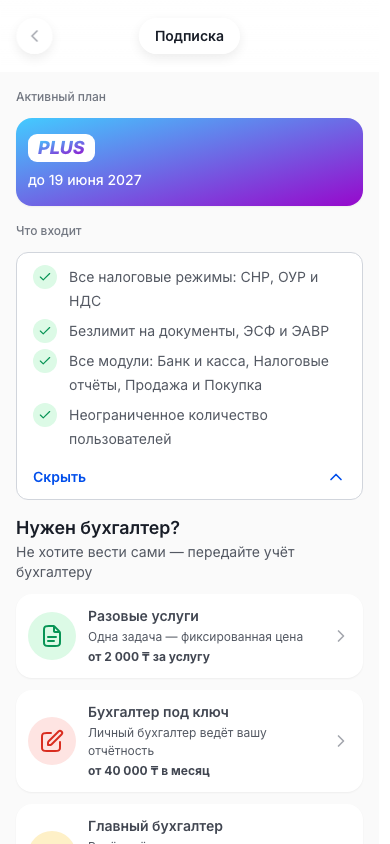
The Активный план (Active plan) block shows the plan — PLUS, Market or FREE — and the date it runs until. The FREE plan says «Бесплатно» (Free) instead of a date.
If a plan is on, below is the Что входит (What's included) block. Скрыть (Hide) collapses the list and Показать (Show) expands it:
- Все налоговые режимы: СНР, ОУР и НДС (all tax regimes);
- Безлимит на документы, ЭСФ и ЭАВР (unlimited documents and e-invoices);
- Все модули: Банк и касса, Налоговые отчёты, Продажа и Покупка (all modules);
- Неограниченное количество пользователей (unlimited users).
Without a plan, a card offering PLUS takes the place of Что входит — see Buying a plan. Below, with or without a plan, is the Нужен бухгалтер? (Need an accountant?) block, captioned «Не хотите вести сами — передайте учёт бухгалтеру» (hand the books over to an accountant):
| Row | Caption | Price |
|---|---|---|
| Разовые услуги (one-off services) | «Одна задача — фиксированная цена» (one task, fixed price) | from 2 000 ₸ per service |
| Бухгалтер под ключ (full-service accountant) | «Личный бухгалтер ведёт вашу отчётность» (a personal accountant runs your reporting) | from 40 000 ₸ per month |
| Главный бухгалтер (chief accountant) | «Ведёт учёт и следит за здоровьем бизнеса» (keeps the books and watches the business's health) | from 150 000 ₸ per month |
| Мои заявки (My requests) | «Статус ваших обращений к бухгалтерам» (status of your requests to accountants) | — |
- Tap a service row to send a request, or Мои заявки to see the ones you sent — see Request to an accountant.
At the bottom of the screen are the Условия использования (Terms of use) and Политика конфиденциальности (Privacy policy) links.
Buying a plan
- If there is no plan, open the Подписка screen. Instead of Что входит it shows a card offering PLUS: the list of features, the plan name and the price.
- Check the price. In a browser the card is called Получите больше с PLUS (Get more with PLUS), with Тариф PLUS (PLUS plan) and «10 000 ₸ / мес» (per month) at the bottom. In the app on iPhone and iPad the card title is the App Store price and term — exactly what the store will charge. In the app on Android the card shows no price.
- Tap Перейти на PLUS (Switch to PLUS):
- in the app for iPhone and iPad the plan is bought through the App Store — confirm the purchase. Once it goes through, «Тариф активирован» (Plan activated) and «Спасибо за покупку — доступ уже открыт.» (thanks, access is open) appear;
- if the Подписка screen is open in a browser, the plans page opens — continue with Choose and pay for a plan.
- Check the Активный план block: it shows PLUS and the end date.
If you cancel the purchase in the App Store, the plan does not change and no message appears.
In the app for Android, purchasing is currently unavailable: Перейти на PLUS shows «Покупка сейчас недоступна» (Purchase unavailable right now).
Trial and reminders
In a company account the app may show a plan status strip above the bottom tabs. Tap it — a window with the relevant actions opens:
| Strip | When it appears | What opens |
|---|---|---|
| «14 дней Payda Pro бесплатно» (14 days of Payda Pro free) | The company has never had a plan or a trial | A window with Начать бесплатно (Start for free) |
| «Демо активно ещё N дней» (demo active for N more days), for example «Демо активно ещё 9 дней» | The trial is running | Пробный период активен (Trial active): days left, Выбрать тариф (Choose a plan) and Продолжить демо (Continue the demo) |
| «N дней до конца подписки» (N days until the subscription ends), for example «5 дней до конца подписки» | 10 days or fewer are left on the plan | Подписка скоро закончится (Subscription ends soon): Продлить тариф (Renew the plan) and Выбрать другой тариф (Choose another plan) |
| «Доступ закрыт, срок истёк» (access closed, term expired) | The plan has ended | The Выберите тариф (Choose a plan) window straight away |
If the term is unknown, the strip says «Демо активно» or «Подписка скоро закончится» without the number of days.
- To start the trial, tap the «14 дней Payda Pro бесплатно» strip and then Начать бесплатно in the window. A company gets the trial only once.
- «Ваш пробный период начался!» (Your trial has started) appears with how many free days you have and until what date. Tap Начать работу (Get started).
- Продолжить демо just closes the window. Выбрать тариф, Продлить тариф and Выбрать другой тариф open the Выберите тариф window — «Продолжите пользоваться всеми возможностями Payda» (keep using everything Payda offers).
The Выберите тариф window has four cards:
| Card | Caption | Price | What opens |
|---|---|---|---|
| Сам себе бухгалтер (your own accountant) | «Для самостоятельного учёта» (for doing your own books) | In a browser «от 30 000 ₸ за 3 месяца» (from 30 000 ₸ for 3 months), on iPhone and iPad the App Store price, on Android no price | A plan purchase, as in Buying a plan |
| Разовые услуги | «Одна задача — фиксированная цена» | from 2 000 ₸ per service | Request to an accountant |
| Маркетплейс (Marketplace) | «Личный бухгалтер ведёт вашу отчётность» | from 40 000 ₸ /month | Request to an accountant |
| Бухгалтер под ключ | «Ведёт учёт и следит за здоровьем бизнеса» | from 150 000 ₸ /month | Request to an accountant |
Below the cards are the «Есть код ваучера?» (Have a voucher code?) row — except in the app on iPhone and iPad, see Voucher code — and the Условия использования and Политика конфиденциальности links.
Voucher code
A voucher code is a paid plan that you apply to your company.
- Tap Активировать (Activate) in the «Есть код ваучера?» row. It is in the Выберите тариф and Подписка скоро закончится windows (except in the app on iPhone and iPad).
- The Активировать код (Activate code) window opens. In Код (Code), pick a code from the list, or tap Ввести вручную (Enter manually) under «Не вижу свой код?» (I don't see my code) and type it in.
- In Компания (Company), pick the company. If it is not there, pick Добавить (Add) at the top of the list and connect it.
- Tap Активировать. «Код активирован» (Code activated) — «Подписка обновлена — можно продолжать работу.» (subscription updated) appears.
In a personal account the same window opens from the «У вас есть активный код» (You have an active code) strip on the home screen — see If no company is selected.
A code cannot be activated in the app for iPhone and iPad: there is no «Есть код ваучера?» row and no «У вас есть активный код» strip there.
If an action is unavailable
If the company has no active plan or trial, an action that needs a plan does not go through. The «Нет активного тарифа» (No active plan) window opens:
- the company has never tried Payda Pro — the text «Действие доступно на тарифе. Попробуйте Payda Pro бесплатно — это займёт секунду.» (the action needs a plan, try Payda Pro for free) and the Начать бесплатно and Купить тариф buttons;
- the company has had a trial or a plan — the text «Чтобы продолжить работу, оформите тариф Payda Pro.» (buy a Payda Pro plan to continue) and the Купить тариф button.
- Tap Начать бесплатно to start the trial. «Ваш пробный период начался!» appears — tap Начать работу and repeat the action.
- Or tap Купить тариф — the Подписка screen opens. Then follow Buying a plan.
Request to an accountant
- Pick a service:
- on the Подписка screen, in the Нужен бухгалтер? block — Разовые услуги, Бухгалтер под ключ or Главный бухгалтер;
- on the Каталог (Catalog) tab, in the Услуги (Services) block — the same services;
- in the Выберите тариф window — Разовые услуги, Маркетплейс or Бухгалтер под ключ.
- A Payda marketplace page opens with the service name in the header. The selected company's BIN or IIN and your phone number are filled into the request automatically. A BIN (company tax ID) belongs to a company, an IIN (personal tax ID) to a sole trader or a person.
- Follow the steps on the page and send the request. After sending you return to the screen you came from.
- To leave without a request, tap the back arrow on the left of the header.
- To check your requests, tap Мои заявки on the Подписка screen or in the Услуги block of the Каталог tab. The marketplace page Мои заявки opens with the status of your requests.
How to check it worked
- The Активный план block shows the company's plan and its end date. If the data has not refreshed, pull the screen down.
- After the trial starts, the strip above the tabs says «Демо активно ещё N дней».
- A request you sent appears on the Мои заявки page.
Common problems
| What you see | Why | What to do |
|---|---|---|
| «Покупка не прошла» (Purchase failed) | The App Store did not complete the payment | Try again. If it still fails, message support: Профиль → Чат с поддержкой (Support chat) |
| «Покупка сейчас недоступна» | The app did not get the plan from the store. In the app for Android, purchasing is currently unavailable | Try later or message support: Профиль → Чат с поддержкой |
| «Пробный период уже активирован» and «Для вашей организации пробный доступ уже использован.» (trial already used) | The company has already had a trial | Buy a plan — Buying a plan |
| «Не удалось активировать пробный период» (Could not start the trial) | A temporary failure | Try again later |
| «Код не найден или уже использован» (Code not found or already used) | There is a typo in the code, or it has been used | Check the code or pick it from the list |
| The plan is not the one you expected | A different company is open | Switch company with the right pill showing its name at the top of the home screen |
| No left pill with the logo and no plan strip | A personal account is open, not a company | Switch to the company account |
What next
- Plans and payment — what plans there are, the trial and activation codes.
- Profile in the app — the rest of the Профиль tab.
- What you can do on a phone — the catalog and other sections of the app.