
Invoice, sale, waybill
Why you need this
A sale is recorded as a chain of documents: invoice → sale → its printable form → ESF (electronic invoice). The printable form of a sale is a waybill or an AVR (work completion act). The sale itself records the shipment; stock levels are in Склад → Остатки (Warehouse → Stock).
If the customer's representative collects the goods, enter their power of attorney in the Доверенность (power of attorney) field of the sale. A power of attorney for your own employee who collects goods from a supplier is a different document in Покупка (Purchases): see Issue a power of attorney to collect goods.
What you need
- The counterparty in the reference book — see Counterparties.
- Items in the reference book — see Goods and services. A new item can also be typed straight into a document row.
- For an invoice — your company's bank account (Bank accounts) and the KNP (payment purpose code) — see KNP, KBK, UGD codes and countries.
- For goods — the warehouse they ship from (see Movements and stock).
Step by step
The Sales section (Продажа): document list
Open Продажа (Sales) in the left menu — the Продажи page opens with the Реализация (sale) and Счёт на оплату (invoice) tabs.
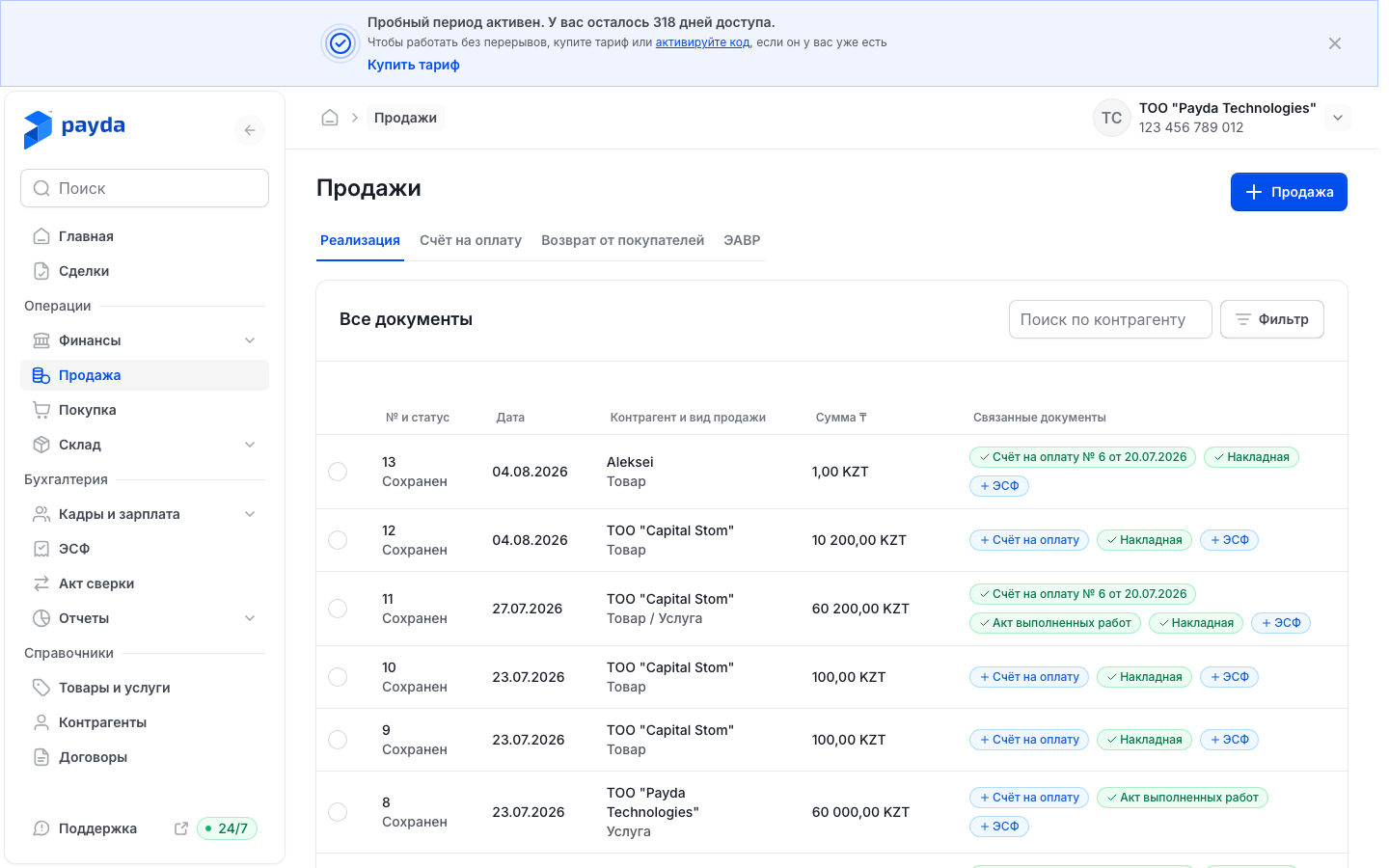
To create a document, press the button with a plus icon at the top right. It depends on the tab: Продажа on Реализация, Счёт на оплату on Счёт на оплату.
To open a document, click its row.
Columns of the Реализация tab:
- № и статус (number and status) — the document number with its status below it: Сохранен (saved) or Проведен (posted);
- Дата (date);
- Контрагент и вид продажи (counterparty and type of sale) — under the counterparty name you see what was sold: Товар (goods), Услуга (service) or Товар / Услуга;
- Сумма ₸ (amount);
- Связанные документы (linked documents) — the invoice, waybill, AVR and ESF for this sale; see Linked documents.
To find a document:
- Start typing a name in Поиск по контрагенту (search by counterparty) and pick the counterparty from the list.
- To search by number, date or amount, press Фильтр (filter).
- Fill in the fields you need — Номер документа, Дата документа от, Дата документа до, Сумма от, Сумма до — and press Подтвердить (confirm).
The filter conditions appear above the table as chips. To remove a condition, click the cross on its chip.
To copy a document:
- Tick the circle at the left of the row — a bar with Открыть (open) and Дублировать (duplicate) appears at the bottom of the screen.
- Press Дублировать and confirm in the «Продублировать реализацию №…?» window with Дублировать.
- A new sale opens with the same data, the next number and today's date. Check it and press Сохранить как черновик (save as draft). The original document does not change.
Invoice
On the Продажи page switch to the Счёт на оплату tab. Its columns are № документа, Итого ₸, Контрагент and Связанные документы.
Press the Счёт на оплату button with a plus icon — the «Счет на оплату | Создание» form opens.
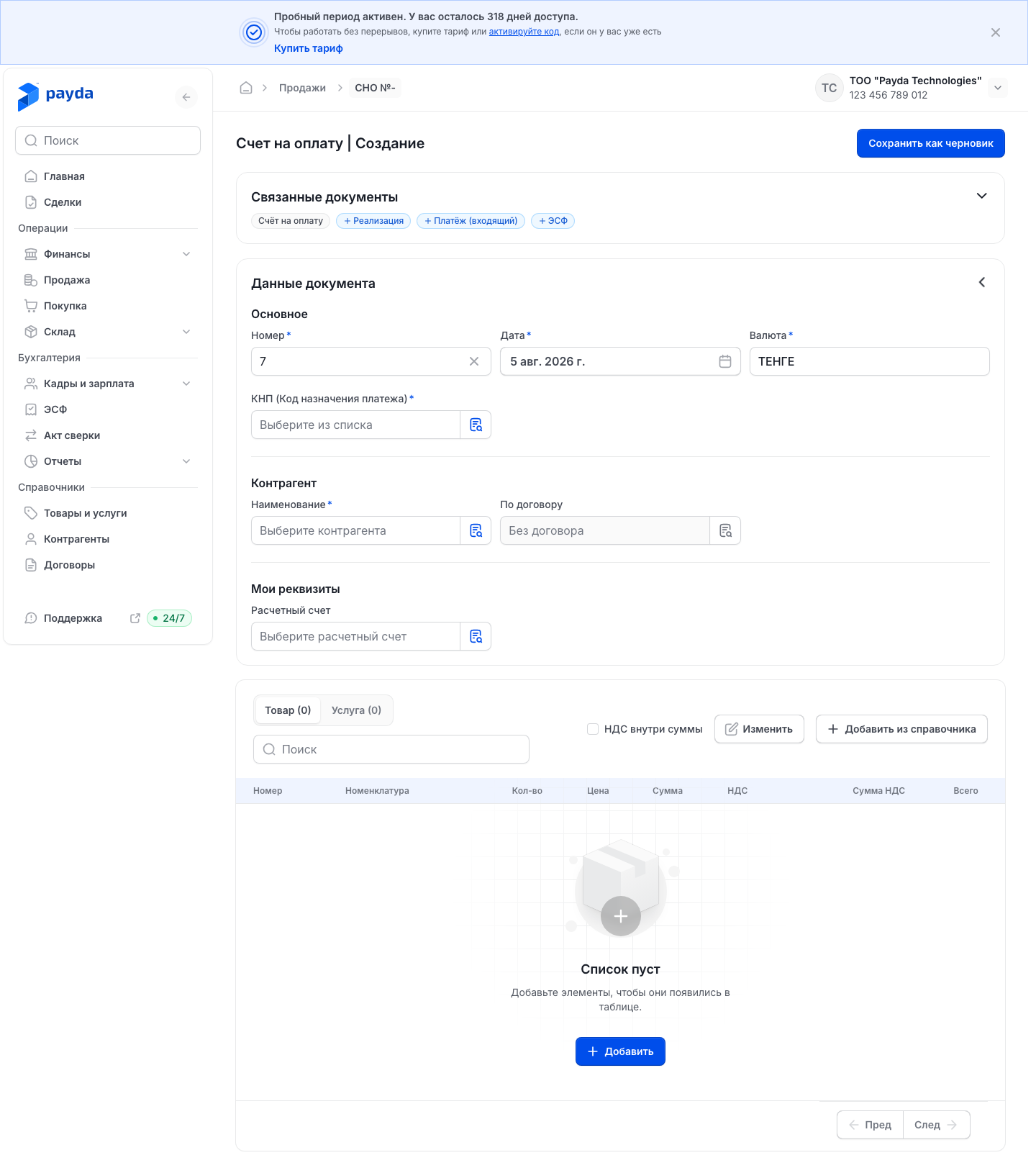
In the Основное (main) block check Номер (number) and Дата (date). Валюта (currency) is required and defaults to «ТЕНГЕ».
Select КНП (Код назначения платежа) — the payment purpose code.
In the Контрагент block pick the customer in Наименование (name). If you work under a contract, select it in По договору (under contract).
In the Мои реквизиты (my details) block select Расчетный счет — your company's account the customer will pay to.
Press Добавить из справочника (add from the reference book) and pick goods and services. They are split between the Товар and Услуга tabs.
In each row set Кол-во (quantity), Цена (price) and the rate in the НДС (VAT) column. Сумма, Сумма НДС and Всего are calculated automatically.
If prices already include VAT, tick НДС внутри суммы (VAT included). The total line under the table then reads «НДС (в т. ч.)»; without the tick it reads «НДС (сверху)».
Press Сохранить как черновик. The message «Счет на оплату успешно сохранен.» appears.
If an item is not in the reference book yet, press Добавить (add): an empty row appears, and you can type the name right in it.
From a saved invoice you can create the next document straight away — its form opens with the invoice data:
- in the list row — the + Реализация, + ЭСФ and + Платёж (входящий) (incoming payment) chips;
- in the invoice form, in the expanded Связанные документы block — Добавить Реализация, Добавить ЭСФ and Добавить Платёж (входящий).
If the sale is already posted and there is no invoice, you can create the invoice from the sale itself — it becomes the sale's basis at once, see Create a basis.
There is no need to fill in a similar invoice again: Дублировать is in the header of a saved invoice and on the row bar in the list.
Send the invoice to the customer
- Open the saved invoice and press Счёт на оплату in the Связанные документы block — the printable invoice opens.
- To change what is printed on this particular invoice, press Печать и подписи (stamp and signatures) in the window header.
- Turn Печать организации (company stamp), Подпись руководителя (director's signature), Подпись бухгалтера (accountant's signature), QR оплаты (payment QR code) and Кнопка «Оплатить» (Pay button) on or off, then press Применить (apply).
- Press Переслать (forward) — a link to the invoice is copied to the clipboard and «Ссылка скопирована» (link copied) appears.
- Send the link to the customer yourself — for example, in a messenger or by email.
The Печать и подписи settings apply to this invoice only. By default they come from the company details — see Company details.
The customer opens the invoice by link without signing in to Payda. They see the Оплатить (Pay) button if a payment link is set in the company details and showing it is turned on — see Paying an invoice by link.
You can also open the printable invoice from the list: click the green Счёт на оплату chip in the row, then Посмотреть (view).
Sale
On the Продажи page, Реализация tab, press the Продажа button with a plus icon — the «Реализация | Создание» form opens.
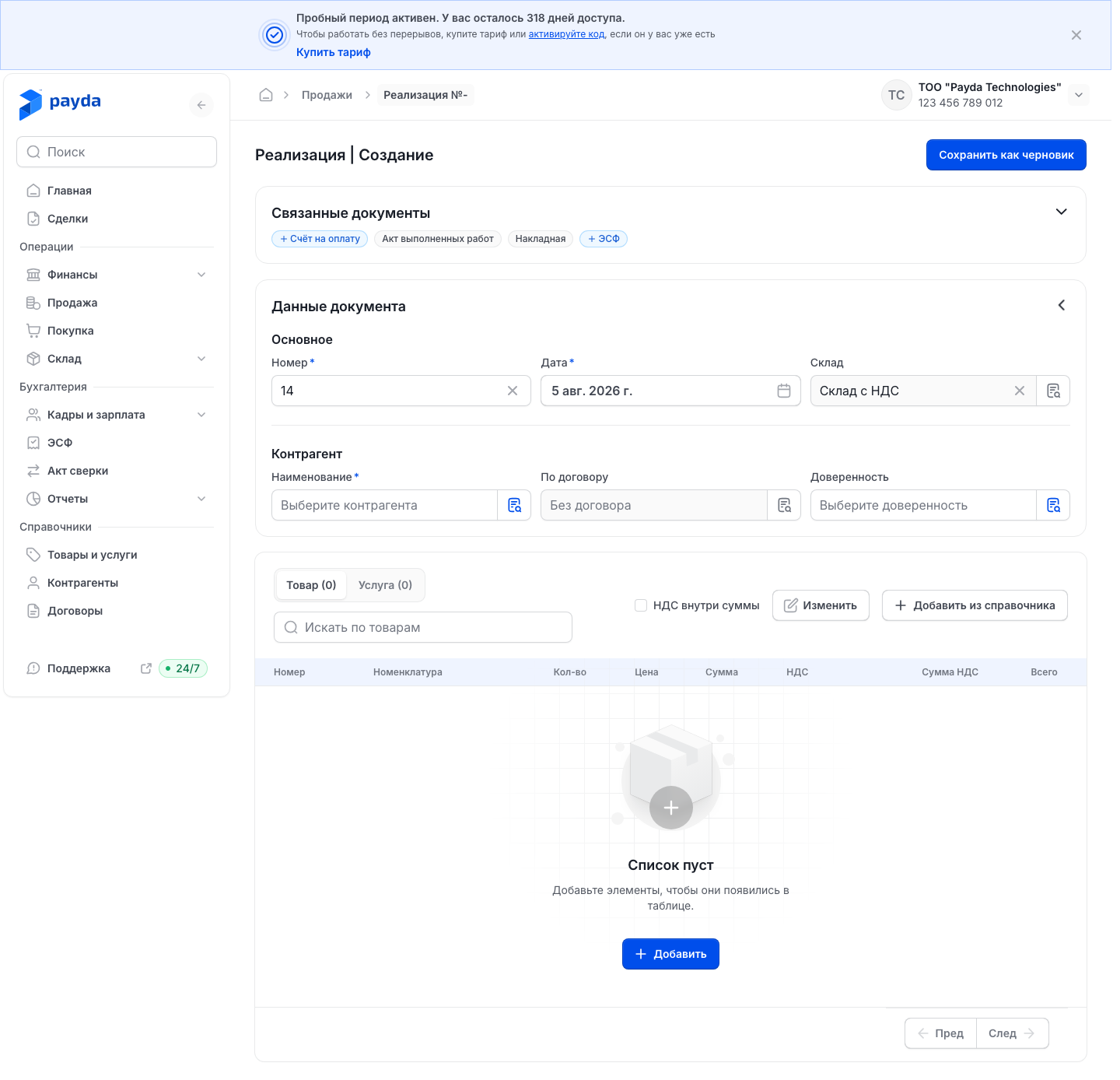
In the Основное block check Номер and Дата. The Склад (warehouse) field already holds your main warehouse; you can change it once the table has goods with a quantity.
In the Контрагент block pick the customer in Наименование and, if needed, a contract in По договору.
If the customer's representative collects the goods, press the icon at the right of the Доверенность field.
In the «Выбор доверенности» window fill in Номер документа (document number), Дата документа (document date) and ФИО доверенного лица (the representative's full name) from their power of attorney, then press Подтвердить.
Add items on the Товар and Услуга tabs with Добавить из справочника or Добавить and set Кол-во, Цена and НДС.
If prices include VAT, tick НДС внутри суммы.
Press Сохранить как черновик. The message «Продажа успешно сохранена.» appears.
More in the form:
- Искать по товарам (search items) above the table searches the rows of this document, not the reference book.
- To delete rows, press Изменить (edit), tick the rows and press Удалить (N) (delete), where N is the number of ticked rows. Готово (done) leaves the mode without deleting.
- If a name was typed straight into a row and the item is not in the reference book, saving opens the «Позиции ещё не в справочнике» window. Press Сохранить все (save all) — the items are added to the reference book and the sale is saved.
- If the warehouse is short of goods, the «Товара не хватает на складе» window opens. It is a warning: Всё равно создать (create anyway) saves the sale and the stock goes negative; Сменить склад (change warehouse) takes you back to the Склад field.
- If you leave the page without saving, the «Несохраненные изменения» (unsaved changes) window appears. Подтвердить leaves without saving, Отменить keeps you on the page.
Waybill and AVR
The waybill and the AVR are printable forms of the sale, so you do not create them separately. After saving, the Связанные документы block shows Накладная (waybill) if you sold goods or Акт выполненных работ (AVR) if you sold services — go by the chip that turned green.
- Open the saved sale.
- In the Связанные документы block press Накладная or Акт выполненных работ — the printable form opens.
- Press Скачать (download) to save the PDF, or Переслать to copy a link to the document.
- To have the document signed electronically, press Отправить на подпись (send for signing) — it goes to EDO (electronic document exchange).
The sent document is signed with an EDS (ЭЦП, electronic digital signature): on a computer — in the menu Документооборот (document flow) → ЭДО → Исходящие (outgoing), on a phone — in the Payda app. How to do it: EDO in the cabinet and Sign EDO documents on a phone.
For the same sale:
- Добавить ЭСФ in the Связанные документы block or + ЭСФ in the list row opens an ESF with the sale data — see Issue and send an ESF;
- Дублировать in the form header makes a copy of the sale.
How to check it worked
- The Продажи list has a row for the document with the Сохранен or Проведен status.
- In the Связанные документы column the sale has green chips for its printable forms — Накладная or Акт выполненных работ.
- The link from Переслать opens the invoice — check it in a browser before sending it to the customer.
Common problems
| What you see | Why | What to do |
|---|---|---|
| «Обязательное поле» (required field) under a field of an invoice | A field with an asterisk is empty | Fill it in and save the invoice again |
| In a sale, the browser highlights an empty field with an asterisk or silently does not save | A required field is empty | Fill in Номер, Наименование and other fields with an asterisk and save again |
| «Добавьте хотя бы одну номенклатуру в документ.» | The document has no rows | Add items: Добавить из справочника or Добавить |
| «Проверьте позиции» (check the items) and a highlighted cell: «Количество должно быть больше нуля», «Укажите цену» or «Выберите ставку НДС» | A row has no quantity, price or VAT rate | Fill in the highlighted cell. The message names the row |
| The «Товара не хватает на складе» window | The warehouse has less stock than the sale | It is a warning, not a block: Всё равно создать — the stock goes negative; Сменить склад — choose another warehouse |
| The «Позиции ещё не в справочнике» window | A name was typed straight into a table row | Press Сохранить все |
| The Склад field is grey | The table has no goods with a quantity | Add goods and set Кол-во |
| The customer has no Оплатить button | No payment link is set in the company details, or the button is off for this invoice | Set the link and turn on Кнопка «Оплатить» — see Paying an invoice by link |
What next
- Linked documents — how to create the next document from the current one.
- Issue and send an ESF — the electronic invoice for the sale.
- Payments and cash desk — record the customer's payment.