
Issue and send an ESF
Why you need this
An ESF (ЭСФ, electronic invoice) is the electronic tax invoice. VAT payers issue one for each sale and submit it to ИС ЭСФ — the state system that receives ESFs. Payda fills in the ESF from the sale, signs it with your EDS (ЭЦП, electronic digital signature) and shows the status ИС ЭСФ returned.
What you need
- Логин ИС ЭСФ (ИС ЭСФ login) in the company details, on the Доп.информация (additional info) tab — see Company details. You enter the ИС ЭСФ password when you connect.
- An EDS issued to the company and NCALayer running on your computer — the program that signs with an EDS.
- The company bank account in the reference book — see Bank accounts.
- Preferably a saved sale: the ESF form fills itself in from it.
Step by step
ESF register
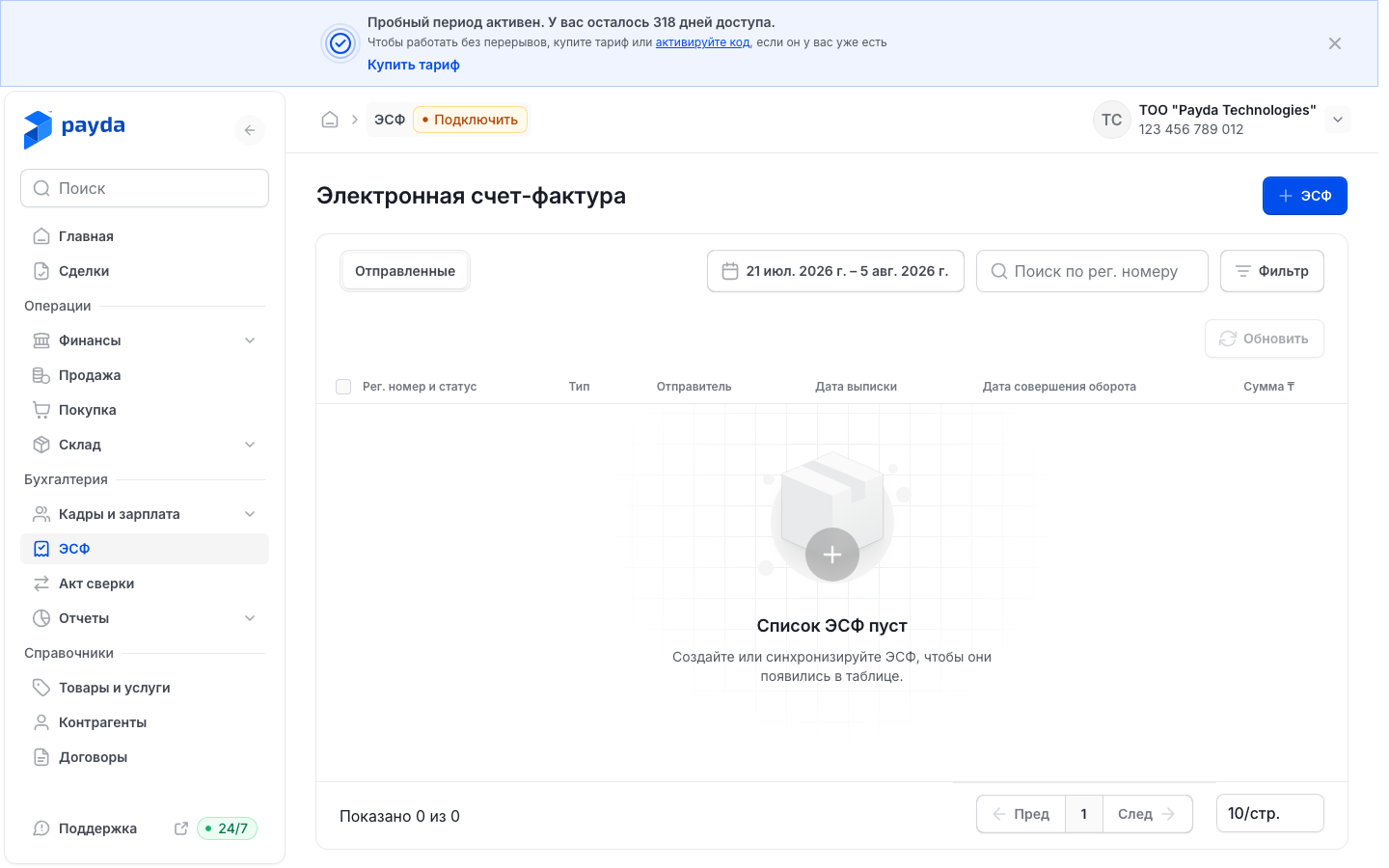
Click ЭСФ in the left menu — the Электронная счет-фактура (electronic invoice) page opens.
Pick a tab: Отправленные (Sent) — ESFs you issued, Полученные (Received) — ESFs from suppliers (see Receive an ESF from a supplier).
Check the period above the table: by default you see ESFs for the last 15 days by turnover date.
To see older ESFs, click the period, pick, for example, Этот год (This year) and click Применить (Apply).
Find an ESF with Поиск по рег. номеру (search by registration number) or Фильтр (Filter). In the Фильтры (Filters) window set Дата оборота (turnover date), Контрагент (counterparty) or Статус ЭСФ (ESF status) and click Применить.
Click a row to open the ESF.
The table columns are Рег. номер и статус (registration number and status), Тип (type), Контрагент, Дата выписки (issue date), Дата совершения оборота (turnover date) and Сумма ₸ (amount). Очистить (Clear) in the Фильтры window resets all criteria, the period included.
If nothing matches, the table says «Ничего не найдено» (nothing found). On the Отправленные tab it also shows a Создать новую (create new) button.
Connect to ИС ЭСФ
Without a connection you cannot send ESFs or refresh statuses. The badge at the top of the page, next to the word ЭСФ, shows the state: Подключить (Connect) — not connected, Подключено (Connected) — a connection exists.
- Make sure Логин ИС ЭСФ is filled in on the Доп.информация tab of the company details.
- Start NCALayer.
- Click the Подключить badge — the Авторизация (authorization) window opens with the text «Введите пароль от портала ИСЭСФ» (enter the ИС ЭСФ portal password).
- Enter the ИС ЭСФ password in Пароль (Password) and click Войти (Sign in).
- When the «Ожидание NcaLayer» (waiting for NCALayer) hint appears, choose your EDS in the NCALayer window and sign.
- The message «Пароль успешно добавлен» (password added) appears and the badge changes to Подключено.
No ИС ЭСФ account, or forgot the password? The Авторизация window has a Перейдите в портал ИС ЭСФ (go to the ИС ЭСФ portal) link. The portal opens in the same tab, replacing Payda.
Create an ESF
The easiest way is to issue the ESF from a sale: the counterparty, dates, sale details and items are filled in for you.
Open the ESF from a sale in one of two ways:
- in the Продажа (Sales) menu, on the Реализация (sale) tab, click + ЭСФ in the Связанные документы (linked documents) column of the row — the badges are explained in Linked documents;
- open the sale and click Добавить ЭСФ (add ESF) in its Связанные документы block — see Invoice, sale, waybill.
To issue an ESF without a sale, click Создать (Create) in the ESF register and fill in the fields manually.
Go through the form sections — the letters in the left column. Sections A–G work:
| Section | What to fill in |
|---|---|
| A. Общий раздел (general) | Номер документа (document number), Дата выписки (issue date), Дата оборота (turnover date) and Тип ЭСФ (ESF type) — only Обычный (regular) is available now |
| B. Реквизиты поставщика (supplier) | Your company's data comes from the company details. Choose Расчетный счет организации (company bank account) |
| C. Реквизиты получателя (recipient) | Choose the counterparty in the Получатель (recipient) field |
| D. Реквизиты грузоотправителя и грузополучателя (shipper and consignee) | Filled in automatically. Until section C has a recipient, the fields show the hint «Заполните пункт С» (fill in section C) |
| Е. Условия поставки (delivery terms) | Способ расчета (payment method): Безналичный расчет (bank transfer, the default) or Наличный расчет (cash). По договору (contract), Способ отправления (shipping method), the power of attorney and Условия поставки (delivery terms) are optional |
| F. Реквизиты документов, подтверждающих поставку товаров, работ, услуг (supporting documents) | Номер документа and Дата документа (document date) — the number and date of the sale |
| G. Данные по товарам, работам, услугам (goods, works, services) | The ESF items — see the next steps |
- In section G add items: Добавить из справочника (add from catalogue) takes them from the catalogue, Добавить (Add) inserts an empty row. Развернуть (Expand) opens the table full screen.
- In every row check Признак Происхождения (origin code) — it is required. For catalogue items it is set automatically: 5 - Прочее (other) for goods and 6 - Работы/услуги (works/services) for services.
- For codes 1–3 fill in Код товара (ТН ВЭД ЕЭАС) (commodity code) — exactly 10 digits. Codes 1 and 2 also need Наименование в соответствии декларации (name as in the declaration), and code 1 also Номер декларации (ТС, СТ-1, СТ-KZ) (declaration number) and п/п СНТ (СНТ line number).
An item row also has an optional Дополнительные данные (additional data) field — it is not a separate section. Letters C1 and H–L are not active yet: hovering over them shows «Данный раздел будет реализован в следующих обновлениях» (this section will come in a future update).
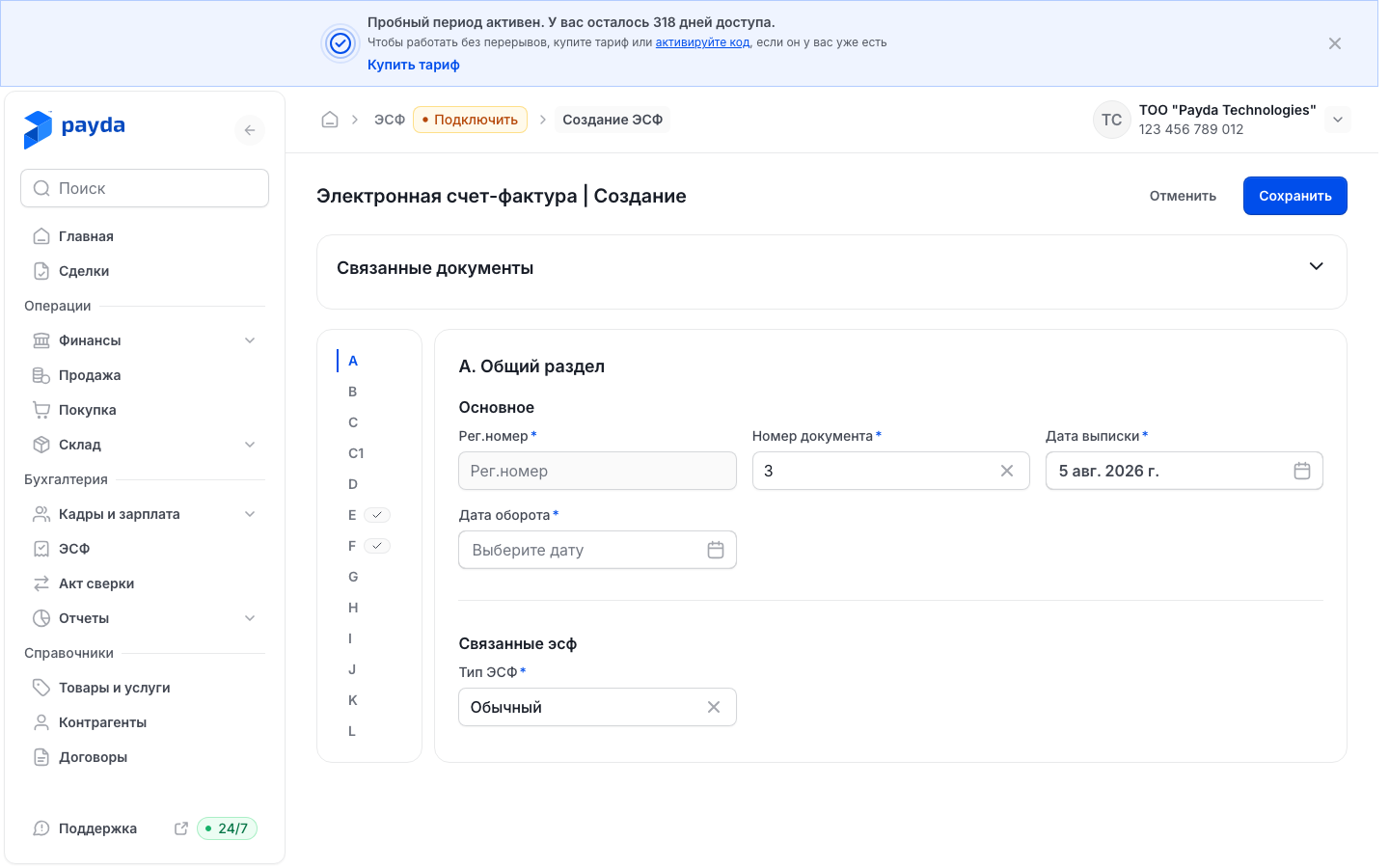
A tick next to a letter means the section is complete; a red number shows how many errors it has. All errors are collected in the Ошибки (N) (errors) panel at the bottom of the screen: click an error to open its section with the cursor in the field.
Send and refresh the status
- Click Сохранить (Save) — a new ESF has only this button and Отменить (Cancel). The message «ЭСФ успешно сохранено» (ESF saved) appears and you return to the register, where the ESF has the Черновик (Draft) status.
- Open the ESF from the register: under the card title it says «Сохранен» (saved).
- Start NCALayer and click Отправить (Send).
- Choose Отправить or Отправить как черновик (send as draft). Both sign the ESF via NCALayer and submit it to ИС ЭСФ; the second one submits it as a draft.
- The «Ожидание NCALayer» (waiting for NCALayer) hint appears — sign the ESF in the NCALayer window. After signing you see «ЭСФ успешно отправлена» (ESF sent).
- The line «Отправлен · Статус в портале: …» (sent · portal status) appears under the card title. To get the latest status, click Обновить статус (Refresh status).
Скачать XML (Download XML) opens the ESF as an XML file in a new browser tab.
On the Отправленные tab you can refresh several ESFs at once:
- Обновить (Refresh) above the table — all ESFs on the current page;
- Обновить выбранное (Refresh selected) — tick the ESFs, and the Выбрано N (N selected) panel with this button appears at the bottom.
After a refresh you see «Статусы ЭСФ успешно обновлены» (ESF statuses updated). Without an ИС ЭСФ connection the refresh buttons and the Отправить menu items are inactive.
Statuses in the register
| Status | What it means |
|---|---|
| Черновик (Draft) | The ESF is saved in Payda with Сохранить |
| Создан (Created) | The ESF was sent; your signature is still being processed |
| Подписан (Signed) | The ESF is signed and being transferred to ИС ЭСФ |
| Завершён (Completed) | ИС ЭСФ accepted the ESF — all good |
| Ошибка подписания (Signing error) | Signing failed: check the EDS and NCALayer |
| Ошибка (Error) | Something failed while sending to ИС ЭСФ or receiving its reply. Open the ESF: ИС ЭСФ remarks, if any came back, are in the Ошибки (N) panel |
| Нет доступа к ИСЭСФ (no access to ИС ЭСФ) | ИС ЭСФ did not accept the login or password |
| Налогоплательщик не найден (taxpayer not found) | ИС ЭСФ could not find the counterparty by its BIN (company tax ID) or IIN (individual ID number of sole traders and individuals) |
| Аннулирован (Cancelled) | The ESF was cancelled in ИС ЭСФ |
How to check it worked
- In the register the ESF has the Завершён status, and the Рег. номер и статус column shows the ИС ЭСФ registration number. Поиск по рег. номеру finds the ESF by it.
- The ESF card shows «Отправлен · Статус в портале: Завершён».
- An ESF created from a sale appears in that sale's Связанные документы block.
Common problems
| What you see | Why | What to do |
|---|---|---|
| After Отправить the «Ожидание NCALayer» hint appears and nothing else happens | NCALayer is not running, or signing was cancelled | Start NCALayer and send the ESF again. The hint itself is not an error: it appears on every send |
| Обновить, Обновить статус or the Отправить menu items are inactive | No ИС ЭСФ connection, or Логин ИС ЭСФ is empty in the company details. Обновить is also inactive while the list is loading | Wait for the list to load. Connect and check the login — see Connect to ИС ЭСФ |
| The Ошибки (N) panel at the bottom of the screen | Fields are empty or filled in incorrectly | Click an error to open its section. If the error is about a date, check both dates in section A |
| «Код ТН ВЭД должен содержать ровно 10 цифр» (the commodity code must have exactly 10 digits) | The code is incomplete | Enter all 10 digits in Код товара (ТН ВЭД ЕЭАС) |
| «Номер декларации обязателен при признаке происхождения 1» (a declaration number is required for origin code 1) | A row with code 1 has no declaration number | Fill in Номер декларации (ТС, СТ-1, СТ-KZ) (declaration number) |
| «Добавьте минимум 1 позицию» (add at least 1 item) | Section G has no rows | Click Добавить из справочника |
| A saved ESF is missing from the register | Its turnover date is outside the period above the table | Choose a wider period, for example Этот год |
| The Нет доступа к ИСЭСФ status | ИС ЭСФ rejected the credentials | Check Логин ИС ЭСФ and Пароль ИС ЭСФ on the Доп.информация tab — see Company details |
| The Налогоплательщик не найден status | ИС ЭСФ could not find the counterparty | Confirm the BIN or IIN with the counterparty and fix its card in the counterparty reference book |
What next
- Receive an ESF from a supplier — received ESFs and goods receipts based on them.
- Invoice, sale, waybill — the document an ESF is issued for.
- Company details — the ИС ЭСФ login and password.