
Payments and cash desk
Why you need this
All money coming in and going out through the bank and the cash desk is gathered in one list, together with the opening and closing balance for the period. From here you create payment orders and cash orders and mark documents as paid.
What you need
- A company account in the Расчетный счет (bank account) reference book — without it a bank payment order cannot be filled in. On a computer the company details have no accounts: an account is added right from an account field, see Bank accounts.
- Cash orders need no account.
Step by step
Payments: bank and cash desk
In the menu open Финансы (Finance) → Платежи (Payments).
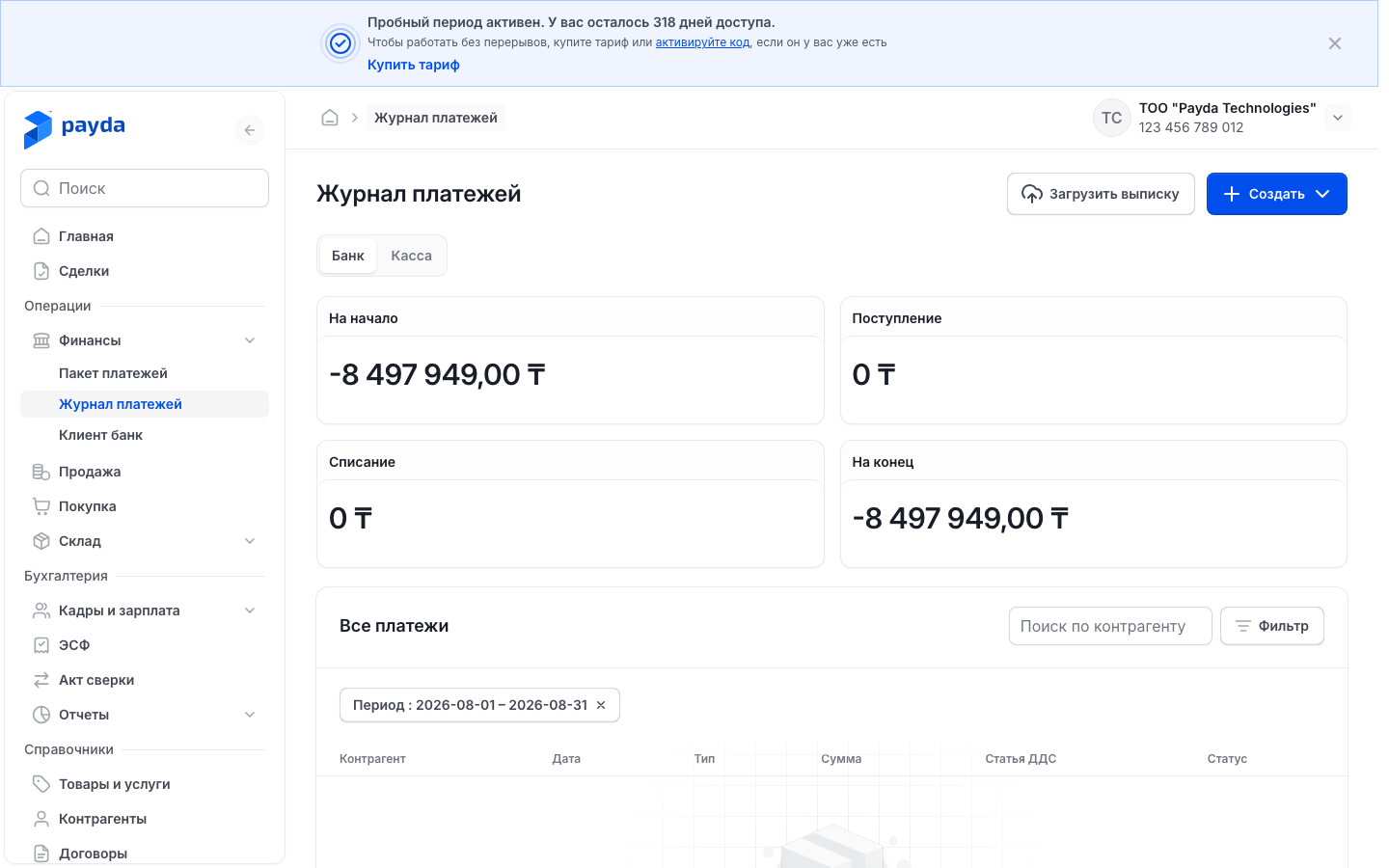
Pick a tab: Банк (Bank) — payment orders, Касса (Cash desk) — cash orders.
Check the period totals: На начало (opening balance), Поступление (incoming), Списание (outgoing), На конец (closing balance).
To find one counterparty's payments, start typing its name in Поиск по контрагенту (search by counterparty) and pick it from the list.
To change the period, press Фильтр (Filter). In the Фильтры (Filters) window set Период (period), Тип платежа (payment type) and, on the Банк tab, Счёт организации (company account), then press Подтвердить (Confirm).
Press a row to open the payment or cash order. You can change it and save it again.
By default the list shows the current month — you can see it in the Период chip above the table. Press the cross on the chip to see payments for all dates. The Тип and Счёт chips are removed the same way.
| Column | What it shows |
|---|---|
| Контрагент (counterparty) | Counterparty name and document number |
| Дата (date) | Document date |
| Тип (type) | Входящий (incoming) or Исходящий (outgoing) |
| Сумма (amount) | With «+» for money in and «−» for money out |
| Вид операции (operation kind) | For example, Оплата от покупателя (payment from a customer) or Налоги, отчисления и взносы (taxes and contributions). For payments from a bank statement it is set by the row's KNP (payment purpose code) |
| Статья ДДС (cash-flow item) | The cash-flow item, if one is chosen |
| Статус (status) | Оплачен (paid) — payment is marked. Without a payment mark: Проведён (posted) — the bank has processed the document, Черновик (draft) — not yet. The Касса tab has no status, the column shows a dash |
To create a document, press Создать (Create) and pick an item. The list is the same on both tabs.
| Item | When you need it |
|---|---|
| Исх. платёжное поручение (outgoing payment order) | You pay from the account: a supplier, employees, the budget |
| Вхд. платёжное поручение (incoming payment order) | Money arrived on your account |
| Приходный кассовый ордер (cash receipt order) | Cash was received into the cash desk |
| Расходный кассовый ордер (cash disbursement order) | Cash was paid out of the cash desk |
A bank statement is uploaded with the Загрузить выписку (upload statement) button — Uploading a statement. Salaries and taxes from a payroll sheet are easier to pay as a batch — Paying salaries and taxes with a payment batch.
Incoming payment
- Press Создать → Вхд. платёжное поручение. The Платёж входящий | Создание (incoming payment, new) form opens.
- In the Данные документа (document data) block check Номер документа (number) and Дата документа (date) — they are filled in for you. In Расчётный счёт получателя (recipient account) pick your account the money came to.
- In the Плательщик (payer) block pick the counterparty in Наименование (name), then its Расчётный счёт отправителя (sender account). No suitable account — Counterparty account.
- In the Детали платежа (payment details) block leave Тип операции (operation type) as Оплата от покупателя. If the money is already on the account, set Оплачено (paid) to Да (yes) and enter the date.
- Below the form press Добавить (Add) and fill in the row:
- Договор (contract) — a contract with this counterparty, available once the payer is chosen, see Contracts;
- Сумма платежа (payment amount); Курс взаиморасчётов (settlement rate) is 1 by default, Сумма взаиморасчётов (settlement amount) is calculated for you;
- % ставка НДС (VAT rate) — required in every row; Сумма НДС (VAT amount) is calculated for you, on top of the amount;
- Статья ДДС — optional, an empty cell reads Наследуется (inherited).
- Press Сохранить как черновик (save as draft). The payment appears on the Банк tab.
You can also create the payment from the document being paid: in its Связанные документы (linked documents) block press Платёж (входящий) (incoming payment) — the counterparty and rows are filled in for you. More in Create a document from another one.
Outgoing payment
Press Создать → Исх. платёжное поручение. The Платеж исходящий | Создание (outgoing payment, new) form opens.
In the Данные документа block pick Расчётный счёт отправителя — your account the money leaves from.
In the Получатель (recipient) block pick the counterparty in Наименование. Its main account is put into Расчетный счет получателя (recipient account) for you; pick another one in the same field if needed.
In the Детали платежа block pick Тип операции and fill in what it requires:
Тип операции What to fill in Оплата поставщику (payment to a supplier) — selected by default Below the form Добавить → rows: Договор, Сумма платежа, % ставка НДС (VAT included in the amount), Статья ДДС Перечисления заработной платы (salary transfer) Статья ДДС in the Детали платежа block; below the form Добавить → Ведомость (payroll sheet), Сумма к выплате ₸ (amount payable) comes from it Налоги, отчисления и взносы Вид платежа (payment kind) and Статья ДДС in the Детали платежа block; below the form Добавить → Ведомость If the money has already left the account, set Оплачено to Да and enter the date.
Press Сохранить как черновик.
Changing Тип операции clears the table. A payment order for a payroll sheet takes one row, and the Ведомость list shows only sheets not yet linked to another payment order. Sheets are prepared in Кадры и зарплата (HR and payroll) — Payroll sheet for salaries and taxes.
A saved payment order gets an Экспорт в банк (export to bank) button at the top — it downloads a file for the bank's client software. Upload the file there, see Exporting payment orders to the bank.
Taxes and contributions: KBK and KNP
- In an outgoing payment order set Тип операции to Налоги, отчисления и взносы.
- Pick Вид платежа. Payda fills in КНП (Код назначения платежа) (KNP, payment purpose code) and КБК (Код бюджетной классификации) (KBK, budget classification code) for you.
- Check the codes. You can pick another code in the same field, see KNP and KBK.
- Below the form press Добавить and pick the Ведомость for this tax.
- Press Сохранить как черновик.
Tax payment orders that came from a bank statement have an empty Вид платежа. Such an order cannot be saved: «Выберите вид платежа» (choose the payment kind) appears under the field. Pick the kind and save again.
To pay all taxes of a payroll sheet at once — one payment order per tax — build a tax batch.
Cash orders
- Press Создать and pick Приходный кассовый ордер if you received cash, or Расходный кассовый ордер if you paid it out. The Наличные входящие | Создание (cash in, new) or Наличные исходящие | Создание (cash out, new) form opens.
- In the Данные документа block check Номер документа and Дата документа. Тип операции is already set: Оплата от покупателя for a receipt order, Оплата поставщику for a disbursement order.
- In Контрагент pick who you received the cash from or paid it to.
- Below the form press Добавить and fill in the row: Договор, Сумма платежа, % ставка НДС — it is required. Type the item as text in the Статья ДДС column.
- Press Сохранить как черновик. The Касса tab with the list of orders opens.
Cash orders have neither a company account nor a status. In a receipt order VAT is added on top of the amount, in a disbursement order it is included in the amount.
Cash-flow items
A cash-flow item (Статья ДДС) shows what the money came in or went out for. Where to pick it:
| Document | Where the item is |
|---|---|
| Исх. платёжное поручение with Перечисления заработной платы or Налоги, отчисления и взносы | The Статья ДДС field in the Детали платежа block |
| Исх. платёжное поручение with Оплата поставщику, Вхд. платёжное поручение | The Статья ДДС column in the table rows. An empty cell reads Наследуется — the row has no item of its own |
| Приходный кассовый ордер, Расходный кассовый ордер | The Статья ДДС column — plain text, the reference book does not open here |
| Tax batch | The expanded tax row, see Tax batch |
The reference-book icon exists only on the Статья ДДС field in the Детали платежа block (salary and taxes) and in the expanded row of a tax batch. In table cells the item is picked from a drop-down list of items that already exist. All documents share one reference book: if the item is missing from the list, create it through such a field and then pick it in the table.
The item reference book:
- Press the reference-book icon on the right of such a Статья ДДС field. The Статьи ДДС (cash-flow items) panel opens — each row has the item name and Поступление (incoming) or Списание (outgoing).
- Find the item in Поиск статьи (search items), select it and press Выбрать (Select).
- Not there — press Создать. In the Создать статью (new item) form fill in Название (name), Движение ДС (cash movement) — «Раздел: …» (section) appears under the fields — and Вид движения (direction): Поступление or Списание. Press Создать.
- «Статья ДДС успешно добавлена в справочник.» (item added) appears. The new item is already selected — press Выбрать.
- To fix an item, press the arrow on the right of its row. In the Редактировать статью (edit item) form change the fields and press Сохранить (Save). Items cannot be deleted.
A field's drop-down list shows only items of its own direction: incoming documents show items with direction Поступление, outgoing ones — Списание. The reference book shows all items, so pick an item of the matching direction there: the name of an item with another direction will not be displayed in the field.
Payments on a phone
- In the app press Финансы on the home screen, or open Каталог (Catalog) → Финансы. The section exists only in a company account.
- Pick the Банк or Касса tab. The totals На начало, На конец, Поступление and Списание are at the top.
- To find a counterparty's payments, enter its BIN or IIN (company or personal tax ID) in Поиск по БИН/ИИН (search by BIN/IIN).
- To set a period, press the calendar icon to the right of the search. In the Период panel pick the С (from) and По (to) dates and press Применить (Apply); Сбросить (Reset) brings back all dates.
- Press a payment to open its card: amount, direction Входящий or Исходящий and, for a bank payment, the Оплачен, Черновик or Проведён mark. Below are the Основное (main) block (Тип операции, КНП, Статья ДДС, Стадия документа — document stage, Назначение платежа — payment purpose) and the Контрагент block with ИИН/БИН and a copy icon next to it, and Счёт контрагента (counterparty account).
The card is read-only: payments are created and changed on a computer. The Банк tab has a Загрузить выписку button at the bottom of the screen — Uploading a statement. While there are no payments, the screen says «Платежей пока нет» (no payments yet).
How to check it worked
The payment appears on Платежи on its tab — Банк or Касса — with the right status, and the Поступление and Списание totals change. After saving a message appears, for example «Входящий платеж успешно создан» (incoming payment created).
Common problems
| What you see | Why | What to do |
|---|---|---|
| «Таблица не может быть пустой» (the table cannot be empty) | The document has no rows | Below the form press Добавить and fill in a row |
| «Проверьте правильность заполнения полей» (check the fields) in an incoming payment or a cash order; an outgoing payment shows a hint under the field instead | A required field is empty, often % ставка НДС in a row | Check the fields with an asterisk and the VAT rate in every row |
| «Выберите вид платежа» | Вид платежа is not chosen in a tax payment order — typical for orders from a bank statement | Pick the payment kind and save again |
| «Статьи ДДС недоступны организации: …» (items not available to the company) | The server did not accept the chosen item | Pick another item from the list |
| «Нет счетов — откройте справочник» (no accounts — open the reference book) in an account field | The company has no account yet | Press the reference-book icon in the field and add an account — Adding an account |
| «Не удалось выгрузить поручение» (could not export the order) | The file for the bank was not built | Check the sender and recipient accounts in the order and press Экспорт в банк again |
| The payment is not in the list | Its date is outside the period — the current month is shown by default | Remove the Период chip above the table or set the period in Фильтр |
What next
- Uploading a statement and exporting payment orders to the bank — payments from the bank without manual entry.
- Paying salaries and taxes with a payment batch — all payment orders for a payroll sheet in one file.
- Invoice, sale, waybill — the documents that get paid.