
Working with deals
Why you need this
A deal ties the documents of one sale into a single chain: the invoice, the sale document (a waybill or an AVR (work completion act)), the ESF (electronic invoice) and the payment. The deal shows at a glance which step is done and which is still ahead.
What you need
- A company account: there are no deals in the Физическое лицо (individual) mode.
- The customer — a counterparty from your reference book, or its BIN (company tax ID) or IIN (personal tax ID).
- Items in the Goods and services reference book — or just the deal total.
- For an invoice — your company's bank account (see Bank accounts) and a KNP (payment purpose code) (see KNP).
Step by step
Deal list
Open Сделки (Deals) in the left menu — the company's deals. The Создать сделку (Create deal) button at the top right starts a new one.
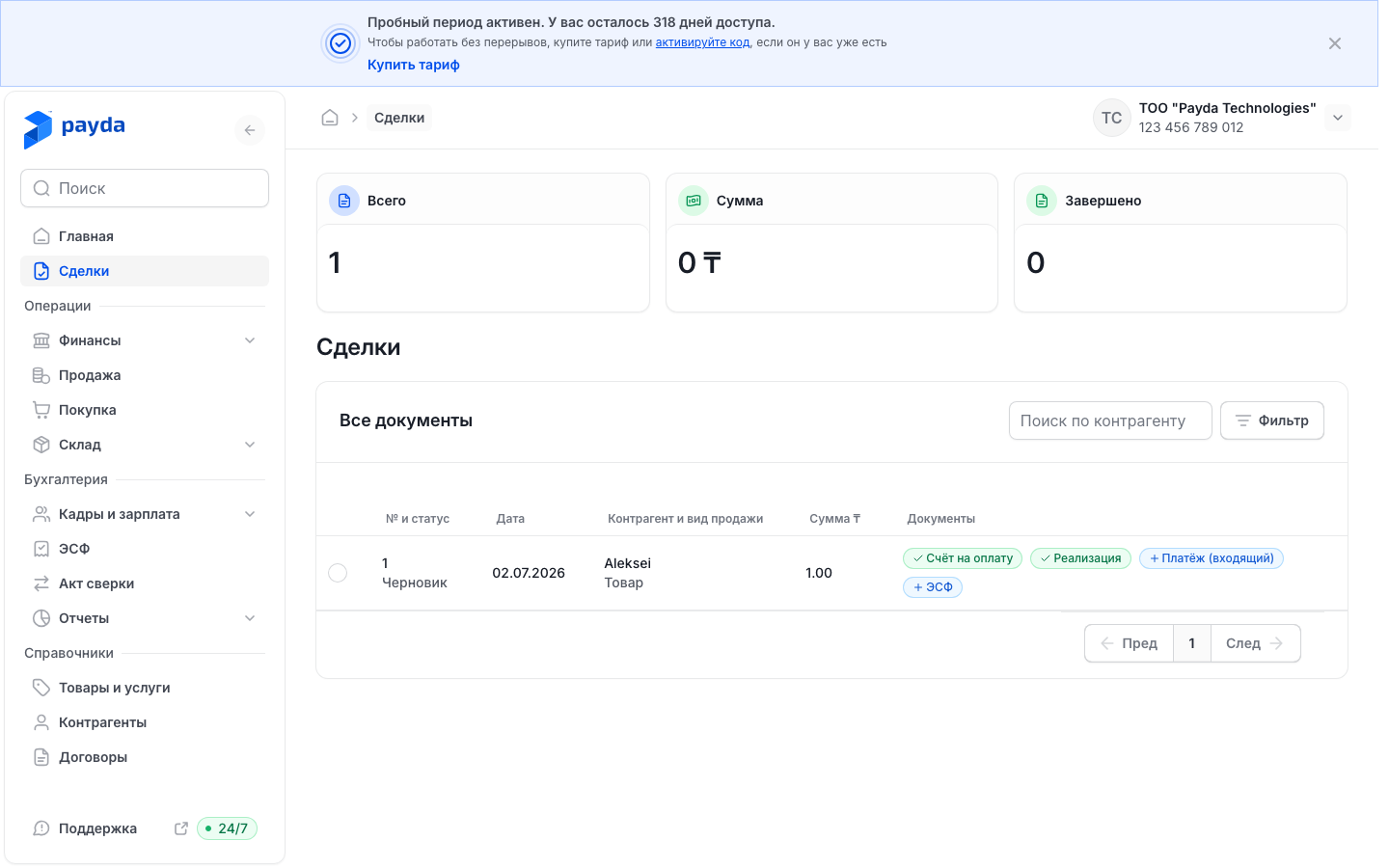
The table columns are № и статус (number and status), Дата (date), Контрагент и вид продажи (counterparty and sale type), Сумма ₸ (amount) and Документы (documents).
The Документы column shows the deal's steps. A green badge with a tick means the document exists: press it and Посмотреть (view), Отправить (send), Скачать (download) and Печать (print) appear at the bottom.
A blue badge with a plus means there is no document yet. Press it to open the document form; once saved, the document is linked to the deal and the deal card opens.
To find a deal, pick a counterparty in Поиск по контрагенту (search by counterparty). To filter by status, press Фильтр (Filter), choose Статус (status) and press Подтвердить (Confirm).
Press a deal's row to open its card.
Creating a deal in the web cabinet
In the deal list press Создать сделку — Сделка | Создание (Deal | New) opens. Everything is filled in on one page, without steps.
In the Участники и реквизиты (parties and details) block fill in:
- Заказчик (customer) — start typing a name or BIN/IIN and pick the counterparty from the list. If it is not there, choose Добавить (Add) and create a new one;
- Адрес контрагента (counterparty address) — filled in from the reference book; check it.
Under Заказчик a company card appears, marked «Контрагент из вашей базы» (a counterparty from your reference book) or «Найден в базе Payda — будет сохранён в ваши контрагенты» (found in the Payda database, will be saved to your counterparties).
If you need an invoice, tick Счёт на оплату (invoice) — «Будет создан автоматически вместе со сделкой» (created automatically with the deal) — and choose Мой банковский счёт (my bank account) and КНП. The box is unticked by default, and without it no invoice is created.
In the Предмет сделки (subject of the deal) block choose where the amount comes from:
- Товары и услуги (goods and services) — add items with Добавить из справочника (add from reference book) or Добавить and set Кол-во (quantity) and Цена (price). If the prices already include VAT, tick НДС внутри суммы (VAT included);
- Только сумма (amount only) — enter Сумма сделки (deal amount) and pick Ставка НДС (VAT rate); Сумма без НДС, Сумма НДС and Итого к оплате (net amount, VAT, total due) appear below. The deal gets a template line «Товар №1» (Item No. 1) as its item.
Press Создать сделку — the new deal's card opens. The button stays inactive until a customer is chosen, while the customer's data is loading and, in Товары и услуги mode, until there is at least one item.
Deal card
At the top: Сделка № … (Deal No.), the creation date and Сумма сделки (deal amount).
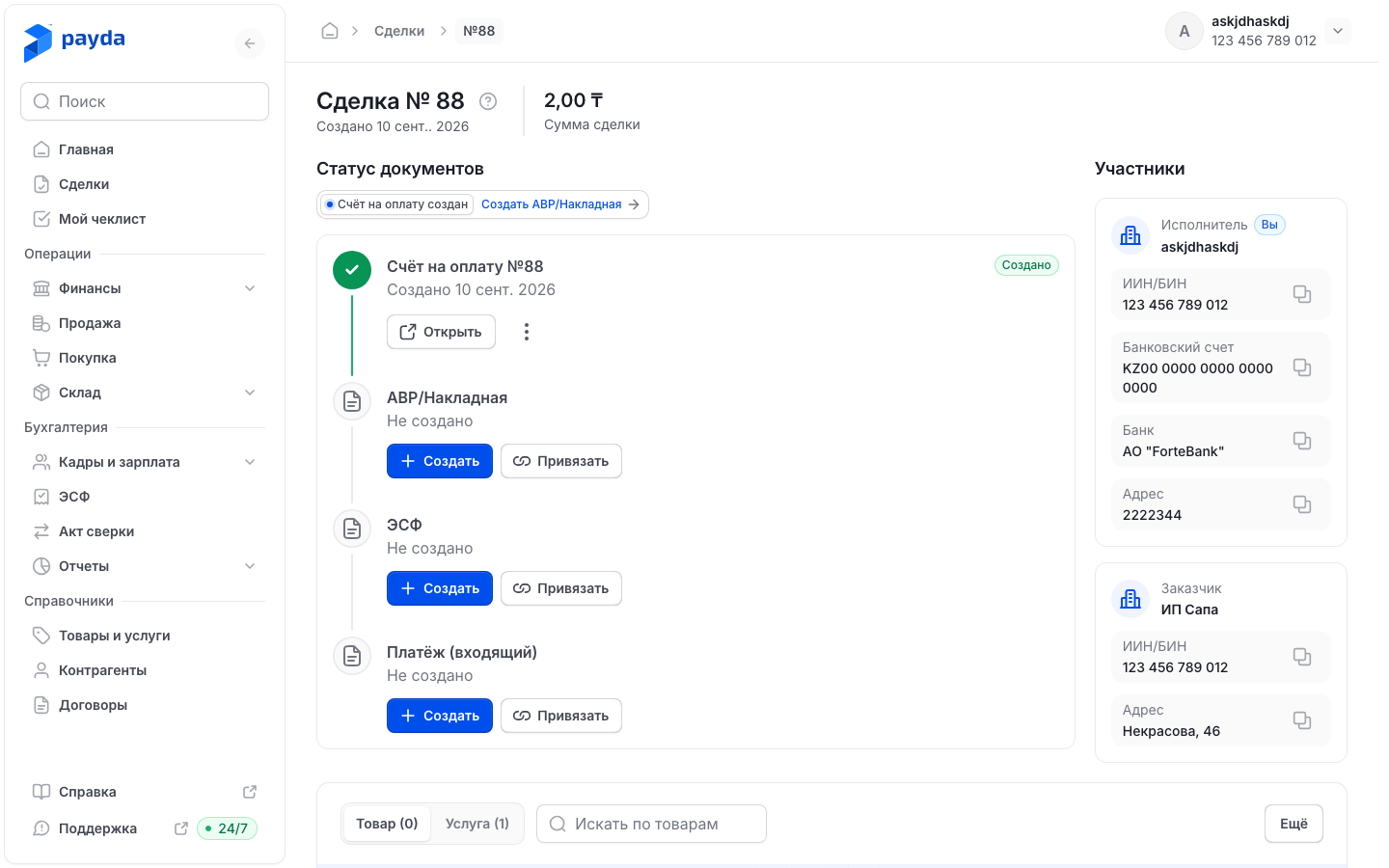
The Статус документов (document status) block lists the deal's steps. Under each step you see «Создано» (created) with a date or «Не создано» (not created).
A step without a document has two buttons:
- Создать (Create) — opens the document form filled in from the deal. Once you save, the document is linked to the deal and you return to its card;
- Привязать (Link) — opens the «Привязать основание» (link a source) window for the step's document type. Pick an existing document and press Привязать — «Документ успешно привязан» (document linked) appears.
A completed step has:
- Открыть (Open) — the document's print form with Скачать (download) and Переслать (forward); a waybill and an AVR also have Отправить на подпись (send for signature);
- the three-dot icon next to Открыть — Перейти к документу (go to the document), Скачать and Отвязать (unlink).
To unlink a document, choose Отвязать and press Подтвердить in the «Подтвердите отвязку» (confirm unlinking) window. «Документ успешно отвязан» (document unlinked) appears; the document itself stays in Payda.
The Участники (parties) block shows the Исполнитель (executor — your company) card and the Заказчик (customer) card. The copy icon to the right of ИИН/БИН, Банковский счет, Банк or Адрес copies the value.
At the bottom: the deal's items on the Товар (goods) and Услуга (services) tabs, with the Искать по товарам (search items) box.
An ESF for the deal is created the same way — with Создать on the ЭСФ step. How to check and send it: Issue and send an ESF.
Sending the customer a link
In the web cabinet the deal itself has no «Поделиться» (Share) button. The invoice is sent from the invoice:
- On the deal card press Открыть on the Счёт на оплату step.
- In the print form press Переслать — the invoice link is copied and «Ссылка скопирована» (link copied) appears.
- Paste the link into a messenger or an email to the customer.
The customer opens the invoice from the link without signing in to Payda. The Оплатить (Pay) button appears on the invoice page if a payment link is set in your company details — see Paying an invoice by link.
On a phone, the share icon on the deal card sends a link to the deal itself, not to a payment page. The customer sees the deal card with its documents — see Deal card on a phone.
Deal statuses
The status is shown in the deal list of the web cabinet, under the deal number: Черновик (draft), Активна (active), Завершена (completed) or Отменена (cancelled). To show deals with a given status, press Фильтр, choose Статус and press Подтвердить. To clear the filter, press the cross on the filter chip above the table.
Deals on a phone
Open the Каталог (Catalogue) tab and choose Сделка (Deal) in the Сервисы (Services) block — the deal list opens. The five latest deals are also on the home screen, in Последние сделки (recent deals).
At the top of the list are the Вы продаете (you sell) and Вы покупаете (you buy) tabs and the Создать сделку button. Deals are grouped by date; each shows its number, customer, amount and number of items.
While there are no deals, the screen shows «Здесь будет список сделок» (your deals will appear here) and the Создать сделку button.
Press Создать сделку — Создание сделки (new deal) opens at stage 1 of 2. Fill in:
- Данные БИН/ИИН (BIN/IIN) — the customer's full number. Payda finds the company and shows «Контрагент из вашей базы» or «Найден в базе Payda — будет сохранён в ваши контрагенты»;
- Адрес контрагента — required; check the address that was filled in;
- Счёт на оплату — switch it on if you need an invoice and choose Мой банковский счёт and КНП.
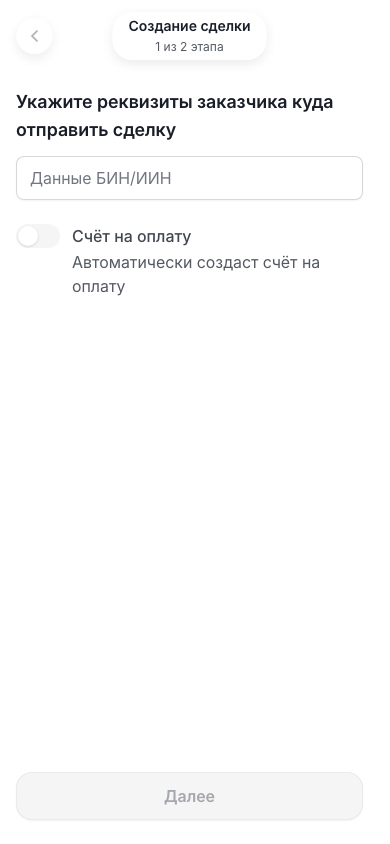
Press Далее (Next) — Payda saves the customer to your counterparties and opens stage 2 of 2. The button stays inactive until the company is found and the address is filled in.
Choose where the amount comes from:
- Товары и услуги — press Добавить (Add), tick items in the catalogue and press Добавить в сделку (add to deal). You can adjust each item's price and quantity;
- Только сумма — enter Сумма (amount) and pick Ставка НДС; Итого к оплате appears below. The deal gets the template text «Товар №1» as its item.
If the prices already include VAT, switch on В том числе НДС (VAT included) at the bottom of the screen. Check Итого (total) and press Завершить (Finish).
The Сделка создана (deal created) screen opens with a link to the deal. Поделиться (Share) sends it to the customer through the phone's share menu; История сделок (deal history) returns to the list.
Deal card on a phone
- At the top: Сделка #…, the date and Сумма сделки. The share icon at the right of the header sends a link to this card.
- In the Статус документов block each step shows «Создано» with a date or «Не создано». Открыть shows the document's print form.
- While they have no document, the Счёт на оплату step and the sale step (АВР or Накладная) have buttons:
- Создать — opens the document form. Once you save, the document is linked to the deal and you return to it — see Documents on a phone;
- Привязать — in the Привязать документ (link a document) window find the document with Поиск по номеру (search by number), select it and press Привязать. «Документ успешно привязан» appears.
- To unlink a document, press the three-dot icon on the step and choose Отвязать. Answer Подтвердить to «Отвязать документ?» (unlink the document?) — the document stays in Payda but no longer belongs to the deal.
- The ESF and payment steps are read-only on a phone: create and link them in the web cabinet.
- The Участники block shows the Поставщик (supplier) and Покупатель (buyer) cards, with Вы (you) on your side, the tax regime and a Показать реквизиты (show details) button. For the buyer Payda explains what happens to VAT, for example «Сумма НДС вернётся к зачёту» (the VAT will be offset) or «НДС к зачёту недоступен» (no VAT offset).
- The Детализация (breakdown) block lists the deal's Товары (goods) and Услуги (services).
Only the executor — the company that created the deal — sees Создать, Привязать and Отвязать. From a share link the card opens read-only. A customer who opens it without signing in sees the «Узнайте налоговый разбор сделки» (see the tax breakdown of the deal) banner and a Войти (Sign in) button.
How to sign a deal document on a phone: EDO on a phone. EDO (ЭДО) is electronic document exchange.
How to check it worked
- The deal appears in Сделки in the web cabinet and in Сделка on a phone.
- If you ticked Счёт на оплату, Payda creates the invoice together with the deal: find the Счёт на оплату step in Статус документов. If it says «Не создано», press Создать.
- As you work, the steps switch to «Создано» and the list's Документы column shows green badges.
Common problems
| What you see | Why | What to do |
|---|---|---|
| «Проверьте заполнение формы» — «Не все обязательные поля заполнены» (check the form — not all required fields are filled in) | A required field is empty: Заказчик, Адрес контрагента, with Счёт на оплату ticked — Мой банковский счёт and КНП, in Только сумма mode — Сумма сделки | Fill in the fields marked «Обязательное поле» (required field) |
| Создать сделку cannot be pressed | No customer is chosen, the customer's data is still loading, or there are no items in Товары и услуги mode | Choose the customer and wait for its card, add an item, or switch to Только сумма |
| No invoice was created | Счёт на оплату was not ticked — it is off by default | On the deal card press Создать on the Счёт на оплату step |
| Мой банковский счёт is empty or shows «Нет счетов — откройте справочник» (no accounts — open the reference book) | The company's bank account has not been added | Press the magnifier icon in the field, then Создать новый (create new) — see Bank accounts |
| «Не удалось сохранить контрагента» (could not save the counterparty) | The customer was not saved to the reference book | Check the BIN/IIN and the address and try again |
| «Не удалось создать сделку» (could not create the deal) | The deal was not saved | Check the data and try again |
| «Организация не найдена» (company not found) on a phone | There is no company with this BIN/IIN in the database | Check the number: you need the full 12-digit BIN or IIN |
| «Документ сохранён. Привяжите его к сделке вручную» (document saved, link it to the deal manually) | The document created from a deal step was saved but not linked | Open the deal and press Привязать on the step |
| «Не удалось отвязать документ» (could not unlink the document) | The link was not removed | Try unlinking again |
What next
- Linked documents — how a deal's documents are linked to each other.
- Paying an invoice by link — the Оплатить button in the invoice for the customer.
- EDO in the cabinet — signing the deal's documents on a computer.