
Contracts
Why you need this
A contract ties documents to a specific paper agreement: an invoice, a sale or a reconciliation act can state which contract the settlement belongs to. This matters when you have several contracts with one counterparty on different payment terms.
What you need
- A counterparty — a contract is always signed with one.
- The contract details: number, date, validity period.
Step by step
Open Договоры (Contracts) in the left menu — the Договоры side panel opens with all of your organisation's contracts. Each row shows the name, number, signing date and counterparty.
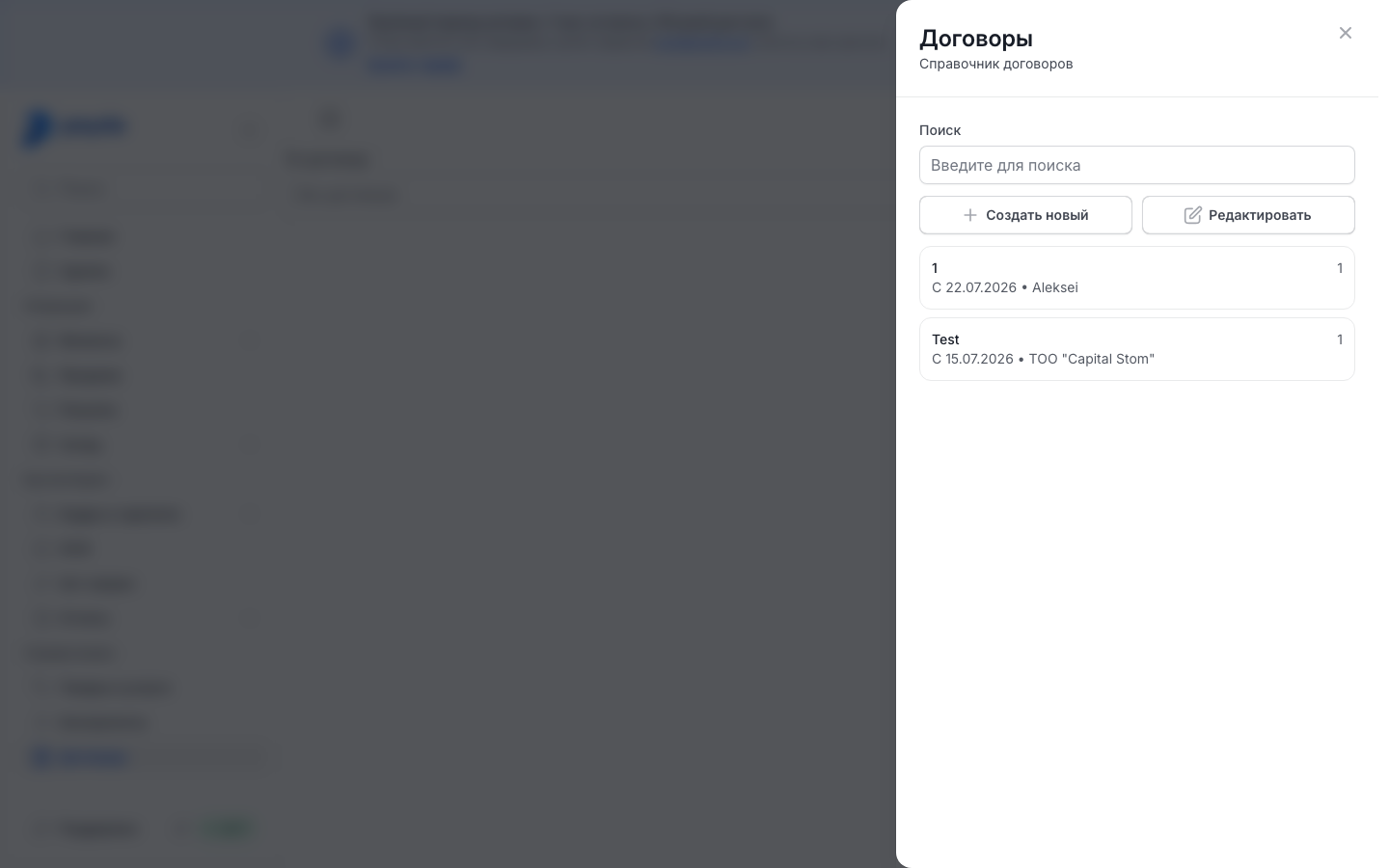
Press Создать новый (Create new) — the Создать договор (Create contract) form opens.
Fill in the fields. Fields with an asterisk are required: without them the contract is not saved.
- Контрагент (counterparty) — who the contract is with. Start typing a name or IIN/BIN (BIN — company tax ID, IIN — personal tax ID for sole traders and individuals) and pick the counterparty in the list under the field. The field works the same way as in documents: Counterparty in a document;
- Наименование (name) — how the contract appears in lists, up to 255 characters;
- Номер документа and Дата заключения (number and signing date);
- Валюта (currency) — tenge by default;
- Статус (status) — Действует (active), Закрыт (closed) or Черновик (draft);
- Вид договора (contract type) — Входящий (incoming) or Исходящий (outgoing): pick the one that describes the contract;
- Дата начала and Дата окончания (start and end date) — the validity period, optional;
- Условия оплаты and Условия поставки (payment and delivery terms) — optional, as text.
Press Создать (Create). The message «Договор был успешно создан.» (contract created) appears and the contract shows up in the list.
To find a contract, start typing in the Поиск (Search) field above the list.
Editing a contract
- In the Договоры panel press Редактировать (Edit) — the buttons are replaced by Готово (Done).
- Press the contract you need — the Редактировать договор (Edit contract) form opens. While edit mode is off, pressing a contract on the reference-book page opens nothing.
- Correct the fields and press Изменить (Change). The message «Договор был успешно создан.» appears — Payda shows it after a change too.
- Press Готово to leave edit mode.
A contract cannot be deleted.
How a contract reaches a document
A contract is picked in the По договору (under contract) field. It is in the Контрагент (Counterparty) block of an invoice, a sale, a receipt and a power of attorney, in a reconciliation act and in the Е. Условия поставки (delivery terms) section of an ESF (electronic invoice). An empty field reads Без договора (no contract) — the document saves anyway.
- Pick the counterparty first. Until you do, the По договору field is grey and the reference-book icon in it does not respond.
- Open the По договору field: the list shows only this counterparty's contracts. Start typing to narrow the list and pick the contract.
- Or press the reference-book icon (a sheet with a magnifying glass) on the right of the field — the Договоры panel opens with the caption «Справочник договоров» (contract reference book) and the counterparty's name. Select the contract and press Выбрать (Select).
If the contract you need is not there, create it right from the document:
- when the field's list is empty («Нет данных», no data), pick Добавить (Add) — Создать договор opens with the document's counterparty already set, so the form has no Контрагент field;
- or press Создать новый in the Договоры panel.
After Создать the contract is set in the document field, and Выбрать closes the panel. If you change the counterparty in the document, the По договору field is cleared: pick a contract of the new counterparty.
In payment orders and cash orders the contract is set per row: press Добавить below the form and pick the contract in the Договор (contract) column. The column is available once a counterparty is selected, and the Справочник (reference book) item in its list opens the Создать договор form. More — Incoming payment.
How to check it worked
Open Договоры: the new contract is in the list with its name, number, signing date and counterparty. Then open a document with this counterparty: the contract should be offered in the По договору field.
Common problems
| What you see | Why | What to do |
|---|---|---|
| After Создать the form stays open: the browser highlights an empty field, or it shows «Обязательное поле» (required field) | A field with an asterisk is empty: Контрагент, Наименование, Номер документа, Статус or Вид договора | Fill in the field and press Создать again |
| «Максимум 255 символов» (255 characters max) | Наименование or Номер документа is too long | Shorten the text |
| The По договору field is grey | No counterparty is selected in the document yet | Pick the counterparty in the Контрагент block |
| The contract is not offered in a document | It is signed with another counterparty: the list shows only the document counterparty's contracts | Open the contract in the reference book and check its Контрагент field. Create a contract with this counterparty via Добавить |
| The selected contract disappeared from the field | The counterparty in the document was changed | Pick a contract of the new counterparty |
| «Ничего не найдено» (nothing found) in the Договоры panel | The counterparty has no contracts yet, or the search found nothing | Clear Поиск or press Создать новый |
What next
- Reconciliation act — reconcile per contract.
- Counterparties — add a counterparty for the contract.
- Invoice, sale, waybill — reference the contract on a sales document.