
Employees and payroll
Why you need this
This is where you run HR and payroll: you add employee cards and record HR events — leave, sick leave, bonuses, dismissals. Once a month Payda calculates salaries and taxes, and you turn the calculation into a payroll sheet and pay it with a payment batch.
What you need
- The employee's IIN (personal tax ID), their contractual salary and the calculation type: gross salary, net salary or a civil-law contract (ГПХ).
- To pay salaries — the employee's bank account. It is added to the card after the first save: Bank accounts.
Step by step
All sections open from Кадры и зарплата (HR and payroll) in the left menu: Начисления (accruals), Ведомости (payroll sheets), Сотрудники (employees) and Кадровые записи (HR records). These are menu items; the page itself has no tabs.
Adding an employee
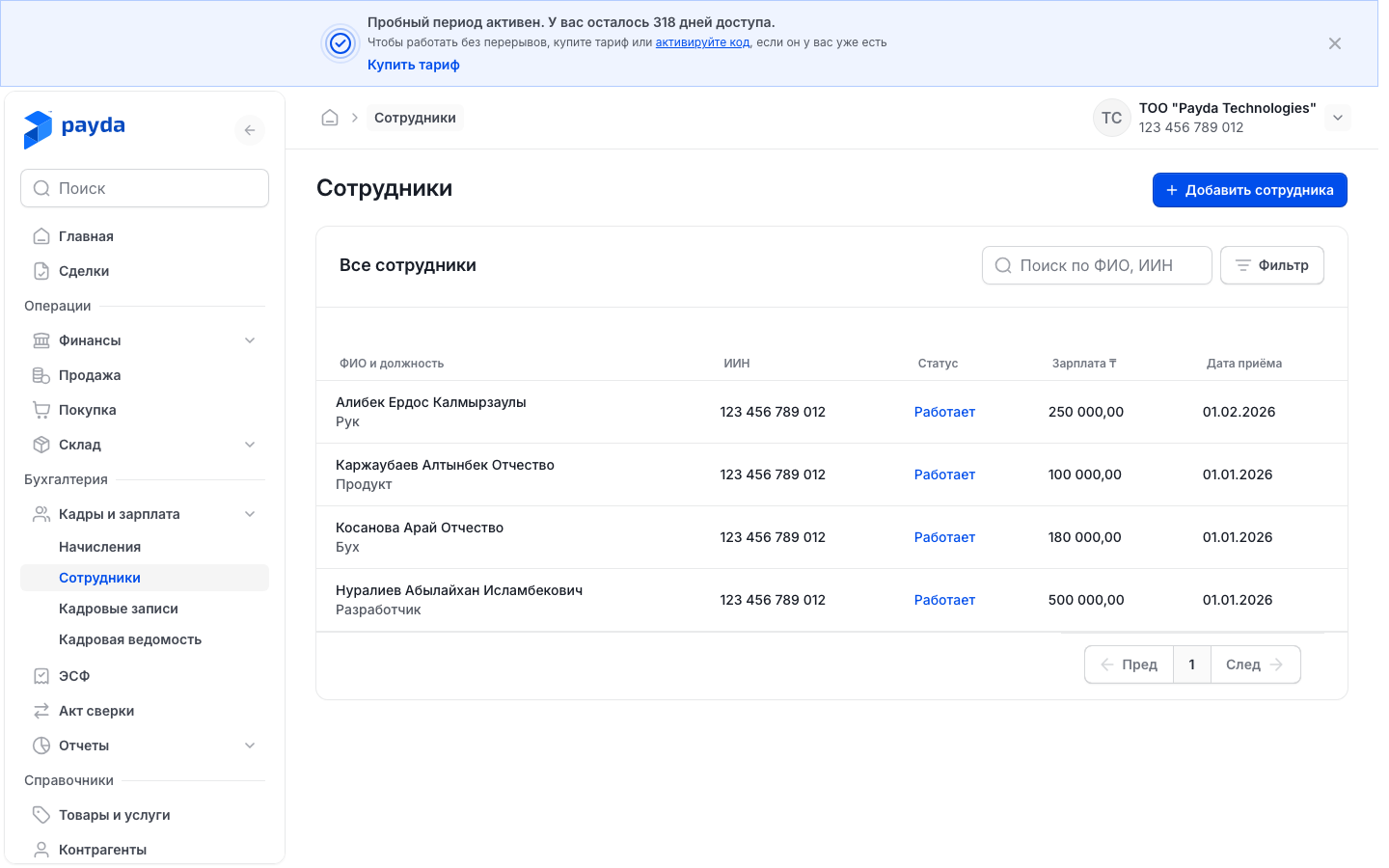
Open Кадры и зарплата → Сотрудники and press Добавить сотрудника (add employee). The Информация о сотруднике (employee information) page opens.
In the Основные данные (basic details) block enter the ИИН — Дата рождения (date of birth) fills in automatically. Fill in Имя (first name), Фамилия (surname) and, if there is one, Отчество (patronymic).
In the Работа и условия (job and terms) block fill in:
- Тип (type) — Руководитель (manager) or Сотрудник (employee);
- Должность (position) and Дата приема (hire date);
- Размер начальной заработной платы (starting salary) — the salary from the contract;
- Рабочая неделя (working week) — Пятидневка (five days) or Шестидневка (six days);
- Вид расчёта (calculation type) — whatever you agreed with the employee: Зарплата c налогами (оклад) (gross salary), Зарплата на руки (net salary), Договор ГПХ на руки (civil-law contract, net) or Договор ГПХ с налогами (civil-law contract, gross).
In the Дополнительно (additional) block choose Гражданство (citizenship), Инвалидность (disability; «Не инвалид», not disabled, is preselected) and Вычет МЗП (minimum-wage deduction) — Да (yes) or Нет (no). All three fields are required.
If needed, fill in the employee's ID document: Номер документа (уд лич/паспорт) (ID card or passport number), Дата выдачи документа (issue date) and Кем выдан (issued by). You will need them if the employee collects goods under a power of attorney.
If the employee is a pensioner, choose Да in Пенсионер (pensioner) and set Дата выхода на пенсию (retirement date).
Press Сохранить (save). The message «Сотрудник успешно добавлен» (employee added) appears and the employee list opens.
Add a salary account: open the employee from the list and press the catalogue icon on the right of the Банковские счета (bank accounts) field. How to add the account — Bank accounts.
Working with the employee list:
- Find an employee — the Поиск по ФИО, ИИН (search by name or IIN) box above the table. The Фильтр (filter) button opens the Фильтры (filters) window: По статусу (by status), Зарплата (salary, from and to), Дата приема. Choose the conditions and press Подтвердить (confirm).
- Edit a card — press the employee's row, correct the fields and press Сохранить.
- The salary on a saved card cannot be edited: Размер начальной заработной платы and Размер текущей заработной платы (current salary) are read-only. Create an Изменение зарплаты (salary change) HR record (HR records).
- Dismiss — an Увольнение (dismissal) HR record; after it the status in the list becomes «Уволен» (dismissed). An employee cannot be deleted.
Employees in documents
Documents take employees from the Список сотрудников (employee list) catalogue. The Сотрудник (employee) field appears in a power of attorney, in the Мои реквизиты (my details) block, and in the filter of the Доверенности (powers of attorney) tab under Покупка (purchases). On the phone this field of a power of attorney is called Доверенное лицо (authorised person).
- Press the catalogue icon on the right of the Сотрудник field — the Список сотрудников panel opens. You can also just start typing the name in the field.
- Find the person with Поиск сотрудника (search employee): each row shows the name, IIN and position.
- Tick the employee and press Выбрать (select).
You cannot create an employee in this panel: the list comes from Кадры и зарплата → Сотрудники. If the person is missing, add their card.
For a power of attorney, fill in Должность and the ID document on the employee card: Номер документа (уд лич/паспорт), Дата выдачи документа, Кем выдан.
Without these details a power of attorney cannot be saved from the phone — you will see «Не заполнены данные сотрудника» (employee details are missing), and the card can only be completed in the web version.
How to issue a power of attorney — Issue a power of attorney to collect goods; from the phone — Documents on a phone.
HR records
An HR record is an order concerning an employee: a salary change, leave, sick leave, dismissal and other events that affect the calculation.
- Open Кадры и зарплата → Кадровые записи.
- Press Создать кадровое действие (create HR action) and choose the record type.
- Choose the person in the Сотрудник field. If the form has an ИИН field, it fills in automatically.
- Fill in the fields from the table below.
- Press Сохранить. The message «Кадровая запись успешно добавлена» (HR record added) appears. Отменить (cancel) closes the form without saving.
| Record type | When to use it | What to fill in |
|---|---|---|
| Изменение зарплаты (salary change) | The employee's salary changed | Сумма ₸ (amount), Дата начала (start date) |
| Оплачиваемый отпуск (paid leave) | Annual paid leave | Дата начала и окончания (start and end dates), Дата начисления (accrual date) |
| Командировка (business trip) | A work trip | Дата начала и окончания, Суточные (за 1 день) (daily allowance), Место назначения (destination), Организация (organisation), Основание (grounds), Цель (purpose) |
| Бонус (bonus; Премия in the form and the list) | A one-off payment | Сумма ₸, Дата выплаты (payment date) |
| Больничный (sick leave) | The employee is ill and has a sick note | Дата начала и окончания, Номер больничного листа (sick note number) |
| Компенсация (compensation) | Compensation for unused leave and the like | Дата выплаты, Сумма компенсации ₸ (compensation amount) |
| Отпуск без содержания (unpaid leave) | Leave at the employee's own expense | Дата начала и окончания, Причина (reason) |
| Отзыв из отпуска (recall from leave) | The employee was called back from leave | Дата начала и окончания, Отзыв (recall) |
| Увольнение (dismissal) | The employee is leaving | Дата увольнения (dismissal date), Статья (the ground under the Labour Code of Kazakhstan), Номер договора (contract number) |
After a record that changes the amount payable, open Начисления and press Пересчитать (recalculate) so that the monthly calculation takes the change into account.
- Find a record — the Поиск по ФИО, ИИН box. The Фильтр button opens the Фильтры window with Тип записи (record type) and Период (period); then press Подтвердить.
- Correct a record — press its row, make the changes and press Сохранить. HR records cannot be deleted.
- All records of one employee — the Кадровые записи button on their card.
Accruals
Open Кадры и зарплата → Начисления. The current month opens by default.
To pick another month, press the month button above the table, choose the month and press Сохранить.
Press Пересчитать. The message «Начисления успешно пересчитаны» (accruals recalculated) appears, and the table gets a row for each employee.
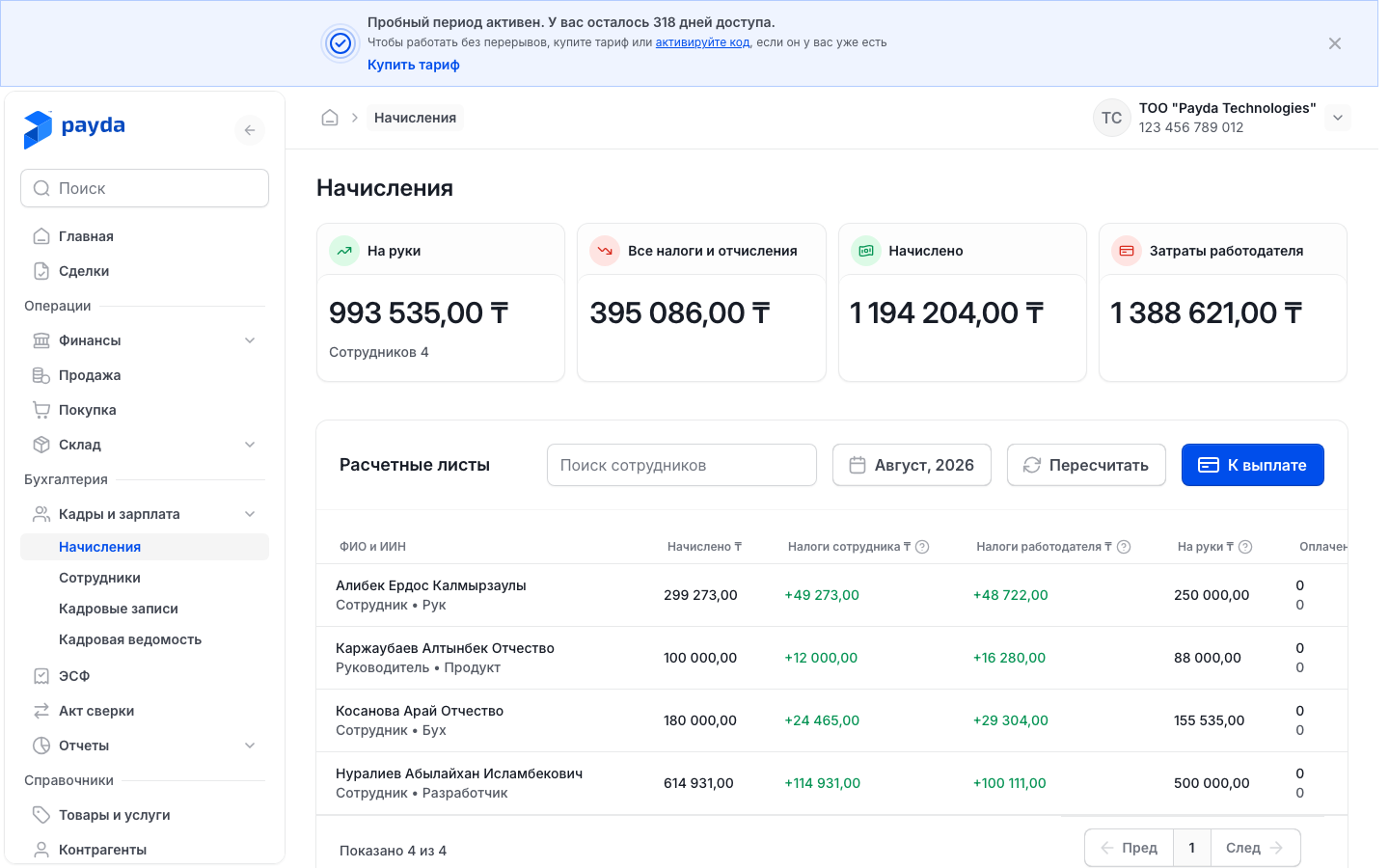
Check the totals in the cards: На руки (net pay, with the number of employees), Все налоги и отчисления (all taxes and contributions), Начислено (accrued) and Затраты работодателя (employer cost).
Press an employee's row to open the Расчетный лист (payslip) with accruals, deductions from the employee and employer taxes.
Until the month is calculated, the table is replaced by «Здесь появятся расчётные листы» (payslips will appear here). The table columns:
- Начислено ₸ — the salary before taxes;
- Налоги сотрудника ₸ (employee taxes) — withheld from the salary: ОПВ (OPV, pension contributions), ВОСМС (VOSMS, medical insurance contributions) and ИПН (IPN, personal income tax);
- Налоги работодателя ₸ (employer taxes) — paid by the company on top of the salary: ОПВР (OPVR, employer pension contributions), СО (SO, social contributions), ОСМС (OSMS, employer medical insurance contributions) and СН (SN, social tax);
- На руки ₸ — the amount payable to the employee;
- Оплачено ₸ (paid) and Остаток ₸ (remaining) — how much has already been paid under payroll sheets and how much is left. The top line is net salary, the bottom line is taxes.
The Поиск сотрудников (search employees) box helps find an employee. To pay salaries or transfer taxes, press К выплате (to pay) in the top right corner of the page and continue with Payroll sheet for salaries and taxes.
Payroll sheet for salaries and taxes
A payroll sheet is built from the month's accruals, so first press Пересчитать in Начисления. Salaries and taxes go on separate sheets.
- Open Кадры и зарплата → Начисления, choose the month and press К выплате. The Создание кадровой ведомости (create payroll sheet) window opens.
- Check Период действия (period) and choose Тип операций (operation type): Зарплата (salary) or Налоги (taxes).
- Tick the employees — «Выбрано N из M» (N of M selected) shows at the bottom. The Остаток ₸ column (for taxes — Налоги к оплате ₸, taxes due) shows how much is left to pay.
- Press Создать (create) — the Кадровая ведомость (payroll sheet) page opens. Check Дата документа (document date).
- On a Зарплата sheet check each employee's Банковский счёт (bank account) — it is taken from the card. If needed, change the amount in К оплате ₸ (to pay):
- enter an advance or a partial payment;
- 0 — the employee stays on the sheet but is not paid this time («В этот заход не платим», not paying this round);
- Вернуть начисленное (restore accrued; or Вернуть остаток, restore remainder, if part has already been paid) — undo the change.
- On a Налоги sheet tick the taxes for each employee. The tick in a column header selects that tax for everyone; «н/п» means the tax does not apply to the employee.
- Press Сохранить как черновик (save as draft). The message «Кадровая ведомость успешно создана» (payroll sheet created) appears.
- Press Создать платёжный пакет (create payment batch) and then Подтверждаю (I confirm) in the «Создать платежный пакет?» window. The page for creating a payment batch for this sheet opens — continue with Pay salaries and taxes with a payment batch.
All sheets are collected under Кадры и зарплата → Ведомости:
- find a sheet — the Поиск по номеру (search by number) box; the Фильтр button opens the Фильтры window with Период начисления (accrual period), Тип (type), Статус (status) and Дата документа; then press Подтвердить;
- statuses — «Черновик» (draft), «Частично оплачен» (partially paid) and «Оплачен» (paid);
- only a draft can be changed: press its row, edit it and press Сохранить как черновик again. Тип операций cannot be changed after creation, and a sheet with the status «Частично оплачен» or «Оплачен» opens read-only.
How to check it worked
- The new employee is in the Сотрудники list with the status «Работает» (working).
- In Начисления, after Пересчитать, every employee has a row with a На руки ₸ amount.
- Once the payment batch is paid, Оплачено ₸ grows in Начисления, and the sheet in Ведомости gets the status «Оплачен» («Частично оплачен» after a partial payment).
Common problems
| What you see | Why | What to do |
|---|---|---|
| «Обязательное поле» (required field) under ИИН | The IIN is empty or shorter than 12 digits. The grey «Введите ИИН» (enter IIN) text in an empty field is a hint, not an error | Enter all 12 digits of the IIN |
| The Банковские счета field is inactive, with the hint «Нужно завершить добавления сотрудника для добавления счета» (finish adding the employee to add an account) | The card has not been saved yet | Press Сохранить, open the employee from the list and add the account |
| The minimum-wage deduction was not applied | Вычет МЗП on the card is set to Нет | Choose Да, save the card and press Пересчитать in Начисления |
| «Некому платить» (nobody to pay) in the Создание кадровой ведомости window (for the Зарплата type) | Пересчитать was not pressed for the month — or everything accrued has already been paid | Close the window, press Пересчитать in Начисления and press К выплате again |
| The Создать button in the window is inactive | No employee is ticked | Tick the employees in the list |
| «У каждого сотрудника должен быть выбран счёт для выплаты зарплаты» (every employee needs a salary account) | On a Зарплата sheet someone's Банковский счёт is empty | Choose the account in the row or add one for the employee — Bank accounts |
| «У каждого сотрудника отметьте хотя бы один налог» (tick at least one tax for every employee) | On a Налоги sheet someone has no taxes ticked | Tick the taxes in the employee's row |
| «По ведомости уже есть оплаты» (the sheet already has payments) | The sheet has already been paid, so it cannot be changed | Pay the remainder with a new sheet: Начисления → К выплате |
| An employee is missing from Начисления | The calculation was not run after the employee was added or an HR record was created | Press Пересчитать. If that does not help, check Дата приема on the card |
What next
- Pay salaries and taxes with a payment batch — send the sheet's payments to the bank.
- Issue a power of attorney to collect goods — give an employee a power of attorney.
- Bank accounts — add a salary account for an employee.