
Interface map
Why you need this
Payda has many sections: sales and purchase documents, payments, warehouse, EDO (electronic document management), payroll, ESF (electronic invoices), reference books. This page is the table of contents. It briefly says what every menu item, top bar button and mobile app tab is for, and links to the article with the details.
The interface is in Russian
Payda's screens are currently in Russian, so this guide keeps every button and field label in the original Russian and explains it in English. Look for the bold Russian text — that is what you will see on screen.
What you need
- A signed-in Payda account.
Step by step
The left menu is split into blocks. In a company cabinet these are an unnamed top block, Операции (operations), Документооборот (document flow), Бухгалтерия (accounting) and Справочники (reference books). Some users also have a Маркет (market) block below them. The Финансы (finance), Склад (warehouse), ЭДО (EDO) and Кадры и зарплата (HR and payroll) items expand when clicked — they hold nested items.
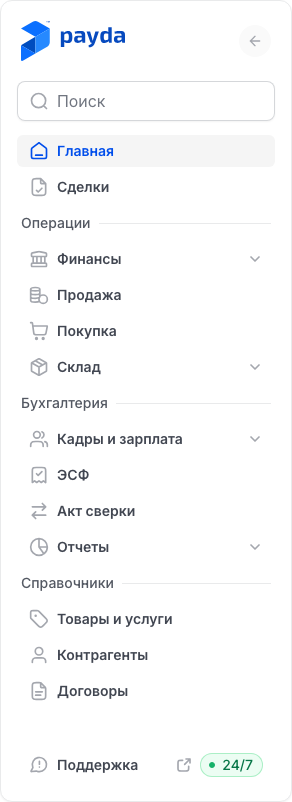
Top of the menu
| Item | What it is for | Article |
|---|---|---|
| Главная (home) | The next-step hint, quick actions, access requests and the setup guide | Home page |
| Сделки (deals) | Working with a customer from the deal to the payment: invoice, sale, ESF and a link for the customer | Working with deals |
| Мой чеклист (my checklist) | An accountant's tasks for the month across all of their companies at once | My checklist |
Operations
| Item | What it is for | Article |
|---|---|---|
| Финансы → Группа платежей (payment batches) | Batches of payment orders for salaries and taxes | Payment batches |
| Финансы → Платежи (payments) | Incoming and outgoing bank and cash payments, cash orders | Payments and cash desk |
| Финансы → Платежи → Загрузить выписку (upload a statement) | Uploading a bank statement so that payments are created for you | Upload a statement |
| Продажа (sales) | The Реализация (sale) and Счёт на оплату (invoice) tabs — documents for the buyer | Invoice, sale, waybill |
| Покупка (purchases) | The Поступления (goods receipts) tab — goods and services from suppliers | Goods receipt |
| Покупка → the Доверенности (powers of attorney) tab | A power of attorney for an employee to collect goods | Power of attorney |
| Склад → Остатки (stock) | Stock balances and turnover for the chosen period: opening, in, out, closing | Movements and stock |
| Склад → Движение по складу (warehouse movements) | Transfers, write-offs, postings, stock counts and opening balances | Movements and stock |
| Склад → Отчёты по складу (warehouse reports) | ABC analysis and product profitability | Warehouse reports |
There is no separate menu item for the bank client: statements are uploaded with the Загрузить выписку button on the Платежи page.
Document flow
| Item | What it is for | Article |
|---|---|---|
| ЭДО → Исходящие (outgoing) | EDO documents you sent — for example, waybills and AVRs (work completion acts) after you press Отправить на подпись (send for signing). Here you open them and sign them with an EDS (electronic digital signature): via eGov by QR code or with a key through the NCALayer program | EDO in the cabinet |
| ЭДО → Входящие (incoming) | EDO documents that counterparties sent to you. You open and sign them here too | EDO in the cabinet |
Unlike the rest of the menu, this block is translated: with the English interface it reads «Document flow» → «e-Docs» → «Outgoing» / «Incoming».
Accounting
| Item | What it is for | Article |
|---|---|---|
| Кадры и зарплата → Начисления (accruals) | Employees' salaries and taxes for the month | Accruals |
| Кадры и зарплата → Ведомости (payroll sheets) | Sheets for paying salaries and for paying taxes | Payroll sheet |
| Кадры и зарплата → Сотрудники (employees) | Employee cards: IIN (personal tax ID), position, salary, bank accounts | Adding an employee |
| Кадры и зарплата → Кадровые записи (HR records) | HR actions: leave, sick leave, business trip, bonus, salary change, dismissal and others | HR records |
| ЭСФ (ESF) | The ESF register: the Отправленные (sent) tab holds yours, Полученные (received) — those from suppliers | Issue and send an ESF, Receive an ESF from a supplier |
| Акт сверки (reconciliation act) | Acts reconciling mutual settlements with counterparties | Reconciliation act |
Reference books
| Item | What it is for | Article |
|---|---|---|
| Товары и услуги (goods and services) | The catalogue of what you sell and buy | Goods and services |
| Контрагенты (counterparties) | Buyers and suppliers: BIN (company tax ID) or IIN (for sole traders and individuals), details, bank accounts | Counterparties |
| Договоры (contracts) | Contracts with counterparties that you pick in documents and payments | Contracts |
Reference books without a menu item open from document fields: click the reference book icon (a sheet with a magnifier) on the right of the field — the reference book side panel opens.
| Panel | Where you meet it | Article |
|---|---|---|
| Склады (warehouses) | The warehouse field in documents | Movements and stock |
| Расчетный счет (bank account) | Bank account fields of your organisation, a counterparty or an employee | Bank accounts |
| Единицы измерения (units of measure) | The Единица измерения (unit) field in the product or service form. The panel opens from the Справочник (reference book) item at the top of the field's list, not from an icon | Goods and services |
| Статьи ДДС (cash flow items) | The Статья ДДС field in payments | Cash flow items |
| Коды назначения платежа, Коды бюджетной классификации, УГД, Страны (payment purpose codes, budget classification codes, tax offices, countries) | The KNP, KBK, UGD and country fields in payments, company details and documents | KNP, KBK, UGD codes and countries |
| Список сотрудников (employee list) | The Сотрудник (employee) field in a power of attorney | Employees in documents |
The reference book panels all work the same way: find the row with the search, tick it and click Выбрать (select). Where you keep the reference book yourself, a new entry is added with Создать новый or Создать (create) and corrected with Редактировать (edit) or the arrow in its row. Codes are kept by Payda, and employees are added in Кадры и зарплата — these panels do not create entries. No reference book lets you delete an entry.
Market
A block for Payda Market accountants. Its items depend on your accountant profile:
- Заполнить анкету (fill in the profile) — in the «Физическое лицо» (individual) mode while you have no profile;
- Моя анкета (my profile) — once a profile exists, in any status;
- Заявки (requests) — when the profile is published or paused.
If none of the items apply to you, or Payda Market did not respond, the menu has no Маркет block.
If no company is connected yet
In the «Физическое лицо» mode the menu is shorter: Главная, Мои компании (my companies) and Мой чеклист. While you have no accountant profile, a Маркет block with Заполнить анкету also sits below. The Операции, Документооборот, Бухгалтерия and Справочники blocks are missing here — they appear once you choose a company. More in The «Физическое лицо» mode and The «Мои компании» page.
Search, collapsing, help and support
- Поиск (search) at the top of the menu finds an item by name: type part of a word and only the matching items stay in the menu. If nothing matches, «Ничего не найдено» (nothing found) and the Очистить поиск (clear search) button appear.
- The round arrow button next to the logo collapses the menu to icons. The same button expands it again. The collapsed menu has no search.
- At the bottom of the menu are Справка (help — this site) and Поддержка (support) marked «24/7» — the support chat in WhatsApp.
Top bar
Breadcrumbs on the left: the house icon leads to the home page, then comes the path to the current page. Click a breadcrumb to go one level up.
The account card on the right: the company name and its BIN, and in the «Физическое лицо» mode — the last four digits of your phone number. Click the card:
- Сменить аккаунт (switch account) — Физическое лицо and up to three companies, Все (all) — the full list;
- Добавить компанию (add a company) — connect a new company;
- in a company — Реквизиты аккаунта (account details), and for the director also Настройки доступа (access settings) and Пригласить (invite);
- in the «Физическое лицо» mode — Настройки пользователя (user settings), Настройки доступа and Запросить доступ (request access);
- Тема (theme) — light, dark or system, and Выйти (sign out).
After switching, the home page of the chosen company opens. More in Switch to a company and Profile and password.
? next to the page title — the «Справка по разделу» (help for this section) hint. It opens the help article about this page right in the cabinet. The «Открыть на payda.kz» (open on payda.kz) icon in the panel header opens the same article on the site.
Руководство по настройке (setup guide) — a floating widget at the bottom right with the company's initial setup steps. It exists only in a company cabinet, shows in a window wider than 1024 pixels until all the steps are done, and closes with the cross — see Setup guide.
In a company cabinet a banner about the trial or the plan term may sit above the top bar — see Trial.
Mobile app
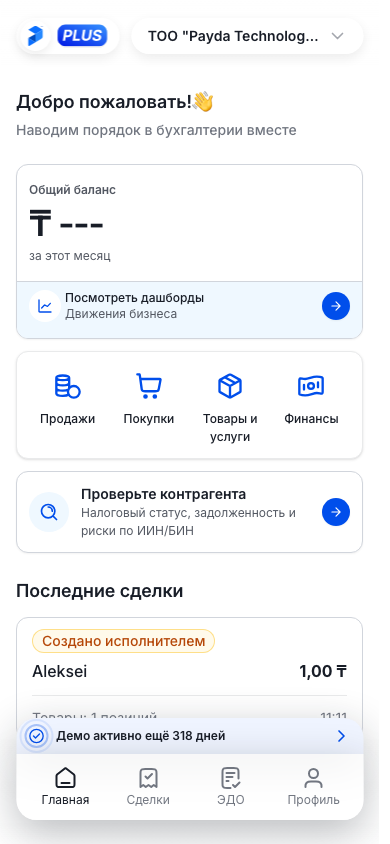
On a phone Payda opens in the app or in a browser. There are four tabs at the bottom of the screen:
| Tab | What is in it |
|---|---|
| Главная (home) | In a company account — the balance, shortcuts to documents, a counterparty check, EDO documents and recent deals. In the personal cabinet — the list of your companies |
| Каталог (catalogue) | Разделы (sections) — Продажа, Покупка, Склад, Финансы; Сервисы (services) — ЭДО and Сделка (deal); accountants' Услуги (services) |
| Сообщения (messages) | Messages from Payda, sorted into folders. The number on the icon is the unread count |
| Профиль (profile) | Account details, Изменить пароль (change password), the theme, support and signing out — see Profile in the app |
The sections and services in Каталог exist only in a company account. Deals on a phone are described in Deals on a phone, signing documents in Signing EDO documents on a phone. An overview of everything — What you can do on a phone.
How to check it worked
Found the item you need? Open the article linked in its row: it has the step-by-step instructions.
Common problems
| What you see | Why | What to do |
|---|---|---|
| No Мои компании item in the menu | A company is selected | Switch to Физическое лицо in the account card — Switch to a company |
| No Операции, Документооборот, Бухгалтерия and Справочники blocks in the menu | The «Физическое лицо» mode is selected | Choose a company in the account card |
| The menu search shows «Ничего не найдено» | Only menu item names are searched | Click Очистить поиск and type another word |
| No Поиск field in the menu | The menu is collapsed to icons | Expand the menu with the arrow button at the top |
| No ? next to the page title | Help in the cabinet is not connected for this page | Click Справка at the bottom of the menu and find the article on the site |
| The «Сайт может работать некорректно на мобильных устройствах» (the site may not work correctly on mobile devices) window | The browser window is narrower than 1000 pixels | Продолжить в Payda Web (continue in Payda Web) opens the mobile version, Продолжить с масштабированием (continue with scaling) keeps the cabinet |
What next
- Sign-up and sign-in — if you do not have an account yet.
- Home page — where to start after signing in.
- What you can do on a phone — the mobile app in detail.