
Movements and stock
Why you need this
Stock control answers two questions: how much you have right now and where it went. Balances and cost are built from documents — goods receipts, sales and the warehouse documents described in this article.
Stock control starts with opening balances. Without them a sale shows the warning «Товара не хватает на складе» (not enough stock): you can still save the sale, but the stock balance goes negative.
What you need
- At least one warehouse in the Склады (Warehouses) reference book — see Warehouses.
- Items of type Товар (goods) in the Goods and services reference book. Stock is kept for goods only: in sales and goods receipts the Склад (warehouse) field works only for Товар items.
Step by step
Warehouses
There is no separate page for warehouses. The Склады reference book opens from any warehouse field: Склад in documents, Откуда (склад) (from warehouse) and Куда (склад) (to warehouse) in a transfer, Все склады (all warehouses) in reports.
- Press the reference-book icon (a sheet with a magnifying glass) on the right of a warehouse field — the Склады panel opens. Each row shows the warehouse name and address.
- To add a warehouse, press Создать новый (Create new). In the Создать склад (Create warehouse) form fill in Наименование (name) and Адрес (address) and press Создать.
- «Склад был успешно создан.» (warehouse created) appears. The new warehouse is already ticked in the list — press Выбрать (Select).
If there are no warehouses yet, the field's drop-down list says «Нет данных» (no data). The Добавить (Add) item below it opens the Создать склад form straight away.
The main warehouse is filled in automatically in new sales and goods receipts. While no main warehouse is set, the first warehouse in the list is used. To set the main warehouse:
- In the Склады panel press Редактировать (Edit), then press the warehouse you need.
- In the Редактировать склад (Edit warehouse) form tick Основной склад (main warehouse) and press Изменить (Save changes). «Склад был успешно обновлен.» (warehouse updated) appears.
- Press Готово (Done) to leave edit mode.
The previous main warehouse stops being the main one. The name and address are corrected the same way. The list does not mark the main warehouse: in its edit form the Основной склад box is ticked and greyed out. A warehouse cannot be deleted.
Starting stock control
Opening balances are the goods that were already in the warehouse on the day you start keeping stock in Payda.
- In the menu open Склад (Warehouse) → Движение по складу (stock movements).
- Press Создать (Create) and choose Начальные остатки (opening balances). While the Начальные остатки tab has no documents, it has a Ввести начальные остатки (enter opening balances) button that opens the same form.
- In the Данные документа (document details) block set Дата документа (document date) to the date stock control starts. It can be in the past.
- Choose the Склад.
- Below the table press Добавить and fill in the row: Номенклатура (item), Количество (quantity) and Себестоимость за ед., ₸ (unit cost) — what one unit cost you.
- Add all goods of the warehouse this way and press Сохранить как черновик (Save as draft).
- Press Провести (Post). «Созданы партии и приходные движения по себестоимости.» (batches and receipt movements created at cost) appears.
Do not leave Себестоимость за ед., ₸ at zero: Payda uses it to calculate the cost of future sales. Opening balances are entered with a separate document for each warehouse. Rows with zero quantity are ignored on saving.
Warehouse documents
In the menu open Склад → Движение по складу.
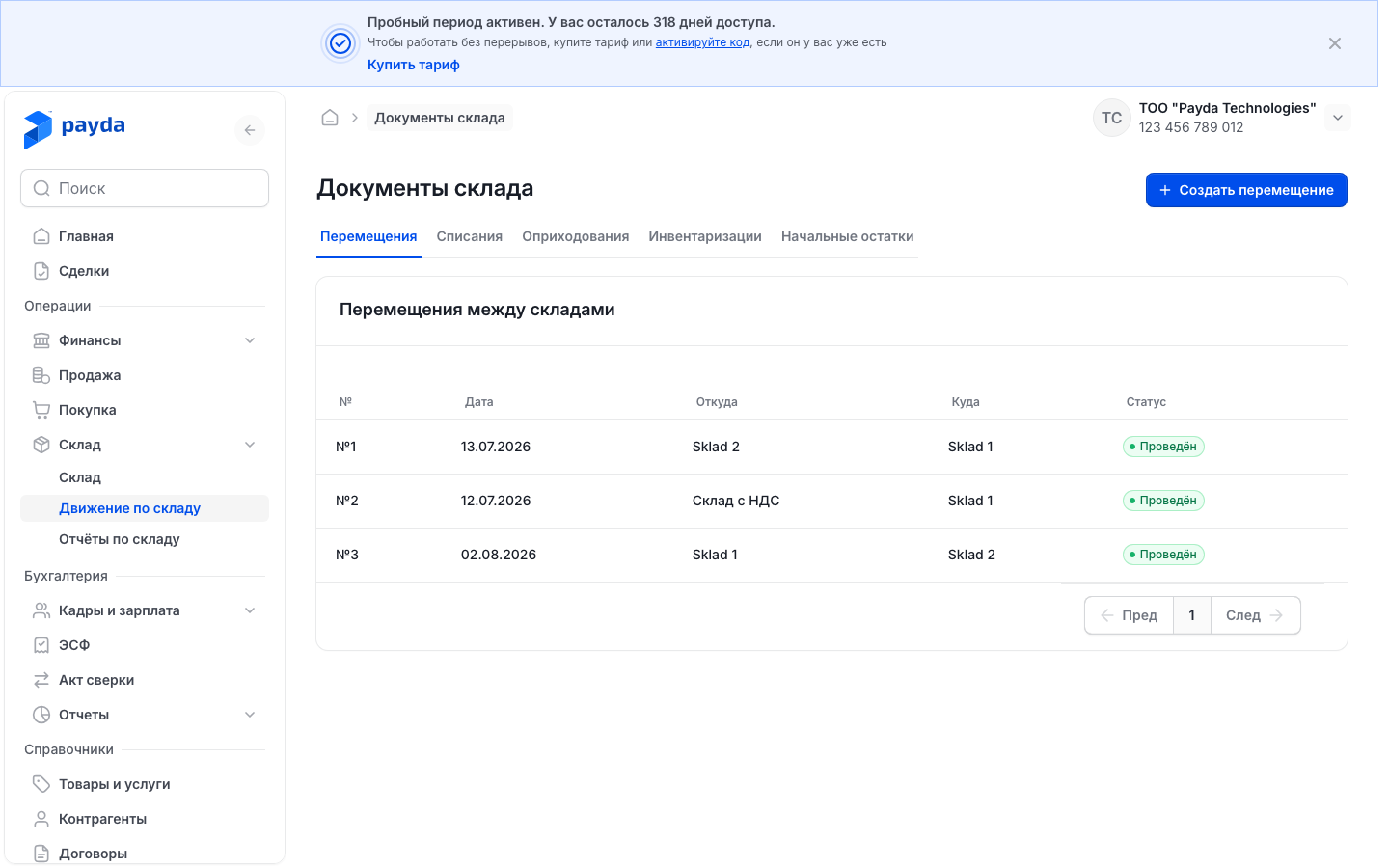
Pick the tab with the document type you need.
To create a document, press Создать at the top right and choose the type: Перемещение (transfer), Списание (write-off), Оприходование (posting), Инвентаризация (stock count) or Начальные остатки. The list is the same on every tab.
To open a document, press its row.
| Tab | When you need it |
|---|---|
| Перемещения (transfers) | Goods move from one of your warehouses to another |
| Списания (write-offs) | Goods are lost, damaged or past their expiry date |
| Оприходования (postings) | Goods appeared in the warehouse without a purchase document, for example a surplus was found |
| Инвентаризации (stock counts) | You counted the goods and compare the actual quantity with the books |
| Начальные остатки (opening balances) | Goods that were in the warehouse before you started stock control in Payda |
While a tab has no documents, it has its own button: Создать перемещение, Создать списание, Создать оприходование, Создать инвентаризацию or Ввести начальные остатки.
Every tab has the № (number), Дата (date) and Статус (status) columns.
On top of that transfers have Откуда (from) and Куда (to), write-offs have Склад and Причина (reason), postings have Склад and Основание (basis), stock counts and opening balances have Склад.
The Черновик (draft) status means the document is saved but has not changed the balances. Проведён (posted) means its stock movements are recorded.
All warehouse documents follow the same path:
- Fill in the document and press Сохранить как черновик. The document gets a number and the Черновик status.
- Press Провести — this button appears only after saving. The status changes to Проведён and the balances change.
- To correct a posted document, press Распровести (Unpost). The movements are reversed and the document becomes a draft again: correct it, save it and post it again.
Items are added with the Добавить button below the table; an extra row is removed with the bin icon at its end. For goods counted in pieces the quantity can only be a whole number.
The exception to this path is write-offs and postings created by a stock count — see Stock count.
Transfer
- On the Движение по складу page press Создать → Перемещение. The Перемещение | Создание form opens.
- In the Данные документа block check Дата документа — today's date is set by default.
- In Откуда (склад) choose the warehouse you take the goods from, in Куда (склад) — the warehouse they go to.
- Below the table press Добавить and fill in Номенклатура and Количество.
- Press Сохранить как черновик, then Провести. «Товар перемещён между складами.» (goods transferred between warehouses) appears.
A warehouse chosen in one field is not shown in the drop-down list of the other field.
Write-off
- Press Создать → Списание.
- Check Дата документа and choose the Склад.
- Choose Причина списания (write-off reason): Потеря (loss), Порча (damage), Истёк срок годности (expired), Недостача по инвентаризации (shortage found in a stock count) or Другое (other). Другое is set by default.
- Below the table press Добавить and fill in Номенклатура and Количество.
- Press Сохранить как черновик, then Провести. «Товар списан со склада по себестоимости.» (goods written off at cost) appears.
A write-off has no price: the goods leave the warehouse at the cost Payda calculates.
A write-off created by a stock count opens with the Основание field — a link to that stock count. Such a write-off is view-only: it has no Сохранить как черновик, Провести or Распровести buttons.
Posting
- Press Создать → Оприходование.
- Check Дата документа and choose the Склад.
- Below the table press Добавить and fill in Номенклатура, Количество and Себестоимость за ед., ₸ — the goods enter the warehouse at this price.
- Press Сохранить как черновик, then Провести. «Товар оприходован на склад по указанной себестоимости.» (goods posted to the warehouse at the given cost) appears.
Postings created by a stock count are visible in the list by the Основание column: it holds an «Инвентаризация №…» link. Like such write-offs, they are view-only.
Stock count
- Press Создать → Инвентаризация.
- Check Дата документа and Время (time) — the current moment is set by default. Book quantities are taken from the balances at that moment.
- Choose the Склад — the table fills in by itself: Номенклатура, Учётное количество (book quantity), Факт. количество (actual quantity) and Расхождение (difference). Факт. количество starts equal to the book quantity.
- Count the goods and change Факт. количество only where the actual quantity differs from the books. Расхождение shows a surplus with «+» and a shortage with «−».
- Add goods that are missing from the table with the Добавить button below it.
- Press Сохранить как черновик. The message shows the stock count number and «Учётные количества рассчитаны на дату документа.» (book quantities calculated on the document date).
- Press Провести — the Проведение инвентаризации (posting the stock count) window opens with the documents that will be created for the differences.
- Check the window and press Провести in it.
| In the window | What it means |
|---|---|
| Оприходование излишков (posting of surplus) | Goods that turned out to be more than in the books. You can change the price in the Цена, ₸ column — the surplus enters the warehouse at that price |
| Списание недостачи (write-off of shortage) | Goods that turned out to be less. They are written off at cost — the window shows its estimate |
| The «не хватает остатка» (not enough stock) label | The current balance is not enough to write off the shortage: the goods were already used after the stock count date. The Провести button is disabled |
A posted stock count creates and posts the surplus posting and the shortage write-off by itself. Links to them appear in the Данные документа block, in the Оприходование излишков and Списание недостачи fields.
If there are no differences, the window says so, and after posting «Расхождений не было — остатки не изменились.» (no differences, balances unchanged) appears.
Documents created by a stock count cannot be changed or unposted on their own. Распровести on the stock count itself reverses and deletes them — «Созданные оприходование и списание отменены и удалены.» (the created posting and write-off are cancelled and deleted) appears.
If you change the warehouse, date or time after editing quantities, the «Перезаполнить таблицу?» (refill the table?) window appears.
Перезаполнить (Refill) replaces the rows with book balances for the new moment, and the quantities you entered are lost. Отменить (Cancel) keeps the table as it is.
Balances
In the menu open Склад → Остатки (balances).
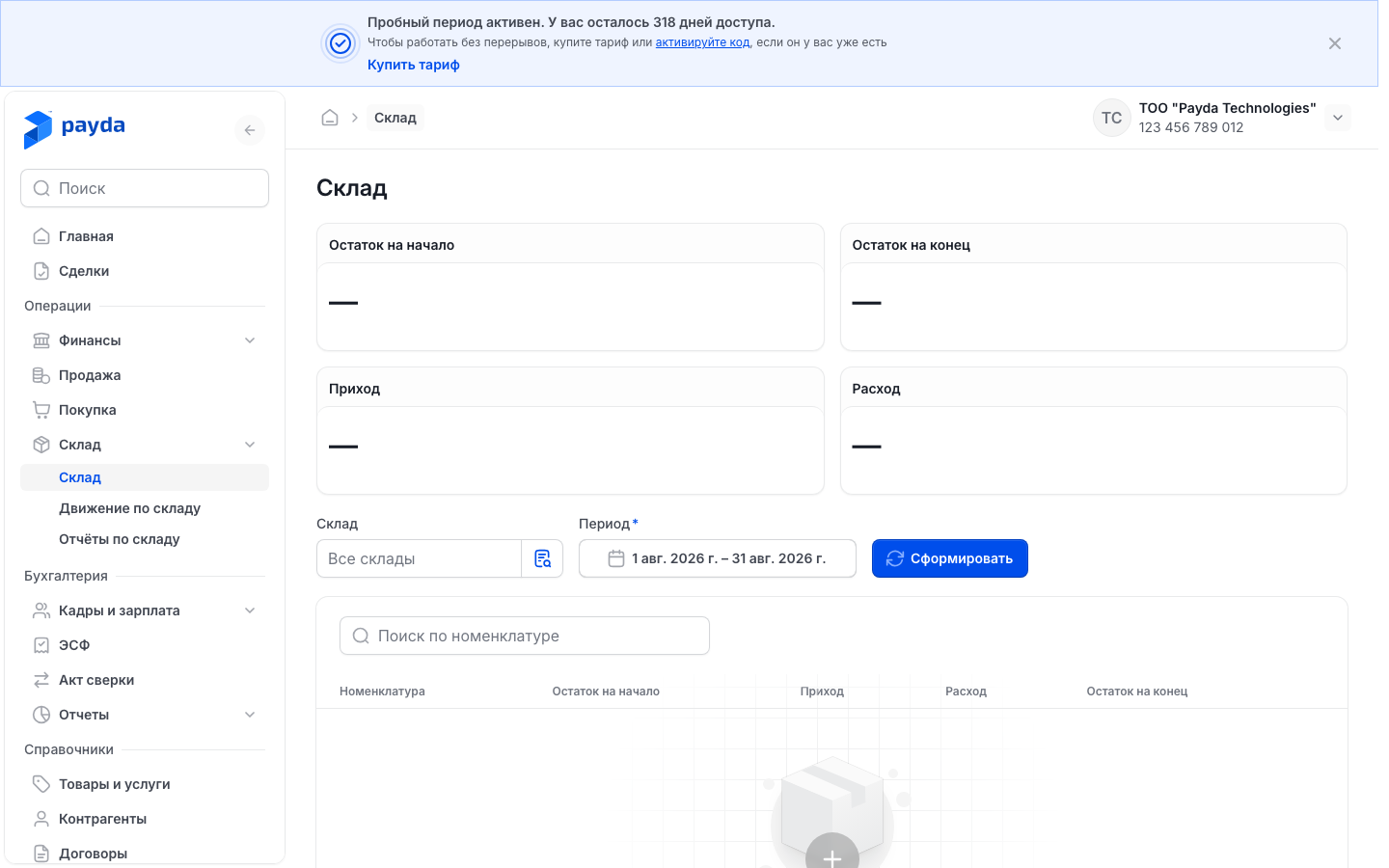
Check the period totals: Остаток на начало (opening balance), Приход (in), Расход (out) and Остаток на конец (closing balance). Amounts are in tenge at cost; the caption «по всем складам» (across all warehouses) means no warehouse is chosen.
To see one warehouse, choose it in the Все склады field.
To change the period, press the button with the dates. Pick dates in the calendar or a ready option on the left, for example Прошлый месяц (last month), and press Применить (Apply).
To find a product, start typing its name in Поиск по номенклатуре (search by item). The totals are recalculated together with the table.
Press a product row to open its history.
The current month is shown by default. The report recalculates by itself after every change — there is no separate button.
The table lists only products that had a balance or a movement in the period. Each cell shows the amount in tenge on top and the quantity below. The Склад column appears when no warehouse is chosen.
| Column | What goes into it |
|---|---|
| Приход | Goods receipts, opening balances, postings and transfers into this warehouse |
| Расход | Sales from the Продажа (Sales) section, write-offs and transfers out of this warehouse |
A red cell is a negative amount or quantity, for example a balance that went negative: a sale was saved with Всё равно создать (create anyway) when there was not enough stock.
To see which products bring revenue and margin, read Warehouse reports: ABC analysis and profitability.
Product history
- On Остатки press a product row. The «Номенклатура | …» page opens with the product name.
- Check the cards: Остаток (balance) and Стоимость остатка (balance value) with the caption «сейчас · все склады» (now · all warehouses), and Средняя себестоимость (average unit cost).
- To see the movements of one warehouse, choose it in the Все склады field. The filter changes only the table; the cards always count all warehouses.
- To open a document, press its name in the Операция (operation) column.
The cards show today's balance across all warehouses, while a row on Остатки shows the balance at the end of the period for one warehouse, so the numbers may differ.
If you came from Остатки, a strip «В отчёте на …» (in the report on …) under the cards shows the date, warehouse and balance from the report row.
| Column | What it shows |
|---|---|
| Дата (date) | Date and time of the operation |
| Склад (warehouse) | The warehouse where the operation took place |
| Операция (operation) | The document and its number. The name link opens the document |
| Количество (quantity) | «+» for in, «−» for out |
| Себестоимость, ₸ (cost) | Unit cost in this operation |
| Сумма, ₸ (amount) | Amount of the operation at cost |
| Остаток (balance) | How much is left after the operation |
If the product has no operations yet, the table is replaced by «Нет движений» (no movements). To return to the report, press the Остатки breadcrumb in the top bar.
How to check it worked
- The document has the Проведён status — in the form header and in the list on its tab.
- On Остатки, for the period that includes the document date, Приход or Расход of the right warehouse changed, and the product history has a row with this document.
- A posted stock count with differences has Оприходование излишков or Списание недостачи links in its Данные документа block. These documents are already posted and change only together with the stock count.
Common problems
| What you see | Why | What to do |
|---|---|---|
| The «Товара не хватает на складе» window when saving a sale | The warehouse has less stock than the document | It is a warning. Всё равно создать saves the sale, the balance goes negative and is shown in red on Остатки. Сменить склад (change warehouse) takes you back to the Склад field, see Sale. To avoid a negative balance, enter opening balances or record a goods receipt first |
| «Обязательное поле» (required field), «Максимум 255 символов» or «Максимум 500 символов» (character limit) in the warehouse form | Наименование and Адрес are required; the name is up to 255 characters, the address up to 500 | Fill in or shorten the field |
| The Склад field in a sale or goods receipt is greyed out | The table has no goods with a quantity | Add a Товар item and enter its quantity |
| The browser asks you to fill in Склад, Откуда (склад) or Куда (склад), or «Выберите склад.» / «Выберите склады отправителя и получателя.» (choose the warehouse(s)) appears, and the document is not saved | No warehouse is chosen | Choose the warehouse and save again |
| «Добавьте хотя бы одну позицию.» (add at least one item) | The document has no row with goods. In opening balances also when every row has a zero quantity: such rows are skipped | Press Добавить below the table, choose the Номенклатура and enter the quantity |
| «Количество должно быть больше 0.» (quantity must be above 0) | A row has a zero quantity | Enter the quantity or remove the row with the bin icon |
| «Склад-источник и склад-получатель должны отличаться.» (source and destination must differ) | Both fields of the transfer hold the same warehouse | Choose a different warehouse in Куда (склад) |
| No Провести button | The document is not saved yet | Press Сохранить как черновик |
| The «не хватает остатка» label in the Проведение инвентаризации window, Провести disabled | The goods were already used after the stock count date, and there is not enough to write off the shortage | Unpost the later outgoing documents for this product, post the stock count, then post them again |
| «Не удалось заполнить по остаткам» (could not fill from balances) | The stock count table was not filled with book balances | Check Склад, Дата документа and Время. You can add items with Добавить — book quantities are calculated on saving |
| A write-off or posting has no Сохранить как черновик and Распровести buttons | The document was created by a stock count — it has the Основание field | Open the stock count via the link in Основание and unpost it |
| «Ничего не найдено» (nothing found) on Остатки | There are no balances or movements for the chosen warehouse in the period | Change the period or choose Все склады |
What next
- Warehouse reports: ABC analysis and profitability — which products bring revenue and margin.
- Goods receipt — the usual way to add stock.
- Goods and services — product cards, their type and price.