
Linked documents
Why you need this
Sales, purchases and deals are recorded as chains of documents: invoice, sale, its waybill or AVR (work completion act), ESF (electronic invoice), payment. The Связанные документы (linked documents) column and block show what is already issued and let you create the next document.
You do not retype anything: the new document opens pre-filled from the source one.
What you need
- A saved document that starts the chain. Until the document is saved you cannot link or create a related document: the notice «Чтобы привязать связанные документы, сначала сохраните текущий документ.» (save the current document first) appears.
Step by step
Chips in the document list
In the Продажи (Sales) and Покупки (Purchases) lists the rightmost column is Связанные документы. The collapsed Связанные документы block in a document form shows the same chips. The chips differ by colour:
| Chip | What it means | What a click does |
|---|---|---|
| Green with a tick, e.g. Накладная or Счёт на оплату № 6 от 20.07.2026 | The document or printable form already exists | In the list, opens the action bar at the bottom of the screen |
| Blue with a plus, e.g. + ЭСФ | The document does not exist yet | Opens the form of a new document based on the current one |
| Blue + Счёт на оплату on a sale | The sale has no basis yet | Opens a menu: create an invoice from the sale or link an existing one, see Create a basis |
| Grey, no icon, e.g. Накладная in a new document | There is no printable form yet (for example, the document is not saved) | Not clickable |
To open a printable form or a document from the list:
Click a green chip, for example Накладная (waybill). An action bar appears at the bottom of the screen.
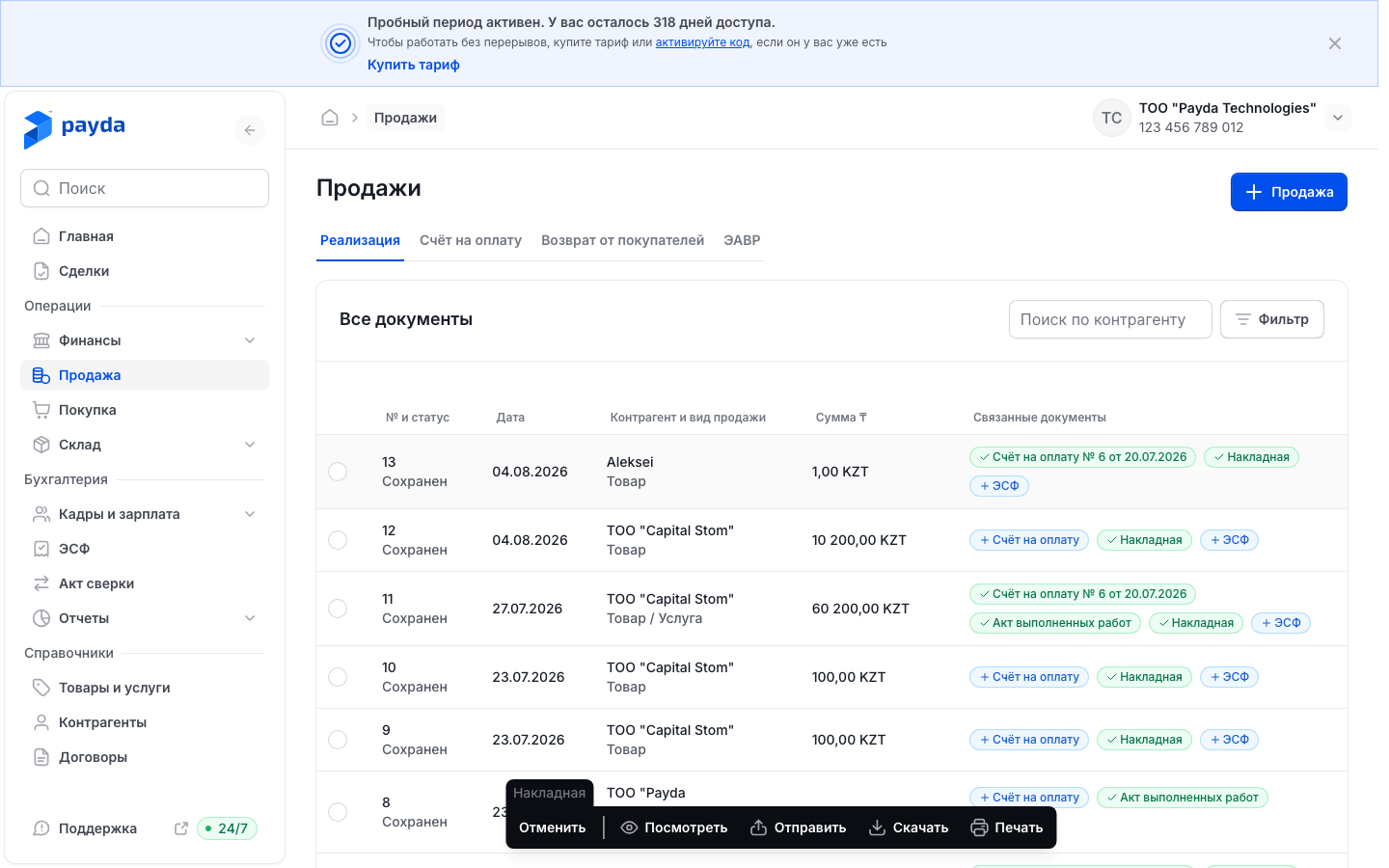
The bar offers:
| Button | What it does |
|---|---|
| Посмотреть (view) | Opens the printable form |
| Открыть (open) | Goes to the document itself. Only chips with a number have it, e.g. Счёт на оплату № 6 от 20.07.2026 |
| Отправить (send) | Opens the system share window with the PDF file. If the browser cannot do that, a link to the document is copied to the clipboard |
| Скачать (download) | Saves the PDF to your computer |
| Печать (print) | Opens the print window |
| Отменить (cancel) | Closes the bar |
- Press Посмотреть — the printable form opens. Its buttons are described in Printable form.
The block in a document form
At the top of a sale, invoice, goods receipt and other document forms there is the Связанные документы block. When collapsed it shows the same chips as the list. Click the block title to expand it.
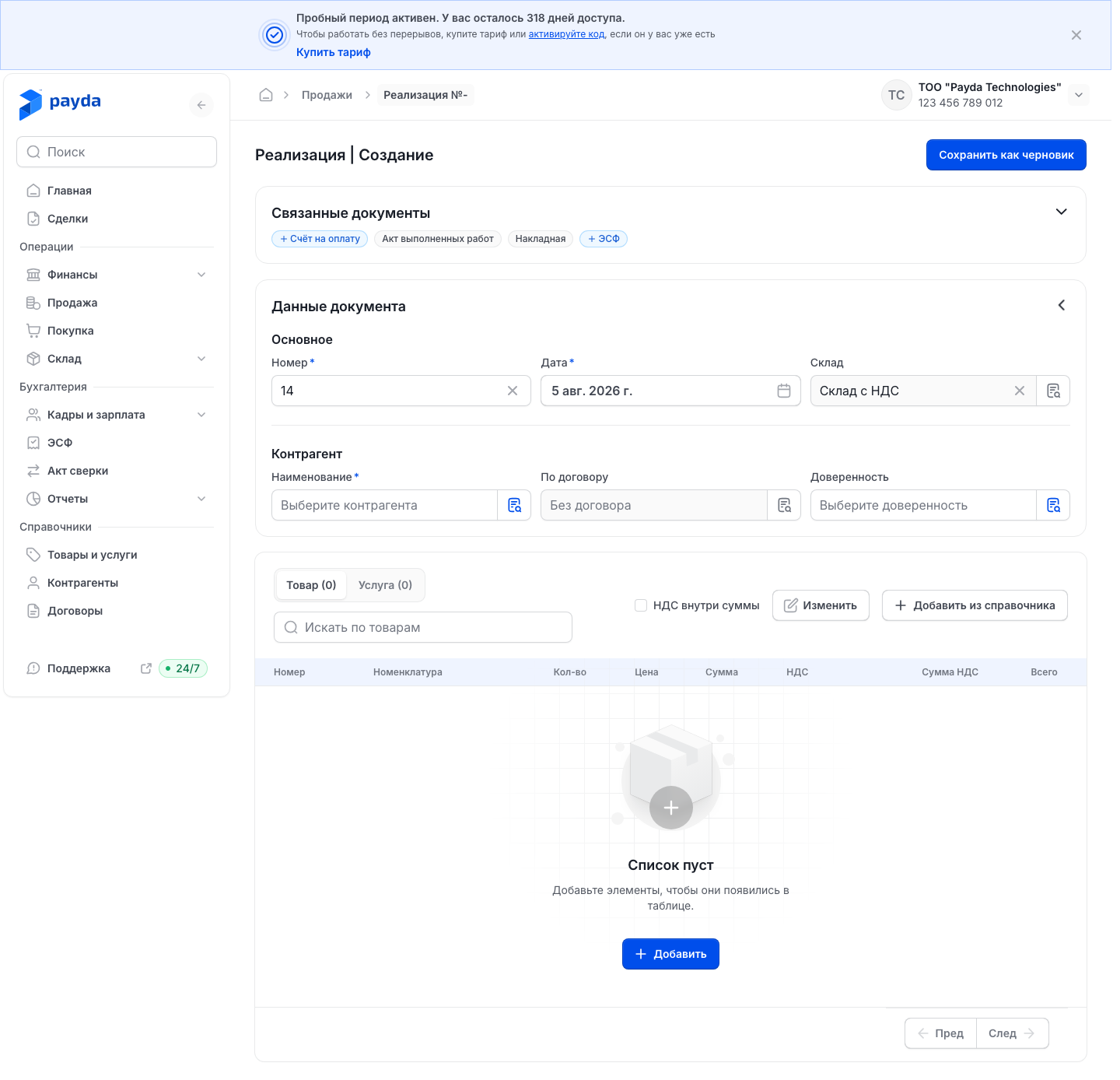
In the expanded block:
- Основания (basis) — the document the current one is based on, e.g. the invoice of a sale. Invoices and powers of attorney have no such column.
- + Basis — a card in the Основания column while there is no basis. It opens a menu: Create from this document — a new basis filled in from the current document — or Link existing… — choose the document type, then the document itself and press Привязать.
- Производные документы (derived documents) — printable forms and documents created from the current one. For a sale the printable form is Накладная or Акт выполненных работ, for an invoice — Счёт на оплату.
- «Добавить …» cards, e.g. Добавить ЭСФ, open the form of a new document.
- Создать документ (create a document) — the «Создать на основании» window with the documents you can create from the current one.
In the form block a chip or card with a document number opens the document itself right away, without the action bar. A chip or card of a printable form opens the printable form.
Printable form
A printable form is a ready-made blank of the document: party details, line items, totals and signature areas. It opens with Посмотреть on the action bar in the list or when you click the printable form chip in the document block.
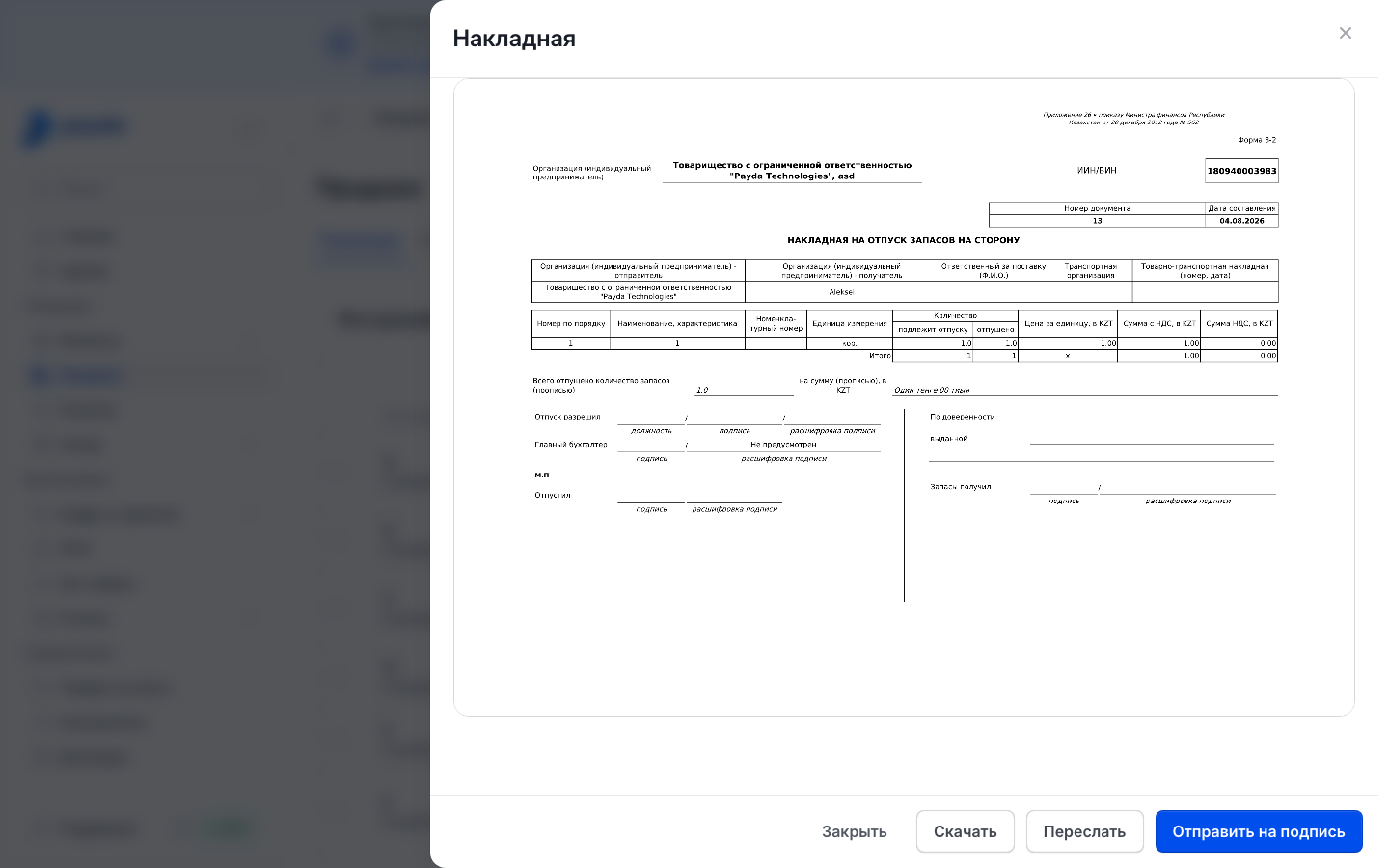
The buttons at the bottom of the window:
| Button | What it does |
|---|---|
| Закрыть (close) | Closes the window |
| Скачать (download) | Saves the PDF to your computer |
| Переслать (forward) | Creates a link to the document and copies it to the clipboard — «Ссылка скопирована» (link copied) appears. Send the link to the counterparty yourself |
| Отправить на подпись (send for signing) | Sends the document to EDO (electronic document exchange). Only Накладная and Акт выполненных работ have it |
| Отправить новую версию (send a new version) | Replaces Отправить на подпись if the document was changed after sending |
Where to find the waybill and AVR of a sale: see Waybill and AVR. An invoice also has the Печать и подписи (stamp and signatures) button in the window header — see Send the invoice to the customer.
Send for signing
- Open the printable form of a waybill or an AVR.
- Press Отправить на подпись. The message «Отправлено на подпись» (sent for signing) appears: the document is registered in EDO and awaits signatures.
- Sign the document with an EDS (ЭЦП, electronic digital signature) in the cabinet: in the menu Документооборот (document flow) → ЭДО → Исходящие (outgoing) — see EDO in the cabinet. On a phone the document is signed in the Payda app — see Sign EDO documents on a phone.
After sending, the bottom of the printable form shows «Отправлено на подпись» with the date and time. If the document is changed after sending, you see «На подписи версия от … — документ изменён» (an older version is out for signing), and the button changes to Отправить новую версию.
Invoices, powers of attorney and reconciliation acts have no Отправить на подпись button. Send such a document as a link with Переслать.
The recipient opens the link from Переслать as a document page:
- they do not need to sign in to Payda — they see the document and can download it or forward it, see If the document was opened by link;
- if it is an invoice with the Оплатить (Pay) button turned on, the recipient sees it on the page — see Paying an invoice by link.
Create a document from another one
- Find the source document in the Продажи or Покупки list, or open it.
- Click a blue chip with a plus, e.g. + ЭСФ on a sale, or a «Добавить …» card in the document block.
- The form of the new document opens with the source data: counterparty, line items, amounts. Check them and fill in the empty fields.
- Save the new document.
The usual sales chain is Счёт на оплату (invoice) → Реализация (sale) → ЭСФ. How to issue an ESF for a sale: see Issue and send an ESF.
Накладная and Акт выполненных работ are printable forms of a sale, not separate documents: the printable form appears by itself once the sale is saved, see Waybill and AVR.
On the purchase side a goods receipt offers + Платёж (исходящий) (outgoing payment) in the same way — see Payments and cash desk.
Create a basis
Documents are not always entered in the order the deal goes: the sale was posted, and the invoice was needed later. You can create the basis right from the document — it is filled in from the document and linked to it at once.
Open the document, e.g. a sale, and expand the Связанные документы block.
In the Основания column press + Basis. The blue basis chip in the collapsed block and in the list, e.g. + Счёт на оплату, opens the same menu.

Under Create from this document in the menu, pick the type, e.g. Invoice for payment.
The form of the new document opens. The counterparty, contract, items, prices and VAT mode are copied from the source; the date is today, the number is the next one. Fill in the rest, e.g. КНП (payment purpose code) and Мой счёт (my account) for an invoice.
- Between a sale and a purchase the counterparty is not copied: for a goods receipt created from a sale, pick the supplier yourself.
- If the source is a payment, only the counterparty is copied.
- A power of attorney gets only the counterparty; add the items yourself.
In the Связанные документы block of the new form the source document shows as a dashed card «Becomes the basis of:», and in the collapsed block as the chip «Will be the basis of: …».
Save the document. It becomes the basis of the source document by itself — no manual linking.
Which bases you can create depends on the document: for a sale — an invoice and a goods receipt. An incoming e-invoice can only be linked. A cash payment order (РКО) can only link a basis for now.
If the document already has a basis, there is no + Basis card: a second basis can be neither created nor linked.
Deal documents
A deal keeps its linked documents in the Статус документов (document status) block of the deal card. A step without a document has Создать (create) — a document form with the deal data — and Привязать (link) — pick a document that already exists.
A completed step has Открыть (open) — the printable form, from which you can send the invoice to the customer with Переслать. Details: Deal card.
How to check it worked
- The chip in the list row turned green.
- In the expanded Связанные документы block of the source document the new document appears under Производные документы, and the new document shows the source under Основания.
- A basis created from a document shows in that document's Основания column.
Common problems
| What you see | Why | What to do |
|---|---|---|
| «Чтобы привязать связанные документы, сначала сохраните текущий документ.» | The document is not saved yet | Save the document and try again |
| No Отправить на подпись button | It is neither a waybill nor an AVR: invoices, powers of attorney and reconciliation acts do not have it | Send the document as a link with Переслать |
| «Document saved but not linked» | The document was saved, but the link to the source was not recorded | Open the source document: + Basis → Link existing… and pick the new document |
| «Document saved without a link» | The source document got a basis while the form was open | A document has only one basis — a second one is not set |
| No + Basis card | The document already has a basis | A document has only one basis; it cannot be replaced from the cabinet |
| Отправить на подпись cannot be pressed | This version of the document has already been sent for signing | Sign the document in the cabinet — Документооборот → ЭДО → Исходящие — or in the Payda app. After you edit the document, Отправить новую версию appears |
| «Не удалось отправить на подпись» (could not send for signing) | The document could not be registered in EDO; the reason is in the message | Fix the reason or try again later |
| «Не удалось создать ссылку» (could not create the link) | The link to the document was not issued | Try again later |
| The chip you need is missing from the row | That document type has no such follow-up | Create the document in its own section |
What next
- Invoice, sale, waybill — where the sales chain begins.
- EDO in the cabinet — where waybills and AVRs are signed on a computer.
- Working with deals — every document for one customer.