
Plans and payment
Why you need this
A plan pays for your company's work in Payda Pro. While the company has no plan or trial, some actions in the cabinet are unavailable — Payda shows the «Нет активного тарифа» (no active plan) message.
This article covers trying Payda for free, paying for a plan, activating a code and paying for several companies at once. The cabinet sections are described in the Interface map.
What you need
- An open company cabinet — for the plans page and the trial. In the «Физическое лицо» (individual) mode the plans page does not open: Payda sends you back to the home page with the «Требуется организация» (organisation required) message. How to switch — Switch to a company.
- The Kaspi.kz app: the order is paid through it.
Step by step
Trial
A banner at the top of the company cabinet shows the state of your plan:
| Banner | When it appears | What to press |
|---|---|---|
| «Попробуйте все возможности Payda Pro.» (try everything Payda Pro offers) | The company has neither a plan nor a trial | Попробовать бесплатно (try for free) or Купить тариф (buy a plan) |
| «Пробный период активен.» (trial active) with the days left | The trial is running | Купить тариф |
| «Срок действия подписки подходит к концу.» (subscription ending soon) | 10 days or fewer are left on the plan | Продлить (renew) |
| «Срок действия подписки истёк.» (subscription expired) | The plan has ended | Продлить |
- Press Попробовать бесплатно in the «Попробуйте все возможности Payda Pro.» banner. A company gets the trial only once.
- The «Ваш пробный период начался!» (your trial has started) window shows how many days of free access you have and until which date. Press Начать работу (start working).
Купить тариф and Продлить open the plans page — see Choose and pay for a plan. Every banner has an активируйте код (activate a code) link that opens the Activation code window. You can close a banner with the cross, except the one about an expired subscription.
Choose and pay for a plan
Open the plans page: press Купить тариф or Продлить in the banner, Купить тариф in the «Нет активного тарифа» message — or follow pro.payda.kz/tarifs. The «Выберите тариф и продолжайте работу» (choose a plan and keep working) page opens.
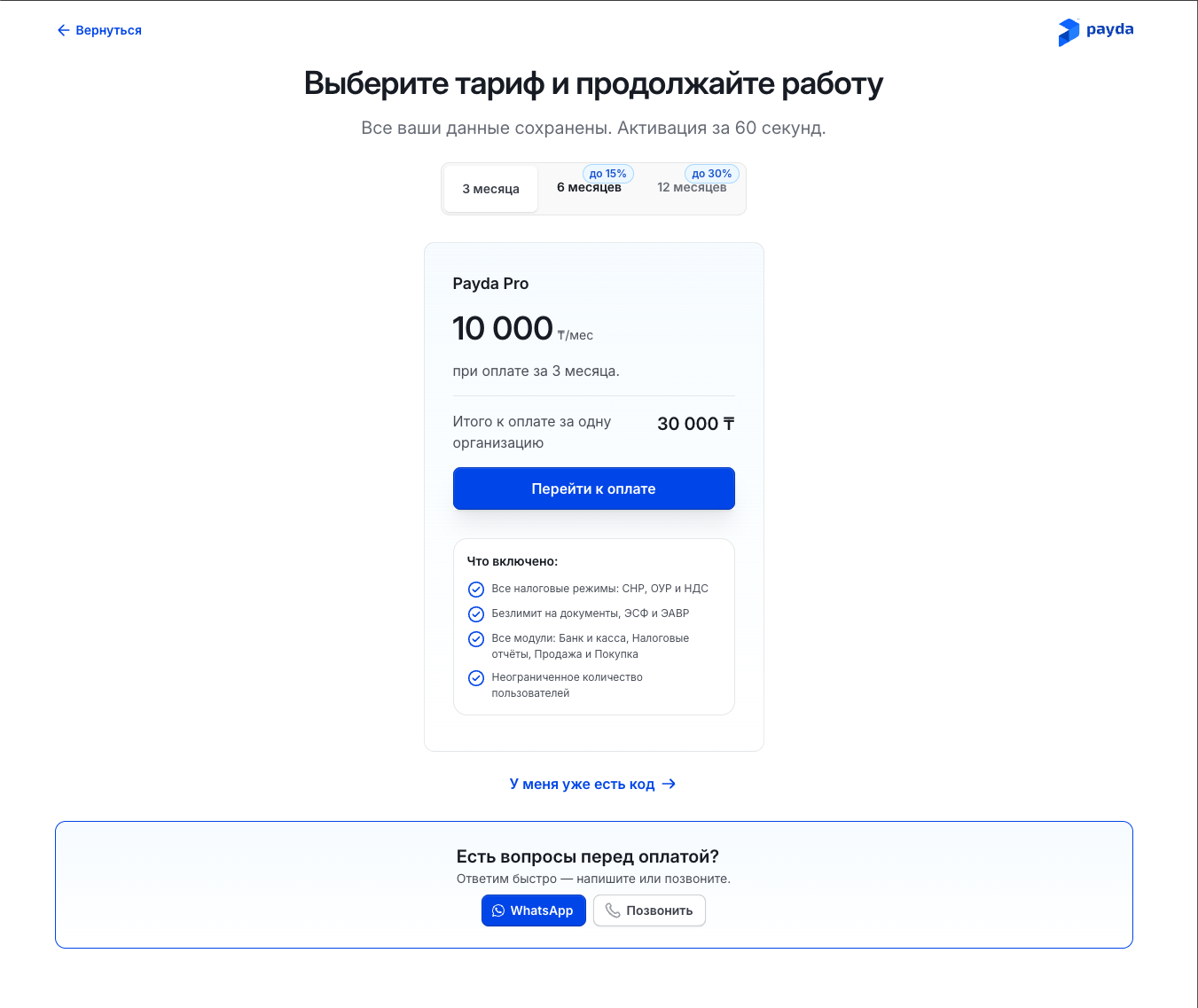
Pick the period: 3 месяца, 6 месяцев or 12 месяцев (3, 6 or 12 months). The «до N%» (up to N%) badge next to a period shows the largest discount.
Check the plan card:
- the price in «₸/мес» (₸ per month) and the period it applies to;
- the «Экономия N ₸» (you save N ₸) badge if the period is discounted;
- Итого к оплате за одну организацию (total for one organisation) — what you pay now;
- the «Что включено:» (what's included) list — it depends on the selected period.
Press Перейти к оплате (go to payment). The order payment page opens on payda.kz — continue with The «Оплата заказа» page.
Вернуться (back) in the top left returns to the home page without paying. In the Payda mobile app the plans page does not open: you are taken to the «Подписка» (subscription) section — see Get a plan on a phone.
The «Оплата заказа» page
This is where you pay an order from Payda itself: a plan, a purchase for several companies or a code bought on the website. The page opens on payda.kz.
- Check the order:
- the header shows «Удаленная оплата» (remote payment) and the order number; an order for several companies shows «Оплата заказа» (order payment);
- in the Детали (details) block: Отправитель (sender) is Payda, Получатель (recipient) is your company and its BIN (company tax ID; sole traders and individuals have an IIN);
- the Стоимость (cost) block lists the services you pay for; an order comment, if any, is in the Сообщение получателю (message to the recipient) field;
- an order for several companies shows a card per company with an Итого (total) line instead of «Стоимость».
- Press Оплатить N ₸ (pay N ₸).
- In the Способ оплаты (payment method) window Kaspi.kz is selected. Press К оплате N ₸ (to payment N ₸) — the payment opens in Kaspi in a new tab.
- Pay the order in Kaspi and return to the payment page. Once the payment goes through, the page shows «Успешно оплачено» (paid successfully) with the amount, date and time.
- Press the button at the bottom of the page. It depends on how you reached the payment:
- Управлять подпиской (manage subscription) — an order for one company from «Купить/обновить план»;
- Вернуться на Главную (back to home) — you are signed in to Payda;
- Зарегистрироваться в Payda (sign up for Payda) and Вернуться на сайт (back to the site) — you are not signed in and came to the payment from the cabinet or a website; Вернуться на сайт takes you back where you came from;
- Зарегистрироваться (sign up) — you are not signed in and opened a link someone sent you.
After an order for several companies is paid, the message «Оплата успешно завершена» (payment completed) — «Вы будете перенаправлены через несколько секунд» (you will be redirected in a few seconds) appears, and Payda takes you back to the cabinet.
Someone else can pay an order for one company: the share icon in the page header opens sharing of the payment link or copies it.
Activation code
An activation code is a paid plan that you apply to your company. Such a code arrives by SMS after a purchase on the website, for example — see If the code was bought on the website.
Open the «Активировать код» (activate a code) window in one of these ways:
- У меня уже есть код (I already have a code) at the bottom of the plans page;
- the активируйте код link in a subscription banner;
- the «У вас есть активный код» (you have an active code) strip on the home page in the «Физическое лицо» mode.
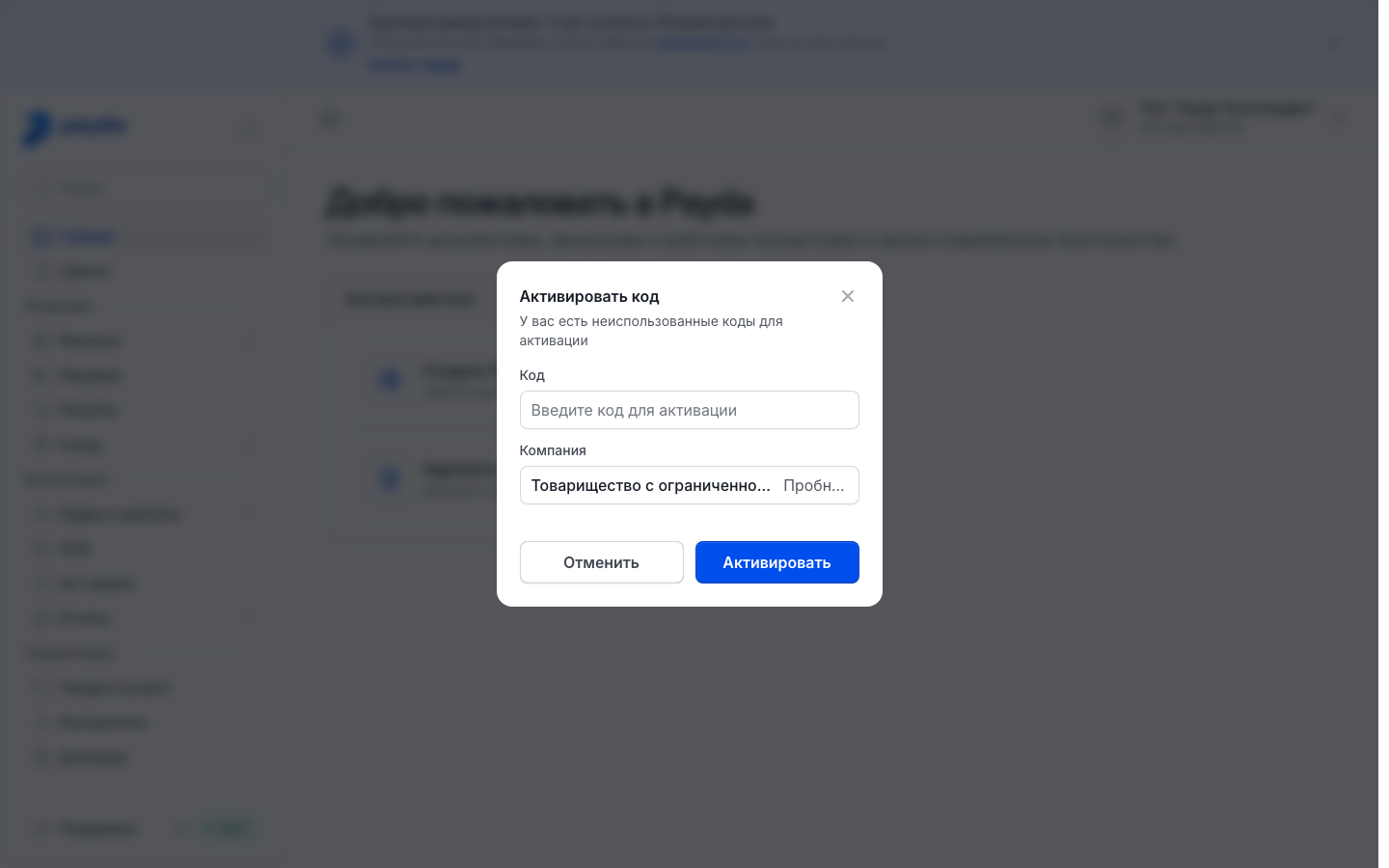
Enter the code in the Код (code) field:
- if codes were paid for the phone number in your profile, the field is a «Выберите код» (choose a code) list: pick the code, its period is shown next to the plan name;
- the code you need is not in the list — press Ввести вручную (enter manually) under «Не вижу свой код?» (can't see my code?) and type the code;
- no paid codes — the «Введите код для активации» (enter the activation code) field appears straight away.
In Компания (company) pick the company — its current plan is shown next to the name. The company you need is missing — choose Добавить (add) at the top of the list and connect it.
Press Активировать (activate). «Код успешно активирован!» (code activated) appears — press Перейти в кабинет (go to the cabinet).
Отменить (cancel) closes the window without changes. The line «У вас есть неиспользованные коды для активации» (you have unused codes to activate) under the window title is always shown — it does not mean you have paid codes.
Buy a plan for several companies
This lets you pay for several companies in one order — for example, an accountant paying for their clients.
- Open the «Мои компании» (my companies) page: in the «Физическое лицо» mode it is the Мои компании item in the left menu; in any mode use pro.payda.kz/manage-company. More in The «Мои компании» page.
- Press Купить тариф. Or tick companies in the table and press Купить тариф для выбранных (buy a plan for the selected) — the «Купить/обновить план» (buy/update a plan) screen then opens straight on the second step.
- The «Выбор компании» (choose companies) step: press Добавить, find companies in the «Добавить компании» (add companies) window with «Поиск компании» (company search), tick them and press Добавить (N). Remove an extra company with the cross in its row. Press Продолжить (continue).
- The «Выбор услуг/тарифов» (choose services/plans) step: press Добавить услугу (add a service) for each company. In the window pick Услуга (service) and Опция услуги (service option) — Стоимость (cost) appears, plus a «Скидка N%» (N% off) badge if there is a discount. Press Добавить.
- Check the Итого line of each company and the grand total at the bottom of the screen. Press Перейти к покупке (proceed to purchase) — the payment page opens. Назад (back) returns to choosing companies.
A company without a service is left out of the order. An order for one company is paid as a regular order, for several companies — as one combined order.
On a phone the same is done in the «Управление компаниями» (company management) section: the Купить тариф button at the bottom of the screen; if you tick companies, it shows their number — Купить тариф (N).
If the code was bought on the website
You can pay for a plan on payda.kz without signing up: Payda sends the activation code by SMS, and you apply it after signing up.
- A purchase link on payda.kz opens the «Введите номер телефона» (enter your phone number) window — «На этот номер будет отправлен ваучер после оплаты» (the voucher will be sent to this number after payment). Enter the number and press Оплатить (pay).
- Pay the order — the same way as in The «Оплата заказа» page.
- The code arrives by SMS. It is also on the «Добро пожаловать в Payda!» (welcome to Payda) order page, in the «КОД АКТИВАЦИИ» (activation code) block: copy it with the icon next to the code, or with the Скопировать (copy) button on a phone. The «ДЕТАЛИ ЗАКАЗА» (order details) block shows the order number, date, payment method and amount.
- Sign up for Payda — Signing up as a director. If you use the same phone number, the code appears in the «Выберите код» list and you do not have to type it.
- Connect your company — Add a company.
- Activate the code for this company — Activation code.
Questions before paying
At the bottom of the plans page there is the «Есть вопросы перед оплатой?» (questions before paying?) block. Press WhatsApp to write to Payda support.
How to check it worked
- After the trial starts, the banner shows «Пробный период активен.» and the days left.
- After payment or code activation the subscription banner disappears. Activation takes up to a minute.
- On the «Мои компании» page the «Статус тарифа» (plan status) column shows «Активен, N дней» (active, N days) for the company, and the «Срок действия тарифа» (plan valid until) column shows the end date.
Common problems
| What you see | Why | What to do |
|---|---|---|
| «Нет активного тарифа» — «Купите тариф, чтобы продолжить работу» (buy a plan to keep working) | The company has no valid plan or trial | Press Купить тариф in the message or start the trial |
| «Требуется организация» | The plans page was opened in the «Физическое лицо» mode | Switch to a company and open the plans again |
| «Пробный период уже активирован» (trial already activated) | The company has already used its trial | Pay for a plan or activate a code |
| «Не удалось активировать пробный период» (could not activate the trial) | A temporary failure | Try again later |
| «Код не найден или уже использован» (code not found or already used) | The code has a typo or was already applied | Check the code. To pay for a plan, press Выбрать тариф (choose a plan) in the same window |
| Your code is not in the «Выберите код» list | The list shows codes paid for the phone number in your profile | Press Ввести вручную and type the code from the SMS |
| «Тариф не найден» (plan not found) | The purchase link from the website is wrong | Start the purchase again on payda.kz |
| No «Успешно оплачено» after paying | The payment has not been confirmed yet | Go back to the tab with the payment page — the status updates on its own |
What next
- Get a plan on a phone — buying in the Payda app.
- The «Мои компании» page — plan terms for all your companies.
- Accountant access to a company — how to invite an accountant.