
What you can do on a phone
Why you need this
In the Payda app you can issue a sales invoice (реализация) or an invoice for payment from your phone, sign a document in EDO (ЭДО, electronic document management), check a counterparty, look through payments and order accountant services.
This article is a map of the app: what is on the home screen, in the header and in the catalogue, and which article covers the rest.
What you need
- The Payda app on your phone and a sign-in — see Sign-up and sign-in.
- For most sections — a selected company. While the Физическое лицо (Individual) account is selected, the home screen shows only the first steps and the list of your companies.
Step by step
Home screen
At the bottom of the screen there are four tabs: Главная (Home), Каталог (Catalogue), Сообщения (Messages) and Профиль (Profile). The number on Сообщения is how many messages you have not read yet — see Messages in the app.
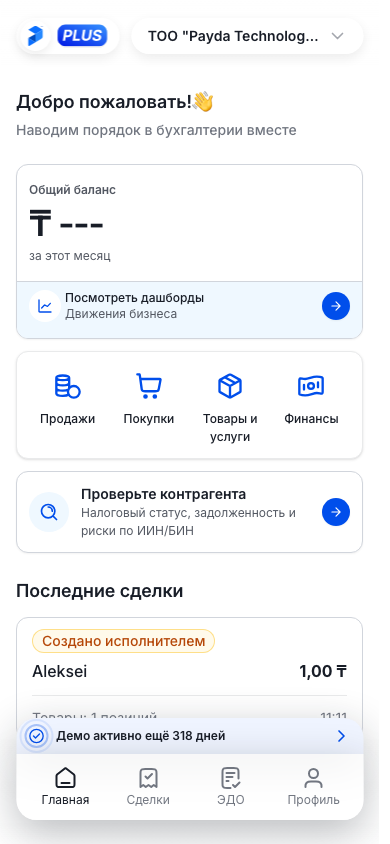
With a company selected, the home screen shows, from top to bottom:
- Общий баланс (total balance) for the current month.
- Section tiles:
- Продажи (Sales) — the Продажа screen with the Реализация (sales invoice) and Счёт на оплату (invoice for payment) tabs;
- Покупки (Purchases) — the Покупка screen with the Поступление (receipt) and Доверенность (power of attorney) tabs;
- Товары и услуги (Goods and services) — the goods and services reference book;
- Финансы (Finance) — bank and cash payments.
- Проверьте контрагента (Check a counterparty) — tax status, debts and risks by IIN/BIN. BIN (company tax ID) belongs to companies, IIN (individual tax ID) to sole traders and individuals. See Checking a counterparty by IIN/BIN.
- The ЭДО block — if there are any EDO documents. It shows a line such as «2 документа ждут подписи» (2 documents awaiting signature) with «Требуется ваша подпись» (your signature is required), or «Нет документов на подпись» (nothing to sign). Below are Всего документов (total documents) and Подписано (signed) for all time; Смотреть все (View all) opens the EDO section.
- Запросы на доступ (Access requests) — only for a director and only when there are requests from accountants or your own invitations. It has the Входящие (Incoming) and Отправленные (Sent) tabs; Смотреть все opens the Настройки доступа (Access settings) screen.
- Заполните данные профиля (Fill in your profile) — if the company has no legal address or bank account yet. Заполнить профиль opens the company details for editing — see Company details.
- Последние сделки (Recent deals) — up to five latest deals. Tap a deal to open its card.
Under the greeting Payda shows a single next-step card — the one that matters most right now. Once the step is done, the card changes to the next one or disappears.
| Card | When it appears | What to tap |
|---|---|---|
| «Подключите компанию, чтобы начать» (connect a company to start) | In your personal account, while you have no companies and no role selected | Я руководитель (I'm a director) — add your company; Я бухгалтер (I'm an accountant) — request access to a client's company |
| «Подключите свою компанию» or «Добавьте первую компанию» (add your first company) | In your personal account, when a role is selected but there is no company yet | Добавить компанию (Add company). If the company already works in Payda, tap Запросить доступ (Request access) in the «Компания уже в Payda?» line |
| «Ждём подтверждения от руководителя …» (waiting for the director to confirm) | In your personal account, after you requested access to a company | Отменить запрос (Cancel request) or Посмотреть все (View all) — the Настройки доступа screen |
| «Компания подключена. Кто ведёт учёт?» (who keeps the books?) | For a director in a company account, until they choose who keeps the books | Я сам (Myself) or У меня есть бухгалтер (I have an accountant) — opens the Пригласить бухгалтера (Invite an accountant) screen |
| «… ещё не принял приглашение» (has not accepted the invitation yet) marked «Ожидание» (Pending) | For a director, until the accountant accepts the invitation | Отменить приглашение (Cancel invitation) or Посмотреть все |
| «Создайте первую сделку» (create your first deal) marked «С чего начать» (Where to start) | In a company account, while it has no deals | Создать сделку (Create deal). A director also sees the Пригласить бухгалтера link |
The «… ещё не принял приглашение» and «Создайте первую сделку» cards can be closed with the cross — they will not appear again for this company. The others disappear only when the step is done. How to invite an accountant from a phone — see Accountant access to a company.
Header and subscription
On the Главная, Каталог and Профиль tabs there are two buttons at the top of the screen:
- on the left — the Payda logo and your plan, «PLUS» or «Market». Without a plan the button alternates between «FREE» and Купить тариф (Buy a plan). Tap it to open the Подписка (Subscription) screen;
- on the right — the name of the selected company with an arrow. This is where you switch companies.
To switch to another company:
- Tap the company name at the top right — the Сменить аккаунт (Switch account) sheet opens.
- Find the company by name or BIN/IIN in the search line. Under each name you see the BIN/IIN, your role and the plan — for example «PLUS • 30 дн.» (30 days left) or «Без тарифа» (no plan).
- Tap the company — the app switches to it and opens the home screen. The Физическое лицо line is your personal account; the selected account has a tick.
Добавить аккаунт (Add account) in the same sheet opens adding a new company — see Several companies: switching and adding. In the personal account there is only the logo at the top left, without a plan.
In a company account a subscription strip may sit above the bottom tabs:
- «14 дней Payda Pro бесплатно» (14 days of Payda Pro free) — the company has never had a plan, you can start a trial;
- «Демо активно ещё N дней» (demo active for N more days) — a trial is running;
- «N дней до конца подписки» (N days until the subscription ends) or «Подписка скоро закончится» (the subscription ends soon) — 10 days or less are left on the plan;
- «Доступ закрыт, срок истёк» (access closed, the plan has expired) — the plan has ended.
Tap the strip to open a sheet with actions: start a trial, renew or choose a plan. More in Subscription in the app.
If no company is selected
When the Физическое лицо account — your personal account — is selected, the home screen has no company tiles or blocks. Instead it shows:
- a first-step card from the table above — for example «Подключите компанию, чтобы начать» with the choice of Я руководитель or Я бухгалтер;
- the «У вас есть активный код» (you have an active code) strip — if a plan has been paid for the phone number in your profile and not activated yet. Tap it to open the «Активировать код» (Activate code) window: choose Код (Code) and Компания (Company) and tap Активировать (Activate). The app on iPhone and iPad does not show this strip;
- the Компаний (N) (Companies (N)) list — your companies with their plan, BIN/IIN, your role and the plan's end date. Tap a company card to switch to it;
- Управление (Manage) above the list — the Управление компаниями (Company management) screen, see Several companies: switching and adding.
In the personal account the Каталог tab has only the Услуги (Services) block.
Catalogue
The Каталог tab gathers the app's sections on one screen. The Поиск по разделам и услугам (search sections and services) line keeps only the rows whose name or caption contains what you typed.
- Разделы (Sections) — Продажа, Покупка, Склад (Warehouse) and Финансы: the same sections as the home screen tiles. Склад opens the goods and services reference book — its screen is also called Каталог, do not confuse it with the tab. More in Goods and services.
- Сервисы (Services) — ЭДО and Сделка (Deal).
- Услуги — requests to accountants on the Payda marketplace. Prices are as shown on this screen:
| Row | What it is | Price |
|---|---|---|
| Мои заявки (My requests) | Status of your requests to accountants | — |
| Бухгалтер под ключ (Turnkey accountant) | A personal accountant runs your reporting | from 40 000 ₸ per month |
| Разовые услуги (One-off services) | One task, fixed price | from 2 000 ₸ per service |
| Главный бухгалтер (Chief accountant) | Keeps the books and watches the health of the business | from 150 000 ₸ per month |
Tap a service to choose an accountant and leave a request — see Subscription in the app. Мои заявки shows what is happening with the requests you have already sent.
Разделы and Сервисы are shown only when a company is selected; Услуги are always there.
Where the other sections are
| Section | Where to open it | Article |
|---|---|---|
| Sales invoice, invoice for payment, receipt, power of attorney | The Продажи and Покупки tiles on the home screen or Каталог → Продажа / Покупка | Documents on a phone |
| Goods and services | The Товары и услуги tile or Каталог → Склад | Goods and services |
| EDO | Каталог → ЭДО or Смотреть все in the ЭДО block on the home screen | Signing EDO documents on a phone |
| Bank and cash payments | The Финансы tile or Каталог → Финансы | Payments and cash desk |
| Deals | Каталог → Сделка or a deal in the Последние сделки block | Working with deals |
| Counterparty check | Проверьте контрагента on the home screen | Checking a counterparty by IIN/BIN |
| Messages | The Сообщения tab | Messages in the app |
| Role, access, password, theme, language, support | The Профиль tab | Profile in the app |
| Subscription and accountant services | The logo button at the top left or the plan card on the Профиль tab | Subscription in the app |
How to check it worked
The name on the right-hand button at the top is the company you are working in now: every section shows its data. Documents and payments are shared between the app and the desktop cabinet.
Common problems
| What you see | Why | What to do |
|---|---|---|
| «Ничего не найдено» (nothing found) and «Попробуйте изменить запрос» (try another query) in the catalogue | No section or service matches what you typed | Clear the search with the cross in the line and type something shorter — for example «ЭДО» |
| No tiles on the home screen, and only Услуги in the catalogue | The personal account — Физическое лицо — is selected | Tap the account name at the top right and choose a company |
| No ЭДО block on the home screen | There are no EDO documents yet | Open Каталог → ЭДО |
| No Запросы на доступ block on the home screen | Only a director in a company account sees it, and only while there are open requests | All requests are on the Профиль tab under Настройки доступа — see Accountant access to a company |
| «Не удалось сменить аккаунт» or «Не удалось переключиться на компанию» (could not switch) | Switching to the company failed | Try again in a minute |
What next
- Documents on a phone — how to create a sales invoice, an invoice, a receipt and a power of attorney.
- Signing EDO documents on a phone — how to find and sign documents waiting for your signature.
- Profile in the app — role, access, theme, language and support.