
Company details
Why you need this
Company details go into documents, ESF (electronic invoices) and tax payments: addresses, tax regime, UGD (state revenue office) codes, VAT data. The stamp, signatures, QR code and payment link appear on printed documents, so a customer can pay an invoice with a button or a QR code.
What you need
- A selected company. The «Физическое лицо» (Individual) mode has no company details: Payda shows «Требуется организация» (Organisation required) and takes you back to the home page.
- Company data: legal and actual address, UGD codes, KBE, and for VAT — the registration series, number and date.
- To send ESF — the login and password for ИС ЭСФ (state e-invoice system).
- For printed documents — images of the stamp and signatures (PNG with a transparent background), a static QR code from your banking app and a payment link, for example from Kaspi Pay.
Step by step
The Реквизиты организаций (Company details) page opens from the account card or from the Добавить юридический адрес (Add legal address) step of the setup guide.
Click the account card in the top right — it shows the company name — and choose Реквизиты аккаунта (Account details).
Check the company card: the name cannot be edited, and below it is the BIN (company tax ID) or IIN (personal tax ID, for sole traders and individuals). Click the number to copy it.
Fill in the tabs in order — details below. On every tab except Склад (Warehouse), press Сохранить (Save) before moving on.
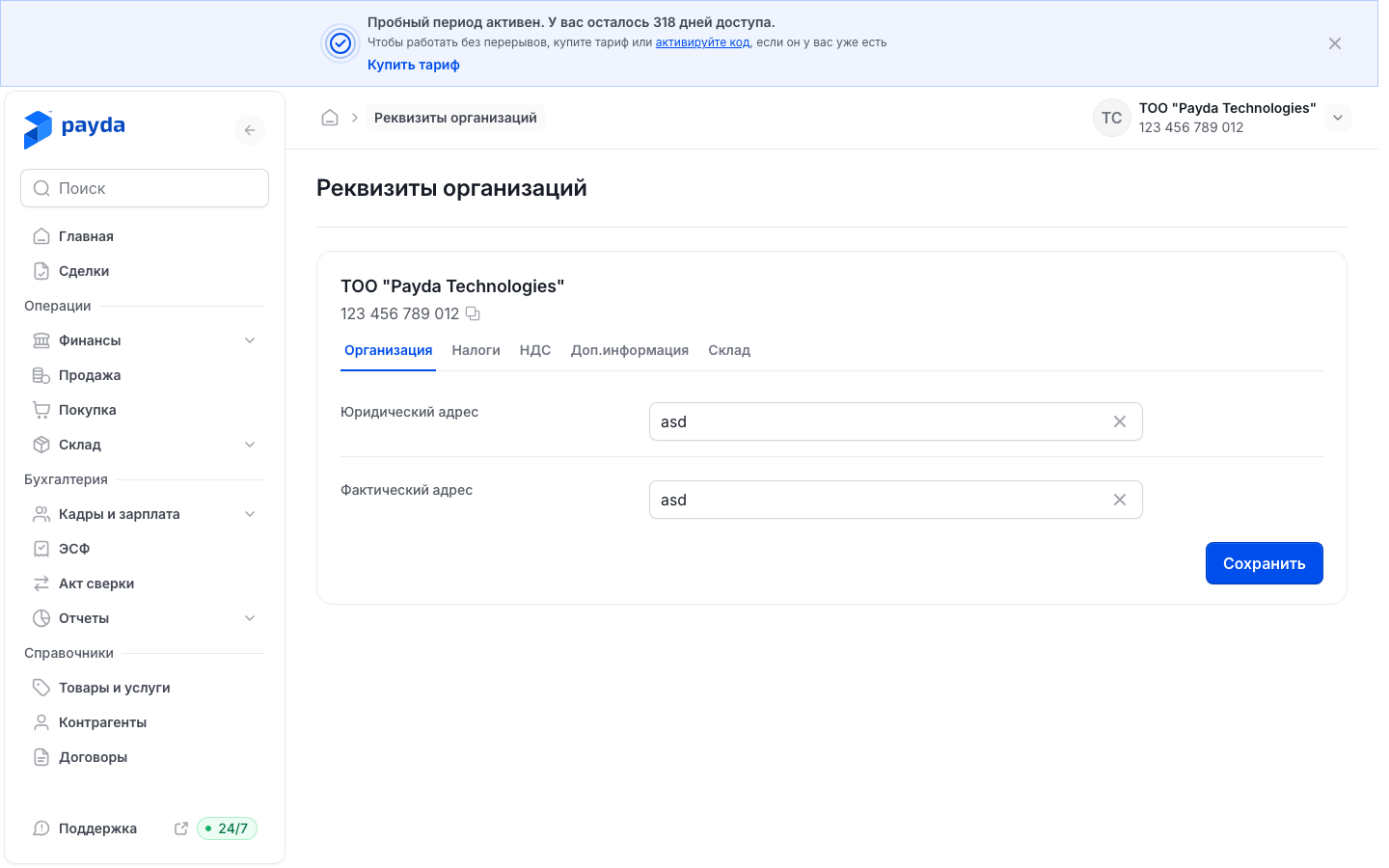
Organisation
- Fill in Юридический адрес (legal address) and Фактический адрес (actual address). If the company was added with Добавить компанию (Add company), both fields already hold the address entered then.
- Press Сохранить. The message «Данные успешно обновлены» (Details updated) appears.
Taxes
- Choose the Налоговый режим (tax regime) — a field marked with an asterisk.
- Set Код УГД по месту регистрации (UGD code at the place of registration) and Код УГД по месту нахождения (UGD code at the actual location): start typing the name in the field or click the reference icon on the right (a sheet with a magnifier) to open the УГД reference book. How to find the right code — see UGD code.
- Fill in КБЕ (beneficiary code) — a field marked with an asterisk.
- Press Сохранить.
VAT
Fill in this tab if the company is registered for VAT.
- Enter Серия НДС (VAT series) and Номер НДС (VAT number).
- Set Дата регистрации НДС (VAT registration date).
- Press Сохранить.
ИС ЭСФ access
- Open the Доп.информация (Additional information) tab.
- Enter Логин ИС ЭСФ and Пароль ИС ЭСФ — the login and password of your ИС ЭСФ account. Payda needs them to connect to ИС ЭСФ.
- Press Сохранить.
The connection itself is made on the ESF page — see Connect to ИС ЭСФ.
Warehouse
The Метод себестоимости (costing method) decides how the cost of written-off goods is calculated. The default is Средневзвешенная (WAC) (weighted average cost).
There is no Сохранить button on this tab: the method is saved as soon as you pick it. For now only Средневзвешенная (WAC) can be chosen, so there is nothing to change.
Stamp and payment QR
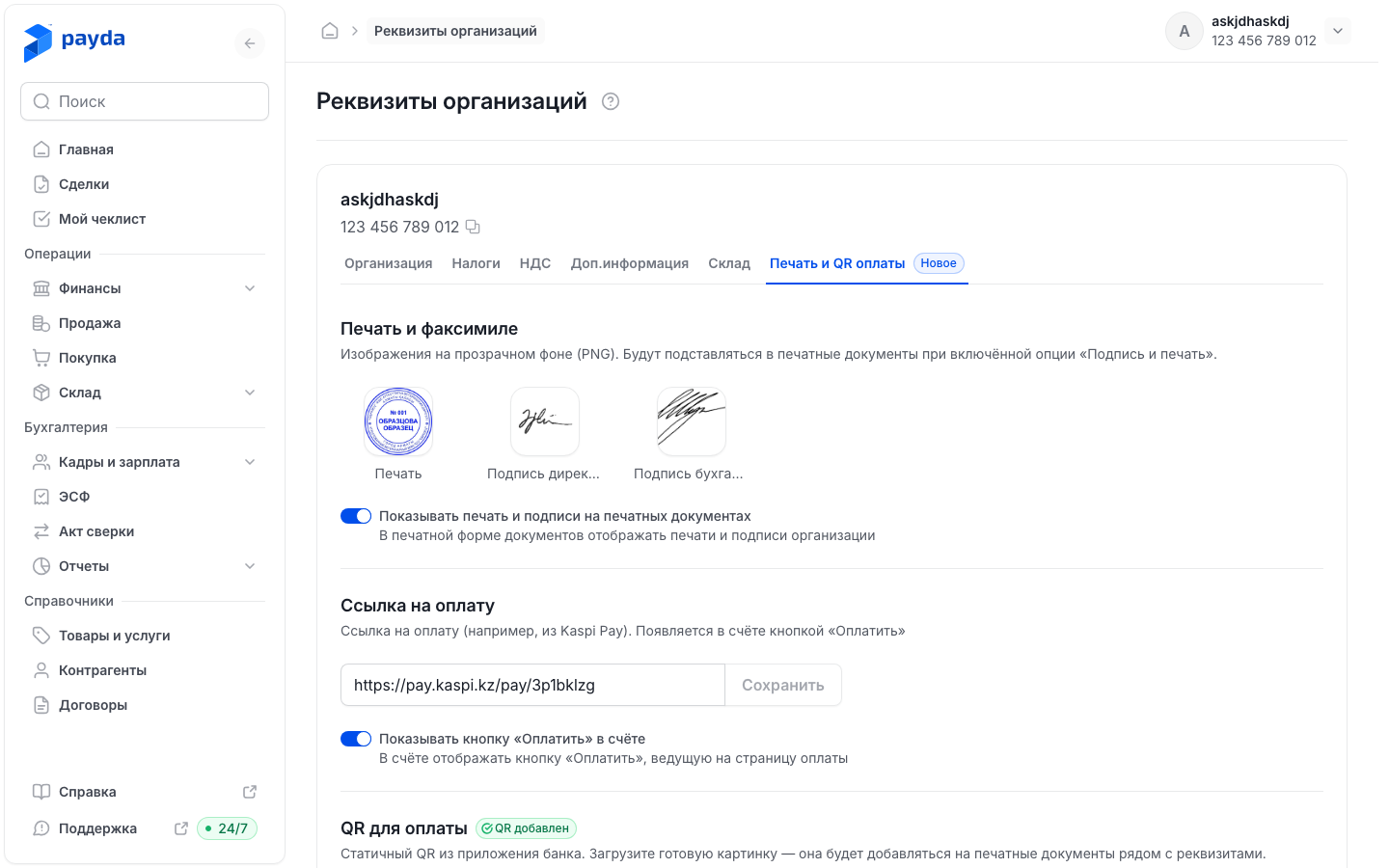
The tab carries a Новое (New) badge. It also opens from the Управлять печатью и подписями в реквизитах (Manage stamp and signatures in company details) link in the Печать и подписи (Stamp and signatures) panel of an invoice preview.
In the Печать и факсимиле (Stamp and facsimile) block, click the Печать (stamp), Подпись директора (director's signature) or Подпись бухгалтера (accountant's signature) tile and choose a file.
The crop view opens: select the part you need, press Применить (Apply), then Готово (Done) — the image is saved immediately.
To Обрезать (crop), Заменить (replace) or Удалить (delete) the image, click the filled tile again.
In the Ссылка на оплату (payment link) block, paste the link to your payment page, for example from Kaspi Pay, into the field and press Сохранить next to it. The link has its own button — the common one at the bottom does not save it.
In the QR для оплаты (payment QR) block, press Выберите с диска (choose from disk) or drag a file in: PNG or JPG up to 5 MB. Like the stamp, the QR code goes through cropping and is saved with Готово.
Turn on the switches you need:
- Показывать печать и подписи на печатных документах (show the stamp and signatures on printed documents);
- Показывать кнопку «Оплатить» в счёте (show the Pay button in the invoice) — available once the payment link is saved;
- Показывать QR на печатных документах (show the QR code on printed documents) — available once the QR code is uploaded.
Press Сохранить at the bottom of the tab. The message «Печать, подписи, ссылка и QR сохранены» (Stamp, signatures, link and QR saved) appears.
New documents only
«Изменения на этой странице действуют только на новые документы.» (Changes on this page apply to new documents only.) The stamp, signatures and QR code appear on documents created after you save. Documents already issued do not change.
How a customer pays an invoice by link — see Paying an invoice by link.
Company bank account
On a computer the company details page has no bank accounts. The company account is added in the Расчетный счет (bank account) reference book: it opens from the reference icon of any account field, for example the Расчетный счет field of the Мои реквизиты (My details) block in an invoice. Another way is the Добавить банковский счет (Add bank account) step of the setup guide, which leads to the Клиент банка (Bank client) page. Details — see Bank accounts.
On a phone
- Open the Профиль (Profile) tab and tap the company card at the top. If the home screen shows the Заполните данные профиля (Complete your profile) block, you can tap Заполнить профиль (Fill in profile) — the screen opens straight in edit mode.
- The Организация (Organisation) screen has the tabs Банковские реквизиты (bank details, open by default), Адрес (address), Налоги (taxes), НДС (VAT), Доп. информация (additional information) and Печать и QR (stamp and QR).
- Tap the pencil icon in the top right: the title changes to Редактировать (Edit) and the fields become editable.
- Make your changes and tap Сохранить or Сохранить и закрыть (Save and close) at the bottom. In the «Данные успешно обновлены» window tap Подтвердить (Confirm).
On a phone the company bank account is added right here: in edit mode, on the Банковские реквизиты tab tap Добавить счет (Add account) and fill in Банковский счет (account number) and Банк (bank). On the Печать и QR tab the payment link is saved by the common button at the bottom of the screen.
How to check it worked
- After Сохранить the message «Данные успешно обновлены» appears.
- Create a new invoice and open its printed form: it shows the stamp, signatures and QR code, and the invoice has an Оплатить (Pay) button — if the matching switches are on.
Common problems
| What you see | Why | What to do |
|---|---|---|
| «Несохраненные изменения» (Unsaved changes) when switching tabs | The current tab has unsaved edits | Press Отменить (Cancel), then Сохранить. Подтвердить switches the tab and the edits are lost |
| No «Данные успешно обновлены» message after Сохранить | The changes were not saved: Payda does not report save errors | Reload the page, check the values and save again. If that does not help, contact support |
| «Требуется организация» | «Физическое лицо» mode is selected, and it has no company details | Switch to the company in the account card — see Several companies |
| «Поддерживаются только PNG и JPG» (only PNG and JPG are supported) | The image is in another format | Save it as PNG or JPG |
| «Файл больше 5 МБ» (file larger than 5 MB) | The image is too large | Reduce the file size |
| «Ссылка должна начинаться с http:// или https://» (the link must start with http:// or https://) | The payment link was pasted incompletely | Copy the whole link, including https:// |
| No stamp, signatures or QR code on an old document | The settings apply only to documents created after saving | Create a new document |
| An ESF gets the status «Нет доступа к ИСЭСФ» (no access to ИС ЭСФ) | ИС ЭСФ rejected the login or password | Check Логин ИС ЭСФ and Пароль ИС ЭСФ on the Доп.информация tab and connect to ИС ЭСФ again |
| The Расчетный счет field in the Мои реквизиты block of a document is empty | The company has no bank account yet | Add one — see Add an account |
What next
- Bank accounts — add the company account for documents and payments.
- Accountant access to a company — invite an accountant.
- Plans and payment — choose and pay for a plan.