
Profile in the app
Why you need this
The Профиль (Profile) tab shows which company you are working in and with which role. From here you open the company details, accountant access, password change and your subscription.
This is also where you change the app's theme and language, contact support and sign out.
What you need
- A sign-in to the Payda app — see Sign-up and sign-in.
- For the company details and the plan card — a selected company.
Step by step
Tap Профиль at the bottom of the screen.
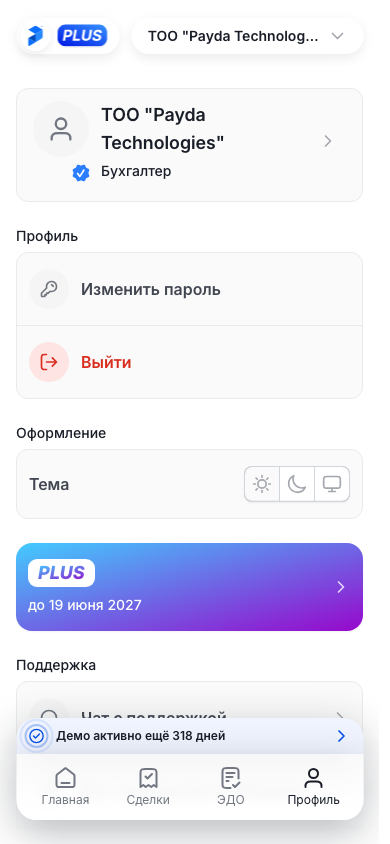
At the top is the company card: the name and your role, «Руководитель» (Director) or «Бухгалтер» (Accountant). Tap the card to open the Организация (Organisation) screen with the company details — see Company details.
Below the Оформление (Appearance) block is the plan card: «PLUS», «Market» or «FREE». A paid plan shows the date «до …» (until …), FREE shows «Бесплатно» (Free). Tap the card to open the Подписка (Subscription) screen — see Subscription in the app.
You do not switch companies in the profile. Tap the company name at the top right and choose another one in the Сменить аккаунт (Switch account) sheet — see Header and subscription. The logo button at the top left opens the Подписка screen.
In the personal account — the Физическое лицо (Individual) account — the card at the top shows your number or name with the caption «Физическое лицо» and does not open. There is no plan card there.
Profile items
The items in the Профиль block depend on where Payda is open, which account is selected and your role.
| Item | Who sees it | What it opens |
|---|---|---|
| Настройки (Settings) | Only when Payda is open in the app (there is no such item in the phone's browser), as the first item | The settings of the app itself on your phone |
| Настройки доступа (Access settings) | In a company account — the director; in the personal account — everyone | Accountant invitations and access requests — Accountant access to a company |
| Мои компании (My companies) | Only in the personal account | The Управление компаниями (Company management) screen — Several companies: switching and adding |
| Изменить пароль (Change password) | Everyone | Password change — Profile and password |
| Выйти (Sign out) | Everyone | Signing out of the account on this phone |
An accountant in a company account sees only Изменить пароль and Выйти, plus Настройки in the app.
To sign out:
- Tap Выйти.
- In the «Выйти из аккаунта?» (Sign out?) window tap Подтвердить (Confirm). Отменить (Cancel) closes the window without signing out.
The session on this phone ends. Sign in again to continue working.
Appearance: theme and language
The Оформление block has two rows:
- Тема (Theme) — three icons: the sun is the light theme, the moon is the dark theme, the monitor is the system theme: the app follows your phone's theme;
- Язык (Language) — Рус, Қаз or Eng. The interface switches to the selected language right away.
The theme and language are remembered on this phone. The translation of the interface is not finished yet: some labels may stay in Russian.
Support and help
The Поддержка (Support) block has three rows, each opens a messenger:
- Чат с поддержкой (Chat with support) — a conversation with Payda support in WhatsApp;
- Бот-консультант в Telegram — the Payda chatbot in Telegram;
- Бот-консультант в WhatsApp — the Payda chatbot in WhatsApp.
The О Payda (About Payda) block has Справка (Help): it opens this help centre. To return from the help centre to the app, tap the logo in its header. If Payda is open in your phone's browser, the block also has Открыть сайт (Open website).
How to check it worked
The theme and language change at once, without restarting the app. The name and role on the card at the top belong to the company you are working in now.
Common problems
| What you see | Why | What to do |
|---|---|---|
| The company card does not open | The personal account — Физическое лицо — is selected. The Организация screen exists only for a company | Switch to a company: the account name at the top right → Сменить аккаунт |
| No Мои компании item | A company is selected — the item exists only in the personal account | Switch to Физическое лицо |
| No Настройки доступа item | Your role in this company is «Бухгалтер» | An accountant sees their requests and invitations in the personal account — switch to Физическое лицо |
| No Настройки item | Payda is open in the phone's browser, not in the app | Open Payda in the app: the item exists only there |
| No plan card | The personal account is selected | Switch to a company: the plan is shown for it |
| You need to change the company's address, bank account or tax data | Company details are edited on the Организация screen, not in the profile items | Tap the company card at the top — see Company details |
| You need to change your email | Personal data cannot be changed in the app | On a computer, in the «Физическое лицо» mode, open Настройки пользователя (User settings) — see Profile and password |
| The theme changes on its own | The monitor icon — the system theme — is selected: the app follows your phone's theme | Choose the sun or the moon |
What next
- Accountant access to a company — invite an accountant or request access from a phone.
- Several companies: switching and adding — managing companies from a phone.
- Subscription in the app — your plan and accountant services.