
Profile and password
Why you need this
This is where you change what belongs to you rather than to the company: your email, password and colour theme. Company details and the plan are set up separately — see Company details and Plans and payment.
What you need
- A signed-in Payda account.
- To change the password — your current one. If you do not remember it, recover your password.
Step by step
In the web version
Click the account card at the top right and in the Сменить аккаунт (switch account) block choose Физическое лицо (individual). The home page of your personal cabinet opens — see The «Физическое лицо» mode.
Click the account card again and choose Настройки пользователя (user settings). In company mode this item is missing, but the page also opens from the direct link pro.payda.kz/user-settings.
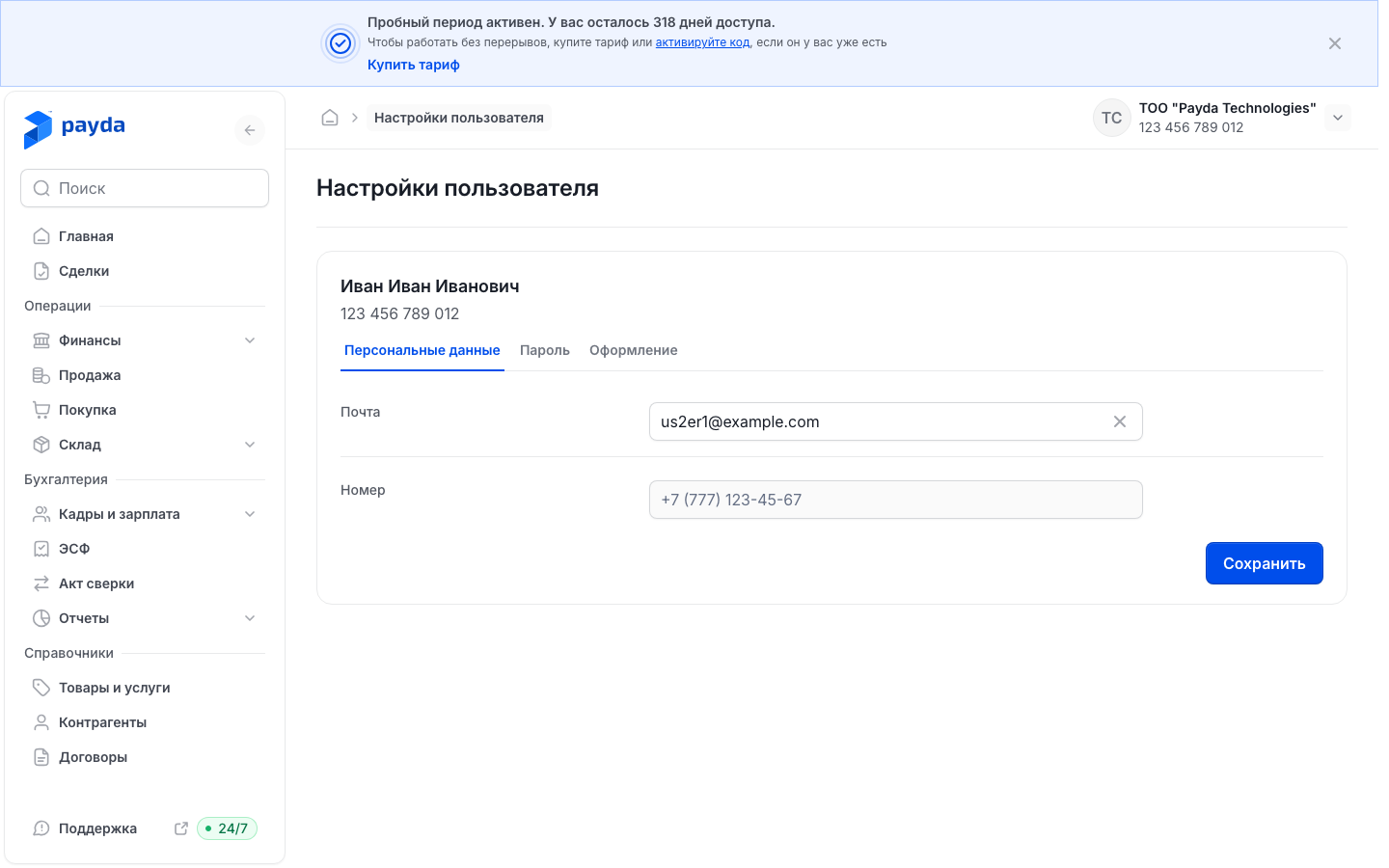
At the top of the page are your name and IIN (individual identification number), below them three tabs: Персональные данные (personal data), Пароль (password) and Оформление (appearance).
On the Персональные данные tab enter the new address in Почта (email). The Номер (phone number) field is locked: you sign in to Payda with this number, and it cannot be changed here.
Click Сохранить (save). «Изменения успешно сохранены.» (changes saved) appears with the note «Ваши персональные данные были успешно обновлены.» (your personal data was updated).
If you switch to another tab or leave the page without saving, the «Несохраненные изменения» (unsaved changes) window appears. Подтвердить (confirm) leaves without saving, Отменить (cancel) takes you back to the form.
Changing the password
In the web version:
- On the Настройки пользователя page open the Пароль tab.
- Fill in Старый пароль (old password), Новый пароль (new password) and Повторите новый пароль (repeat the new password).
- Click Сохранить. «Изменения успешно сохранены.» appears with the note «Ваш пароль был успешно изменен.» (your password was changed).
The new password needs at least 8 characters, an upper-case and a lower-case Latin letter, a digit and a special character — for example ! or #. If a rule is not met, a hint appears under the field, for example «Пароль должен содержать хотя бы одну заглавную букву» (the password must contain at least one capital letter).
The form applies the same rules to the Старый пароль field. If your current password does not meet them — say, it has no capital letter — you cannot change it here. Set a new password through recovery instead: click Выйти (sign out) in the account card and follow the steps in Password recovery.
On a phone:
- Open the Профиль (profile) tab at the bottom of the screen and tap Изменить пароль (change password).
- Fill in Старый пароль, Новый пароль and Повторите новый пароль. The password rules are the same as in the web version.
- Tap Сохранить at the bottom of the screen. «Пароль изменён» (password changed) — «Ваш пароль был успешно изменён.» appears, and Профиль opens again.
Light and dark theme
- On the Настройки пользователя page open the Оформление tab.
- In the Тема (theme) row — «Тема оформления Payda на этом устройстве» (Payda's colour theme on this device) — choose Светлая (light), Тёмная (dark) or Системная (system). Системная follows the theme set on your device.
The theme changes at once; there is no Сохранить button here. The choice is remembered in this browser: on another device or in another browser choose the theme again.
A quicker way is the account card at the top right: the Тема row has three icons — a sun (light), a moon (dark) and a monitor (system). The row is in the card in either mode — in a company and in the personal cabinet. Below it is Выйти: signing out of Payda.
In the app the theme is switched on the Профиль tab — see Profile in the app.
How to check it worked
- «Изменения успешно сохранены.» appeared with the note «Ваши персональные данные были успешно обновлены.» or «Ваш пароль был успешно изменен.». On a phone — «Пароль изменён».
- After changing the password you sign in to Payda with the new one.
- After choosing a theme the interface changed its colours straight away.
Common problems
| What you see | Why | What to do |
|---|---|---|
| «Пароли не совпадают» (web) or «Пароли должны совпадать» (phone) — the passwords do not match | The new password and its repeat differ | Retype the new password in both fields |
| «Пароль должен содержать хотя бы одну заглавную букву» or another rule under Старый пароль | Your current password does not meet the rules, and the form will not accept it | Set a new password through recovery |
| The same message under Новый пароль | The new password does not meet the rules | Add what is missing: Latin letters, a digit, a special character, at least 8 characters |
| «Введите корректную почту» (enter a valid email) | The email address has a mistake | Check the address: it needs an @ and a domain |
| «Обязательное поле» (required field) | One of the fields is empty | Fill in the highlighted field |
| The «Несохраненные изменения» window | You are leaving the page or switching tabs without saving the form | Click Отменить and then Сохранить — or Подтвердить to leave without saving |
| No Настройки пользователя in the account card | A company mode is selected | Switch to Физическое лицо or open pro.payda.kz/user-settings |
| The Номер field cannot be edited | The number is your login and does not change on this page | Change only the email |
What next
- Password recovery — if you forgot your password.
- Profile in the app — what else is on the Профиль tab on a phone.
- The «Физическое лицо» mode — how the personal cabinet differs from a company cabinet.