
Warehouse reports: ABC analysis and profitability
Why you need this
ABC analysis shows which products bring most of your revenue and which ones sell little. Profitability compares the selling price with the cost and shows which products earn you less. These reports help you decide what to restock first and where to review the price.
What you need
- For ABC analysis — sales of goods for the chosen period, see Sale. If a sale does not appear in the report after saving, check the document status in the Продажи (Sales) list.
- For profitability — goods in stock and a price in the product card: the Цена (price) field in the Goods and services reference book. How goods get into stock — see Balances.
Step by step
ABC analysis
In the menu open Склад (Warehouse) → Отчёты по складу (warehouse reports). The Отчёты склада page opens on the ABC-анализ (ABC analysis) tab.
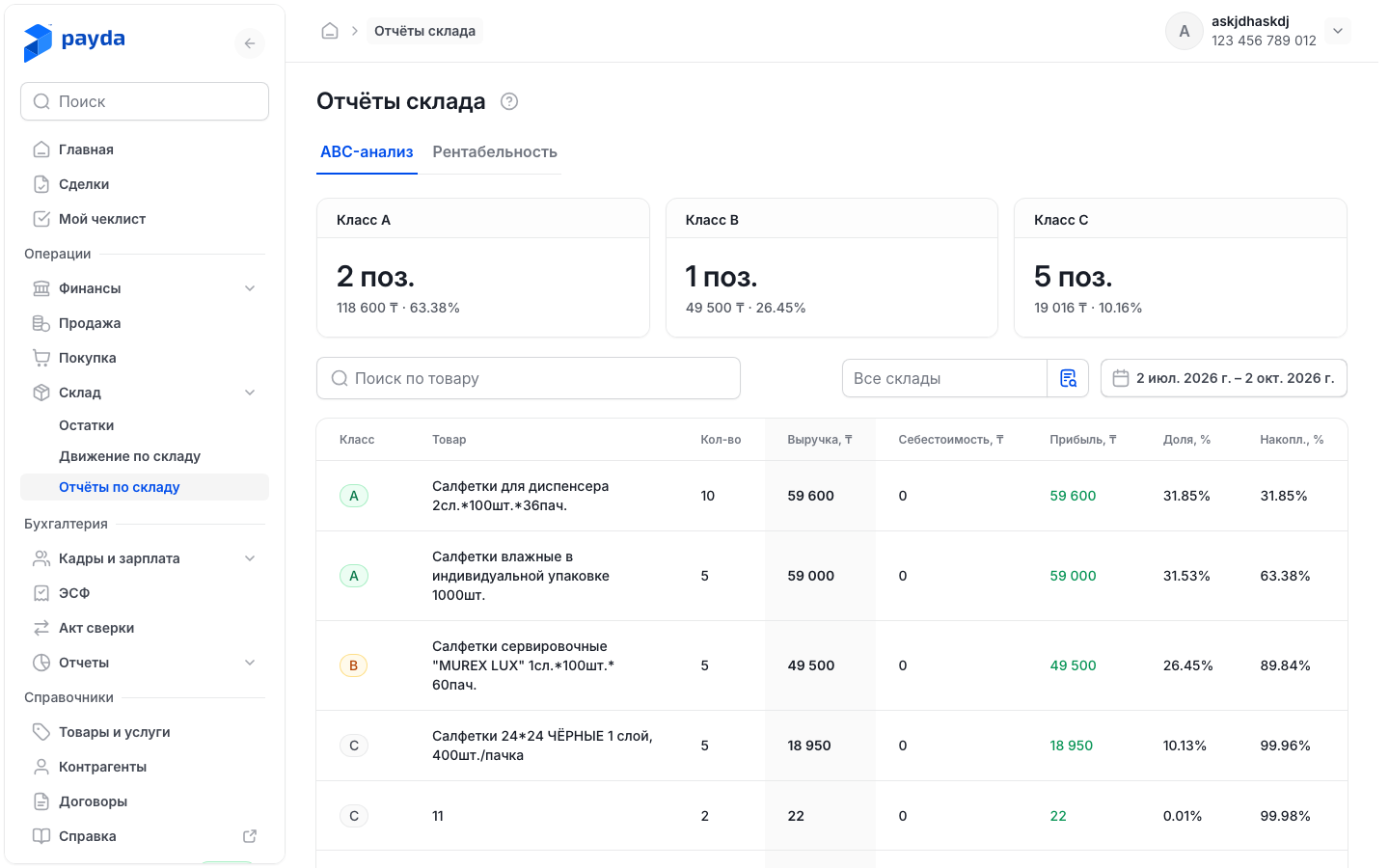
Set the period: press the button with the dates, pick dates in the calendar or a ready option on the left and press Применить (Apply). By default the last three months up to today are shown.
To see the sales of one warehouse, choose it in the Все склады (all warehouses) field.
To find a product, start typing its name in Поиск по товару (search by product).
Check the Класс A, Класс B and Класс C cards: how many items the class has, their revenue and their share of total revenue.
The report recalculates by itself when you change the period, the warehouse or the search text. The table shows 20 products per page, the rest are on the next pages.
Products are ranked by revenue excluding VAT for the period — from highest to lowest — and their shares are added up from the top down:
- A — the products that make up the first 80% of revenue;
- B — the next products, up to 95% of revenue;
- C — the remaining products.
| Column | What it shows |
|---|---|
| Класс (class) | A, B or C |
| Товар (product) | Product name |
| Кол-во (quantity) | How much was sold in the period |
| Выручка, ₸ (revenue) | Revenue for the period excluding VAT |
| Себестоимость, ₸ (cost) | Cost of the goods sold |
| Прибыль, ₸ (profit) | Revenue minus cost. A loss is shown in red |
| Доля, % (share) | The product's share of the revenue of all products |
| Накопл., % (cumulative) | The share of this product together with all products above it |
Profitability
On the Отчёты склада page open the Рентабельность (profitability) tab.
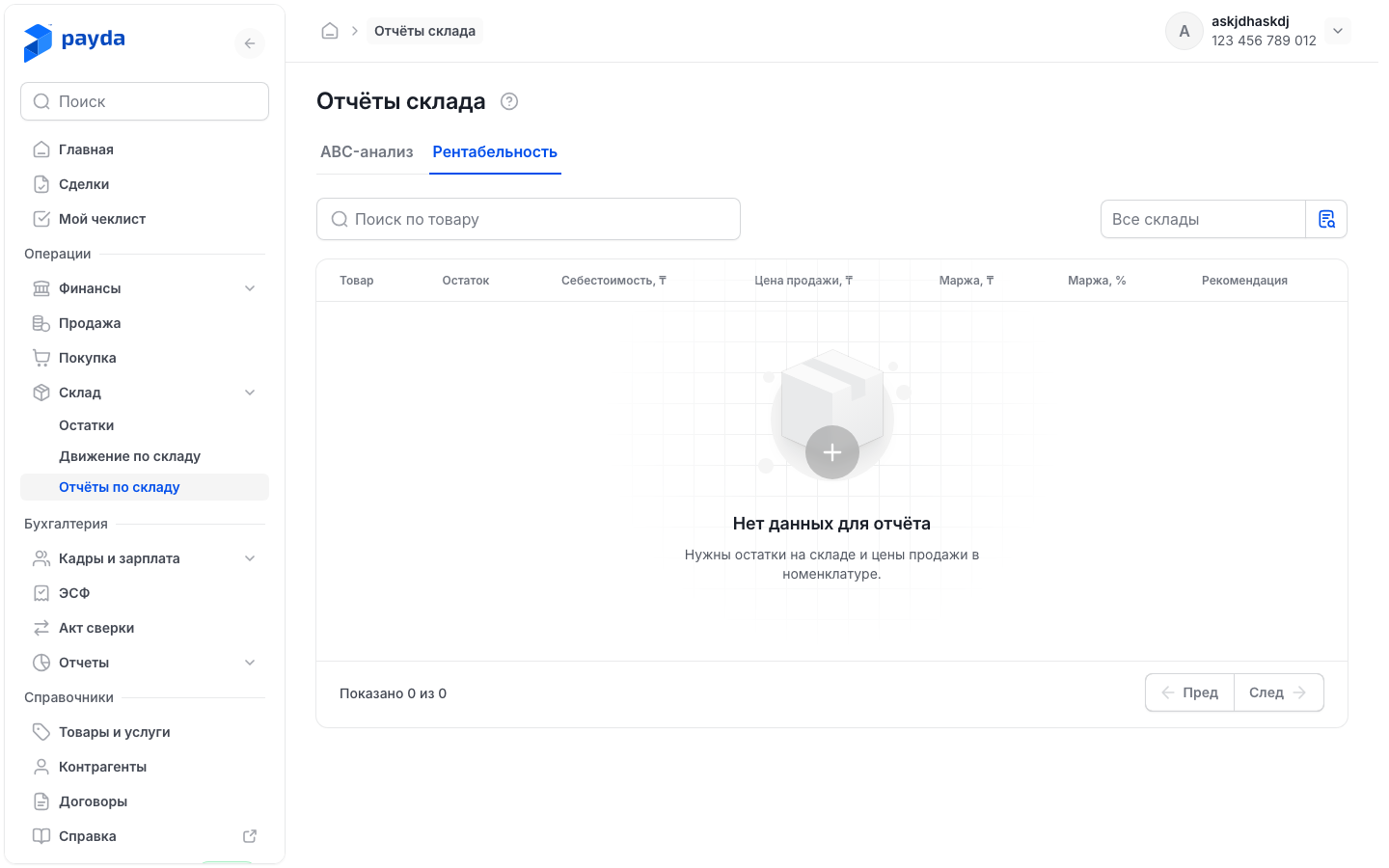
To see one warehouse, choose it in the Все склады field.
To find a product, start typing its name in Поиск по товару. The search looks only through the rows of the open page.
The report has no period: it lists the goods that are in stock now. Products go in descending order of Маржа, %. Products without a price are at the end of the list with «—» in this column.
| Column | What it shows |
|---|---|
| Товар (product) | Product name |
| Остаток (balance) | How much is in stock |
| Себестоимость, ₸ (cost) | Average unit cost of the stock |
| Цена продажи, ₸ (selling price) | The price from the Цена field of the product card |
| Маржа, ₸ (margin) | Selling price minus cost, per unit |
| Маржа, % (margin, %) | Margin as a percentage. Positive in green, negative in red |
| Рекомендация (recommendation) | Payda's hint on what to do with the product |
How to check it worked
- In ABC analysis the revenue on the Класс A, Класс B and Класс C cards adds up to the revenue excluding VAT from sales for the period. Compare it with your sales for the same dates.
- In profitability every product has a Цена продажи, ₸ and a Маржа, %. A dash is a sign to fill in the price in the product card.
Common problems
| What you see | Why | What to do |
|---|---|---|
| «Нет продаж за выбранный период» (no sales for the selected period) in ABC analysis | There are no sales for these dates or for the chosen warehouse | Widen the period or choose Все склады |
| «Нет данных для отчёта» (no data for the report) in profitability | No goods in stock or no prices: «Нужны остатки на складе и цены продажи в номенклатуре.» (stock and selling prices are needed) | Enter opening balances or record a goods receipt, check Цена in the product cards |
| «Нет данных для отчёта» after typing in Поиск по товару in profitability | The search looks only through the open page, and the product is on another one | Clear the search and page through the table |
| A product is missing from profitability | It is not in stock now — the report lists only goods with a balance | Check the balance on Склад → Остатки |
| «—» in the Маржа, % column | The product card has no price | Fill in Цена in the Товары и услуги (goods and services) reference book |
What next
- Movements and stock — how to put goods into stock and view balances.
- Goods and services — product cards and their prices.