
Issue a power of attorney to collect goods
Why you need this
When your employee collects goods from a supplier, they need a power of attorney (доверенность) from your company. It lists the supplier, the goods and their quantities, plus the employee's full name, position and ID document. Payda builds the power of attorney from your reference books and prepares the printed form.
A client's representative who collects goods from you is handled differently: their power of attorney details go into the sale, in the Доверенность field — see Sale.
What you need
- The supplier in the counterparty reference book — Counterparties.
- The employee in Кадры и зарплата → Сотрудники (staff and payroll → employees). In their card fill in Должность (position) and the ID document: Номер документа (уд лич/паспорт) (ID card or passport number), Дата выдачи документа (date of issue) and Кем выдан (issued by). The power of attorney form has no such fields — they are taken from the card; see Employees in documents.
- Goods in the Goods and services reference book — or type the name right into a row of the power of attorney.
- If the power of attorney must show your company's bank account, the account has to be set up — Bank accounts.
Step by step
List of powers of attorney
Open Покупка (purchases) in the left menu and switch to the Доверенности (powers of attorney) tab.
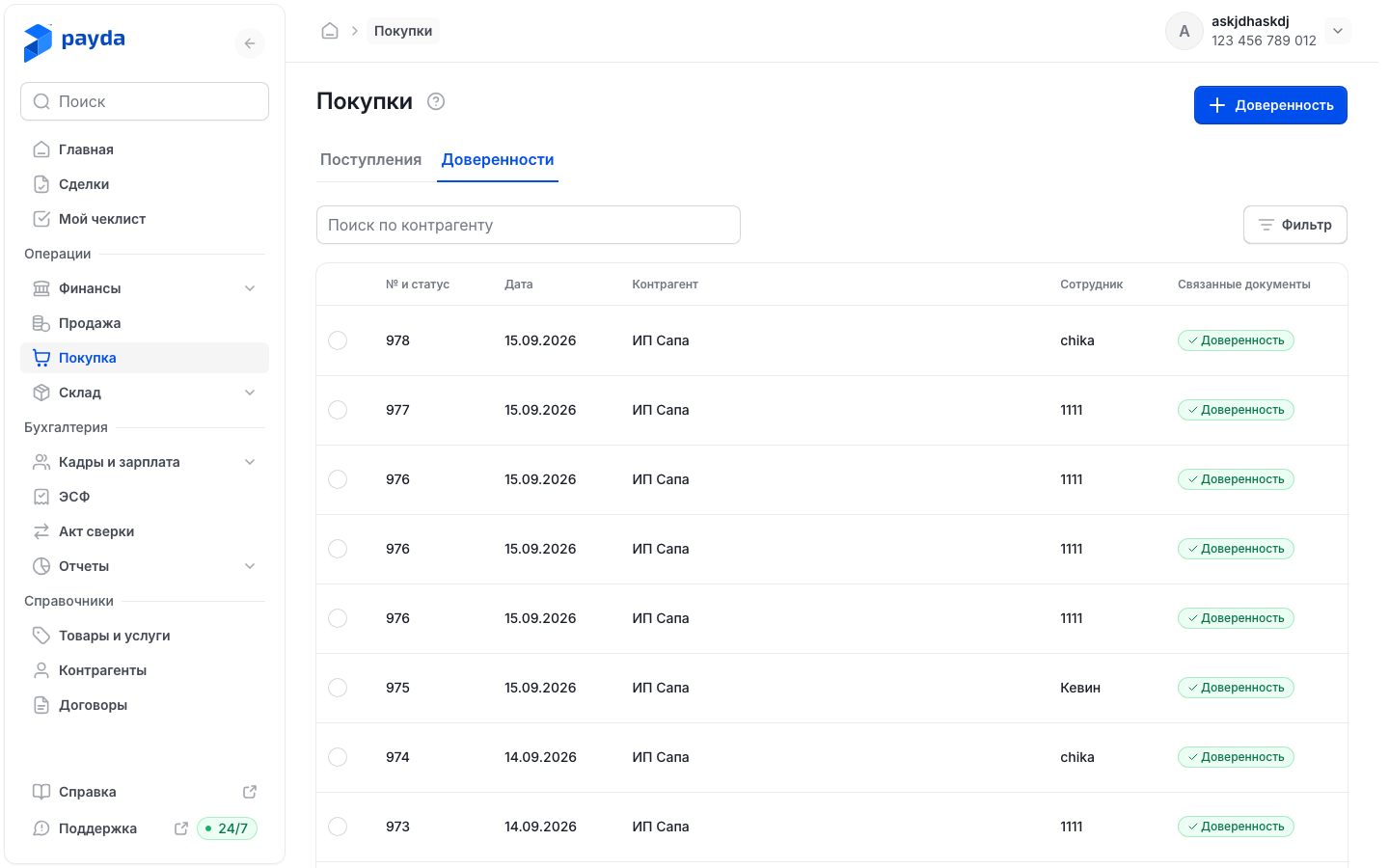
- Columns: № и статус (number and status), Дата (date), Контрагент (counterparty), Сотрудник (employee) and Связанные документы (linked documents). A saved power of attorney has the Сохранен (saved) status.
- In Поиск по контрагенту (search by counterparty) pick the supplier from the list.
- Фильтр (filter) opens the Фильтры window: Сотрудник, Номер документа (document number), Дата документа от and Дата документа до (date from / to). Press Подтвердить (confirm).
- Click a row to open the power of attorney.
- The circle on the left of a row opens a panel at the bottom with Открыть (open) and Дублировать (duplicate). Дублировать asks «Продублировать доверенность №…?» (duplicate power of attorney No. …?) — after you confirm, a new form opens with the same data, the next number and today's date.
Issue a power of attorney
- On the Доверенности tab press the Доверенность button with the plus icon — the Доверенность | Создание (power of attorney | new) form opens. Номер (number) and Дата (date) are filled in automatically — the next number and today's date; you can change them.
- In the Данные документа (document data) block fill in:
- Дата действия (действителен до) (valid until) in the Основное (main) section — the last day the power of attorney is valid;
- Наименование (name) in the Контрагент section — the supplier your employee collects the goods from. If there is a contract, pick it in По договору (under contract);
- Расчетный счет (bank account) in the Мои реквизиты (my details) section — your company account, if it has to be shown;
- Сотрудник in the same section — the person you issue it to. Click the reference book icon on the right of the field, find the person in the Список сотрудников (employee list) panel with Поиск сотрудника (employee search) and press Выбрать (select).
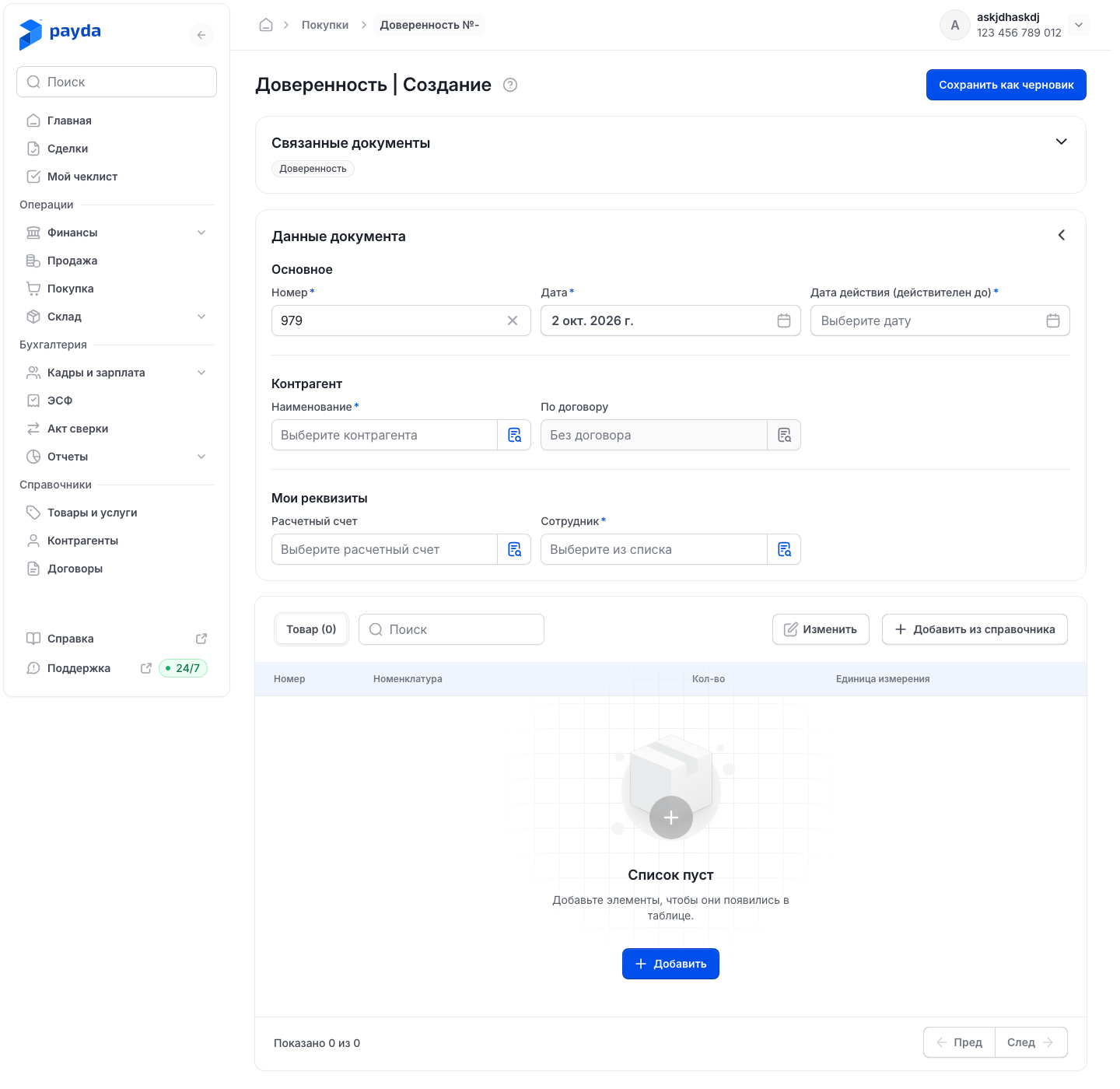
- Add the goods. Добавить из справочника (add from reference book) opens the Номенклатура (items) panel — it shows goods only, no services: tick the items and press Выбрать (the button shows how many items are ticked). Добавить (add) adds an empty row; you can type the name right in it.
- Enter Кол-во (quantity) on every row. Единица измерения (unit) comes from the item card. A power of attorney has no prices or VAT.
- Press Сохранить как черновик (save as draft). If the table has names that are not yet in the reference book, the «Позиции ещё не в справочнике» (items not in the reference book yet) window opens — press Сохранить все (save all).
The message «Документ сохранен» (document saved) appears and the power of attorney opens on its own page. If you leave the page without saving, Payda asks «Несохраненные изменения» (unsaved changes) — Отменить (cancel) takes you back to the form.
Print and hand over
A saved power of attorney has a printed form.
- On the Доверенности tab click the green Доверенность mark in the Связанные документы column — an action panel appears at the bottom.
- Choose an action:
- Печать (print) — opens the print dialog;
- Скачать (download) — saves the PDF to your computer;
- Отправить (send) — opens the system window for sharing the PDF. If the browser cannot do that, Payda copies a link to the document;
- Посмотреть (view) — opens the printed form.
- At the bottom of the printed form there are Скачать and Переслать (forward). Переслать copies a link to the document to the clipboard — «Ссылка скопирована» (link copied) appears. Send the link to your employee or the supplier yourself.
From the power of attorney itself, open the printed form like this: expand the Связанные документы block and click the Доверенность card. More on printed forms — Linked documents.
A similar power of attorney is quicker to make as a copy: Дублировать is at the top of a saved power of attorney and in the row panel of the list.
How to check it worked
The power of attorney appears on the Доверенности tab with the Сохранен status, and the Сотрудник column shows the employee's name. Open the printed form: it should contain the supplier, the goods with quantities, and the employee's full name, position and ID document details.
Common problems
| What you see | Why | What to do |
|---|---|---|
| «Добавьте хотя бы одну номенклатуру в документ.» (add at least one item) | The table has no goods | Add goods with Добавить из справочника or Добавить |
| «Обязательное поле» (required field) under Дата действия (действителен до), Сотрудник or another asterisked field | The field is empty | Fill it in and save again |
| The person is missing from Список сотрудников | The employee is not set up in Кадры и зарплата → Сотрудники, and this panel cannot create employees | Set up the employee card and select the person again |
| «Ошибка при отправки данных» — «Проверьте правильность данных» (error sending data — check the data) | A likely cause is an empty ID document in the employee card | Fill in Номер документа (уд лич/паспорт), Дата выдачи документа and Кем выдан in the card, then save the power of attorney again |
| The printed form has blanks instead of the position or ID document details | These fields are empty in the employee card | Fill in the card, open the power of attorney and press Сохранить как черновик again |
| «Ошибка печати» — «Не удалось открыть диалог печати» (print error — could not open the print dialog) | The printed form did not load, so the print dialog could not open | Press Скачать and print the PDF from your computer |
| On a phone, saving shows «Не заполнены данные сотрудника» (employee details missing) | The employee card has no position or ID document, and the card cannot be filled in on a phone | Fill in the card on a computer. Issuing a power of attorney on a phone — Documents on a phone |
What next
- Goods receipt — record the purchase when your employee brings the goods.
- Employees in documents — how to select an employee and what to fill in their card.
- Linked documents — printed forms and documents created from other documents.